6

This relates to an earlier question I got an answer to the first part and followed some links for the second and came up with a mishmash of code to get it doing what I want but I didn't understand much of what is in the examples with for-loops so they are not the best starting point for me.

Here is a small example of the circle code

\documentclass[paper=a4, fontsize=12pt]{scrartcl}       
\usepackage{amsmath,amsfonts,amsthm}     
\usepackage{graphicx} 

\usepackage{float}
\setlength\parindent{0pt} 
\usepackage{tikz}
\usetikzlibrary{arrows,%
                plotmarks}


\begin{document}
 \begin{figure}[H]

 \makeatletter
\tikzset{
    dot diameter/.store in=\dot@diameter,
    dot diameter=3pt,
    dot spacing/.store in=\dot@spacing,
    dot spacing=10pt,
    dots/.style={
        line width=\dot@diameter,
        line cap=round,
        dash pattern=on 0pt off \dot@spacing
    }
}
\makeatother
 \centering
\label{fig:circle}
   \begin{tikzpicture}
    % Axis
    \draw[thick,->,black] (-4,0)--(4,0) node[below] {$n_x$}; 
    \draw[thick,->,black] (0,-4)--(0,4) node[left] {$n_y$}; 
    \draw[black,thick] (0,0) circle (3.5cm);

    %dots
    \draw [black, dot diameter=4pt, dot spacing=10pt, dots] (0pt,3.5) -- (0pt,6pt) ; 
    \draw [black, dot diameter=4pt, dot spacing=10pt, dots] (0pt,0) -- (110pt,0) ;  
   \draw [black, dot diameter=4pt, dot spacing=10pt, dots] (10pt,3.5) -- (10pt,6pt) ;  
   \draw [black, dot diameter=4pt, dot spacing=10pt, dots] (20pt,3.5) -- (20pt,6pt) ;  
   \draw [black, dot diameter=4pt, dot spacing=10pt, dots] (30pt,3.5) -- (30pt,6pt) ;  
   \draw [black, dot diameter=4pt, dot spacing=10pt, dots] (40pt,3.5) -- (40pt,6pt);  
   \draw [black, dot diameter=4pt, dot spacing=10pt, dots] (50pt,3.5) -- (50pt,6pt) ;  
   \draw [black, dot diameter=4pt, dot spacing=10pt, dots] (60pt,3.5) -- (60pt,6pt) ;  
   \draw [black, dot diameter=4pt, dot spacing=10pt, dots] (70pt,3.5) -- (70pt,6pt) ;  
   \draw [black, dot diameter=4pt, dot spacing=10pt, dots] (80pt,3.5) -- (80pt,6pt) ;  

   \draw [black, dot diameter=4pt, dot spacing=10pt, dots] (90pt,3.5) -- (90pt,6pt) ;  
   \draw [black, dot diameter=4pt, dot spacing=10pt, dots] (100pt,3.5) -- (100pt,6pt) ;  


   \end{tikzpicture}

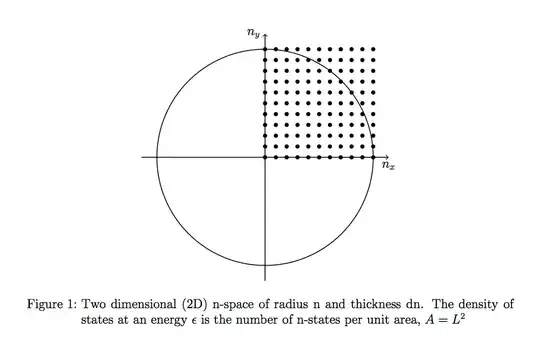
\caption{Two dimensional (2D) n-space of radius n and thickness dn. The density of states at an energy $\epsilon$ is the number of n-states per unit area, $A=L^2$}
\end{figure}
\end{document}

enter image description here

Magpie
  • 2,294

3 Answers3

7

Given your output, I would actually use pgfplots which is based on tikz and has a number of useful environments and commands to ease such a graphic

enter image description here

\documentclass{standalone}       
\usepackage{pgfplots}
\pgfplotsset{mydotstyle/.style={color=black,only marks,mark size=1pt}}

\begin{document}

   \begin{tikzpicture}
    \begin{axis}[axis lines=middle,
                             axis equal,
                             xmin=-1.1,xmax=1.1,
                             ymin=-1.1,ymax=1.1,
                             xtick={-2},
                             ytick={-2},
                             xlabel=$n_x$,
                             ylabel=$n_y$,
                             xlabel style={anchor=north},
                             ylabel style={anchor=east},
                             ]
            \addplot[black, samples=100]({cos(deg(x))},{sin(deg(x))});
            \pgfplotsinvokeforeach{0,0.1,...,1.1}
            {
                \addplot[mydotstyle,samples at={0,0.1,...,1.1}]{#1};
                }
    \end{axis}
   \end{tikzpicture}
\end{document}

If you have a lot of these types of pictures, you might want to use something like

\pgfplotsset{mydotstyle/.style={color=black,only marks,mark size=1pt},
                         every axis/.append style={
                         axis lines=middle,
                             axis equal,
                             xmin=-1.1,xmax=1.1,
                             ymin=-1.1,ymax=1.1,
                             xtick={-2},
                             ytick={-2},
                             xlabel=$n_x$,
                             ylabel=$n_y$,
                             xlabel style={anchor=north},
                             ylabel style={anchor=east},
                         }}

in which case you can just use

\begin{tikzpicture}
    \begin{axis}
      \addplot...
    \end{axis}
   \end{tikzpicture}
cmhughes
  • 100,947
  • I would go with a scatter type of plot with black circle markers to reduce the plot count. Then you need 10 addplots instead of 100. – percusse Mar 08 '13 at 21:16
  • @percusse thanks for the feedback :) I'm afraid I don't really understand- could you elaborate? – cmhughes Mar 08 '13 at 21:30
  • Sure. I mean; think of every horizontal dotted line as a constant function decorated with black circles with samples=10 or something like that (domain=0:1 etc.). Then you only need to draw y=0, y=1 up to 10 or so which pgfplots doesn't even blink to draw. But single points and 100 of them seems like a waste of compilation time (of course vertical lines work too). – percusse Mar 08 '13 at 21:34
  • Thinking of it maybe even a 2D function is better. – percusse Mar 08 '13 at 21:37
  • @percusse thanks, nice idea- see the update :) – cmhughes Mar 08 '13 at 21:52
5
\documentclass[paper=a4, fontsize=12pt]{scrartcl}       
\usepackage{amsmath,amsfonts,amsthm}     
\usepackage{graphicx} 

\usepackage{float}
\setlength\parindent{0pt} 
\usepackage{tikz}
\usetikzlibrary{arrows,%
                plotmarks}

\begin{document}

\begin{figure}[H]
    \centering
    \label{fig:circle}
    \begin{tikzpicture}
        % Axis
        \pgfmathsetmacro{\D}{3.5}
        \draw[thick,->,black] (-4,0)--(4,0) node[below] {$n_x$}; 
        \draw[thick,->,black] (0,-4)--(0,4) node[left] {$n_y$}; 
        \draw[black,thick] (0,0) circle (\D);

        \pgfmathsetmacro{\dx}{\D/10}
        \pgfmathsetmacro{\lastx}{\D+0.0001}
        \foreach \x in {0,\dx,...,\lastx}{
            \foreach \y in {0,\dx,...,\lastx}{
                \fill[black] (\x,\y) circle(.06);
            }
        }
       \end{tikzpicture}

    \caption{Two dimensional (2D) n-space of radius n and thickness dn.
    The density of states at an energy $\epsilon$ is the number of n-states per unit area, $A=L^2$}
\end{figure}

\end{document}

enter image description here

jub0bs
  • 58,916
4

TikZ solution

\documentclass[paper=a4, fontsize=12pt]{scrartcl}       
\usepackage{amsmath,amsfonts,amsthm}     
\usepackage{graphicx} 

\usepackage{float}
\setlength\parindent{0pt} 
\usepackage{tikz}
\usetikzlibrary{arrows,%
                plotmarks}


\begin{document}
 \begin{figure}[H]

 \makeatletter
\tikzset{
    dot diameter/.store in=\dot@diameter,
    dot diameter=3pt,
    dot spacing/.store in=\dot@spacing,
    dot spacing=10pt,
    dots/.style={
        line width=\dot@diameter,
        line cap=round,
        dash pattern=on 0pt off \dot@spacing
    }
}
\makeatother
 \centering
\label{fig:circle}
   \begin{tikzpicture}
        [
            mystyle/.style={black, dot diameter=4pt, dot spacing=10pt, dots}
        ]
    % Axis
    \draw[thick,->,black] (-4,0)--(4,0) node[below] {$n_x$}; 
    \draw[thick,->,black] (0,-4)--(0,4) node[left] {$n_y$}; 
    \draw[black,thick] (0,0) circle (3.5cm);

    %dots
    \draw [mystyle] (0pt,0) -- (110pt,0) ; 
    \foreach \x in {0,10,...,100}{\draw [mystyle] (\x pt,3.5) -- (\x pt,6pt); }

   \end{tikzpicture}

\caption{Two dimensional (2D) n-space of radius n and thickness dn. The density of states at an energy $\epsilon$ is the number of n-states per unit area, $A=L^2$}
\end{figure}
\end{document}

PSTricks solution

If you really have to reduce the number of keystrokes, I present the following.

enter image description here

\documentclass[pstricks]{standalone}
\usepackage{pst-plot}
\begin{document}
\begin{pspicture}(-4.5,-4.5)(4.5,4.5)
\psaxes[labels=none,ticks=none]{->}(0,0)(-4,-4)(4,4)[$n_x$,-90][$n_y$,180]
\pscircle{3.5}
\multips(0,0.35){11}{\multips(0.35,0){11}{\psdots(0,0)}}
\end{pspicture}
\end{document}

TikZ solution (with the same result as PSTricks solution)

\documentclass[tikz,margin=5mm]{standalone}       
\begin{document}
\begin{tikzpicture}[thick]
  \draw[-stealth] (-4,0)--(4,0) node[below] {$n_x$}; 
  \draw[-stealth] (0,-4)--(0,4) node[left] {$n_y$}; 
  \draw (0,0) circle (3.5);
  \foreach \x in {0,...,10}{
    \foreach \y in {0,...,10}{
      \fill (\x*.35,\y*.35) circle(.06);
    }
  }
\end{tikzpicture}
\end{document}

Latest edit

The following explanation is for responding the questioner's additional question in his/her comments.

Use standalone document class to produce a tight diagram.

% the name of this file is circle-grid.tex
\documentclass[tikz,margin=5mm]{standalone}       
\begin{document}
\begin{tikzpicture}[thick]
  \draw[-stealth] (-4,0)--(4,0) node[below] {$n_x$}; 
  \draw[-stealth] (0,-4)--(0,4) node[left] {$n_y$}; 
  \draw (0,0) circle (3.5);
  \foreach \x in {0,...,10}{
    \foreach \y in {0,...,10}{
      \fill (\x*.35,\y*.35) circle(.06);
    }
  }
\end{tikzpicture}
\end{document}

Compile the diagram (circle-grid.tex) with pdflatex.exe to get a circle-grid.pdf.

From your main TeX document (you can name it as main.tex, for example), you can import circle-grid.pdf using \includegraphics[]{circle-grid} (this command is provided by graphicx package).

The main TeX document, for example, looks like the following.

% This filename is Main.tex
\documentclass{article}
\usepackage{graphicx}
\begin{document}
Some texts go here \ldots
\begin{figure}
\centering
\includegraphics[]{circle-grid}
\caption{Circle and grid}
\label{fig:circle-grid}
\end{figure}
Other texts go here!
\end{document}

And finally compile the main.tex with pdflatex.exe to get main.pdf.

  • Feel free to edit my answer as I am not familiar with TikZ. – kiss my armpit Mar 08 '13 at 20:44
  • I answered with the similar tikz solution earlier but deleted it. I thought you weren't going to write it but was surprised that you did, you being a pstricks person. :) – hpesoj626 Mar 08 '13 at 21:37
  • @hpesoj626: Oh, sorry about that. :-) – kiss my armpit Mar 08 '13 at 21:43
  • They are all good answered but I felt the last tikz example on here was most deserving. However I am wondering how you could add this to a document without it all going wrong? – Magpie Mar 09 '13 at 17:38
  • @Magpie: Could you explain more about "adding this to a document without it all going wrong?"? – kiss my armpit Mar 09 '13 at 17:43
  • like either as a standalone or in the tex as a figure; because of this "\documentclass[tikz,margin=5mm]{standalone} " – Magpie Mar 09 '13 at 17:48
  • @Magpie: Separating figure codes from the text contents is a good practice because the document you are writing becomes well-organized and the compilation time becomes more efficient. See my latest update how to do it. – kiss my armpit Mar 09 '13 at 18:01