A quick conceptual definition with hard coded values, you can combine it with Luigi's goodies. It won't work with different line widths etc. since I didn't do any right/left extend calculation.
I took the currarrow definition from circutikz library. It doesn't look too different from the scaled triangle 45. I would recommend using Luigi's definitions and modifiying them if necessary.
\documentclass[tikz]{standalone}
\usetikzlibrary{arrows}
\makeatletter
\pgfarrowsdeclare{mycurrarrow}{mycurrarrow}{
\pgfarrowsleftextend{-5\pgflinewidth}
\pgfarrowsrightextend{5\pgflinewidth}
}
{
            \newlength\pgf@my@length
            \pgf@my@length = 1cm
            \divide \pgf@my@length by 16
            \pgfpathmoveto{\pgfpoint{-.7\pgf@my@length}{0pt}}
            \pgfpathlineto{\pgfpoint{-.7\pgf@my@length}{-.8\pgf@my@length}}
            \pgfpathlineto{\pgfpoint{1\pgf@my@length}{0pt}}
            \pgfpathlineto{\pgfpoint{-.7\pgf@my@length}{.8\pgf@my@length}}
            \pgfpathlineto{\pgfpoint{-.7\pgf@my@length}{0pt}}
            \pgfusepathqfillstroke
}
\makeatother
\begin{document}
\begin{tikzpicture}
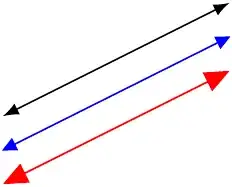
    \draw[mycurrarrow-mycurrarrow,blue] (0,0) -- (2,1);
    \draw[latex-latex,shift={(0mm,3mm)}] (0,0) -- (2,1);
    \draw[triangle 45-triangle 45,shift={(0mm,-3mm)},red] (0,0) -- (2,1);
\end{tikzpicture}
\end{document}
I don't get why you don't post five lines of code(four being documentclass and begin/end document and circutikz package)for an example instead of describing the arrow with screenshot from the manual.


currarrow? – percusse Mar 24 '13 at 11:37\documentclass{...}and ending with\end{document}. Also, please specify what you mean by currarrow; a picture would help. – jub0bs Mar 24 '13 at 11:37