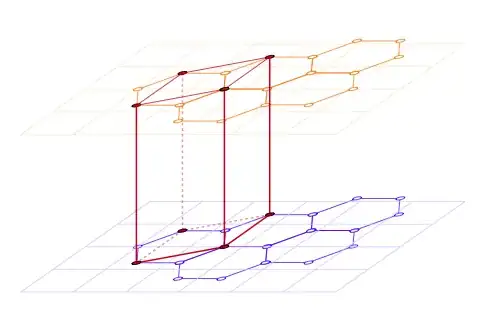
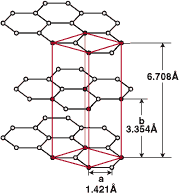
Here's another option, using this time regular polygon from the shapes library; each of the the \hexgrid... commands has two mandatory arguments: the first one, gives a name to the grid and the second one, controls the vertical shifting; the optional argument allows to pass additional options:
\documentclass{article}
\usepackage{tikz}
\usepackage{siunitx}
\usetikzlibrary{arrows,positioning,shapes}

\newcommand\xsla{-1.2}
\newcommand\ysla{0.505}

\newcommand\hexgridv[3][]{%
\begin{scope}[%
  #1
  xscale=-1,
  yshift=#3,
  yslant=\ysla,
  xslant=\xsla,
  every node/.style={anchor=west,regular polygon, regular polygon sides=6,draw,inner sep=0.5cm},
  transform shape
]
\node (A#2) {};
\node (B#2) at ([xshift=-\pgflinewidth,yshift=-\pgflinewidth]A#2.corner 1) {};
\node (C#2) at ([xshift=-\pgflinewidth]B#2.corner 5) {};
\node (D#2) at ([xshift=-\pgflinewidth]A#2.corner 5) {};
\node (E#2) at ([xshift=-\pgflinewidth]D#2.corner 5) {};
\foreach \hex in {A,...,E}
{
  \foreach \corn in {1,...,6}
    \draw[fill=white] (\hex#2.corner \corn) circle (2pt);
}
\end{scope}
}

\newcommand\hexgridiv[3][]{%
\begin{scope}[%
  #1,
  xscale=-1,
  yshift=#3,
  yslant=\ysla,
  xslant=\xsla,
  every node/.style={anchor=west,regular polygon, regular polygon sides=6,draw,inner sep=0.5cm},
  transform shape
]
\node (A#2) {};
\node (B#2) at (A#2.corner 5) {};
\node[xscale=-1] (C#2) at (B#2.corner 4) {};
\node (D#2) at (C#2.corner 4) {};
\foreach \hex in {A,...,D}
{
  \foreach \corn in {1,...,6}
    \draw[fill=white] (\hex#2.corner \corn) circle (2pt);
}
\end{scope}
}

\begin{document}

\begin{tikzpicture}[>=latex]
% the three grids
\hexgridv{a}{0}
\hexgridiv[xshift=0.43cm]{b}{-60}
\hexgridv{c}{-160}

% the red lines
\foreach \corn in {2,4}
  \draw[ultra thick,red!80!black] (Aa.corner \corn) -- (Ac.corner \corn);
\draw[ultra thick,red!80!black,opacity=0.4] (Aa.corner 6) -- (Ac.corner 6);
\draw[ultra thick,red!80!black] (Da.corner 4) -- (Dc.corner 4);
\foreach \hexg in {a,c}
  \draw[thick,red!80!black] (A\hexg.corner 2) -- (A\hexg.corner 4) -- (D\hexg.corner 4);
\foreach \hexg/\opac in {a/1,c/0.4}
  \draw[thick,red!80!black,opacity=\opac] (A\hexg.corner 2) -- (A\hexg.corner 6) -- (D\hexg.corner 4);

% the red vertices
\begin{scope}[  yslant=\ysla,xslant=\xsla]
\foreach \hex/\corn in {Aa/2,Aa/4,Aa/6,Ab/3,Ac/2,Ac/4,Da/4,Cb/6,Cb/4,Dc/4}
  \draw[fill=red!80!black] (\hex.corner \corn) circle (2pt);
\draw[fill=red!80!black,fill opacity=0.4] (Ac.corner 6) circle (2pt);
\draw[fill=red!80!black,fill opacity=0.4] (Cb.corner 2) circle (2pt);
\end{scope}

% The arrows and labels
\draw[help lines]
  (Aa.corner 2) -- +(2.5,0) coordinate[pos=0.75] (aux1);
\draw[help lines]
  (Ac.corner 2) -- +(2.5,0) coordinate[pos=0.75] (aux2);
\draw[<->,help lines]
  (aux1) -- node[pos=0.25,fill=white,font=\footnotesize] {\SI{6.708}{\angstrom}} (aux2);
\draw[help lines]
  (Ab.corner 2) -- +(1,0) coordinate[pos=0.5] (aux3);
\draw[<->,help lines]
  (aux3) -- node[fill=white,font=\footnotesize,align=center] {b\\\SI{3.354}{\angstrom}} (aux3|-aux2);
\draw[help lines]
  (Ac.corner 3) -- +(0,-0.45) coordinate[pos=0.5] (aux4);
\draw[help lines]
  (Ac.corner 4) -- +(0,-0.4) coordinate[pos=0.5] (aux5);
\draw[<->,help lines]
  (aux4) -- node[fill=white,font=\footnotesize,align=center,below=1pt] {a\\\SI{1.421}{\angstrom}} (aux5|-aux4);
\end{tikzpicture}

\end{document}

The code admits still improvements, but the main point is that it can be used as a starting point to easily define hexagonal grids. The siunitx package was used to typeset the units (thanks to Svend Tveskæg for the reminder).




xslanted and shrunken inydirection. – Qrrbrbirlbel Apr 07 '13 at 17:31