I have an inline equation that I don't want to split in lines.
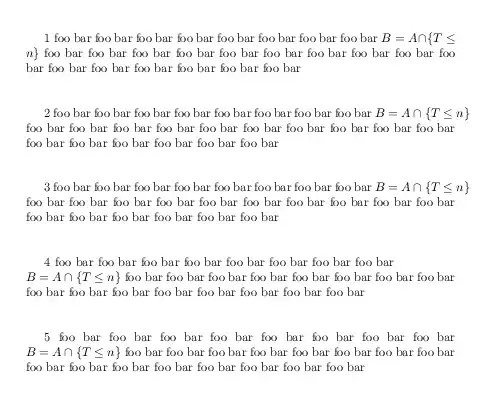
If I use
foo bar foo bar foo bar foo bar foo bar foo bar foo bar ${ B = A \cap \{ T \leq n \} }$
It doesn't fit in the page's width and there's a part of the equation that can't be seen.
If I use
foo bar foo bar foo bar foo bar foo bar foo bar foo bar $B = A \cap \{ T \leq n \}$
it is split like:

I could do something like:
foo bar foo bar foo bar foo bar foo bar foo bar foo bar \\
$B = A \cap \{ T \leq n \}$
To keep it in only one line, but I wonder if there is an standard way to tell latex: "Keep it in only one line and if it doesn't fit in the page's width then start in a new line".
This headers are important in order to reproduce the issue:
\documentclass[a5paper,oneside]{amsart}
\usepackage[scale={.8,.85}]{geometry}



\mbox{$...$}, but if this itself is too long, it may not wrap regardless. See How to prevent LaTeX from line-breaking a phrase? and How can I make a pair of words stick together in line breaks? More generally, math content will only be broken at the text block boundary at certain symbols (or operators). You must have a string of stuff that doesn't break well. Please provide more context in the form of a minimal working example (MWE). – Werner Apr 15 '13 at 04:36\mbox{$...$}behaves exactly the same way as${...}$does. If the equation is too long, there is a part of the equation that can't be seen in the document because it doesn't respect the margins. The main problem is that I don't know what the final width should be, so if it is changed, I'll need to review the whole document for cases like this one. – htellez Apr 15 '13 at 06:08