7

I want the left and the right header to have the same baseline, regardless of the height of the content they yield. To demonstrate this, assume

\documentclass{scrartcl}

\usepackage{scrpage2}
\clearscrheadfoot
\renewcommand{\sectionmark}[1]{\markboth{#1}{#1}}
\ohead{\Huge\thesection -- \Large\leftmark}
\ihead{\small Report No. 11}
\ofoot{\small Page \thepage}
\pagestyle{scrheadings}

\begin{document}

\section{First section}

\end{document}

The output will be equivalent to
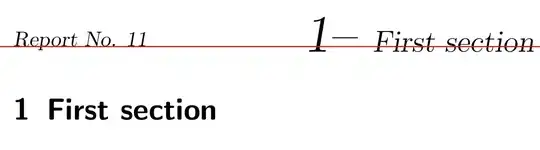
The header baselines don't match

I added red line to emphasize the difference in the baseline.

Question: How can I set them both to the same baseline?

Considered solutions:

  • Add to the smaller header something like \vphantom{\Huge A} to implicitly make it the same height.
  • Use fancyhdr as it aligns the baselines (Well, it brings other issues).
Micha
  • 2,869
Henri Menke
  • 109,596

3 Answers3

6

Here's a quick solution: use a box of zero height to achieve the alignment:

\documentclass[headlines=1.5]{scrartcl}
\usepackage{scrpage2}
\clearscrheadfoot
\renewcommand{\sectionmark}[1]{\markboth{#1}{#1}}
\ohead{\raisebox{0pt}[0pt][0pt]{\Huge\thesection -- \Large\leftmark}}
\ihead{\raisebox{0pt}[0pt][0pt]{\small Report No. 11}}
\ofoot{\small Page \thepage}
\pagestyle{scrheadings}

\usepackage{tikz}

\begin{document}

\section{First section p}

\begin{tikzpicture}[remember picture,overlay]
\draw[red] ([yshift=-60pt]current page.north west) -- +(\paperwidth,0);
\end{tikzpicture}

\end{document}

enter image description here

I used TikZ just to draw a visual guideline.

Gonzalo Medina
  • 505,128
  • There’s a sneaky issue: According to KOMA-Script documentation the default is headlines=1.25, so you actually made the head tighter. – Speravir Apr 20 '13 at 01:06
5

You can use the command \smash. The trick is explained here: Get a box with zero depth including some text

\documentclass{scrartcl}
\usepackage{showframe}
\usepackage{scrpage2}
\makeatletter

\clearscrheadfoot
\renewcommand{\sectionmark}[1]{\markboth{#1}{#1}}
\ohead{\smash{\Huge\thesection -- \Large\leftmark}}
\ihead{\smash{\small Report No. 11}}
\ofoot{\small Page \thepage}
\pagestyle{scrheadings}


\begin{document}

\section{First section}

\end{document}

enter image description here

Marco Daniel
  • 95,681
5

Tell LaTeX that you want \Large also in the inner heading by setting a strut and adding some to the \headheight. This will ensure that the elements of the heading will fit in the reserved area.

I can't recommend using three different font sizes in the heading; actually I advise to reconsider the choice of the big number; I removed the dash that's really horrible.

\documentclass{scrartcl}
\usepackage{showframe}
\usepackage{scrpage2}

\clearscrheadfoot
\renewcommand{\sectionmark}[1]{\markboth{#1}{#1}}
\ohead{\smash{\Huge\thesection}\ \ \Large\leftmark}
\ihead{\small Report No. 11\Large\strut}
\ofoot{\small Page \thepage}
\addtolength{\headheight}{4pt} % Better keeping the number in the reserved box
\pagestyle{scrheadings}


\begin{document}

\section{Start of report}

\end{document}

enter image description here

egreg
  • 1,121,712