I am using the method shown in this answer below to convert my LaTeX file to HTML so that the resulting LaTeX file is processed by MathJax via MATHML:
"... mathml which can be then displayed with mathjax...."
Everything works well, and using the above method, the math looks much better than the standard htlatex method. Except for things such as $\dot{x}$ which shows up really strange now and is not rendered well. I tried this on IE, Firefox, and Chrome, all with the same problem.
I'll show the small tex file, then the htlatex command I used, then the htlatex .cfg file (which is the same exact .cfg file show in the above answer), then show the HTML output.
LaTeX file:
\documentclass[12pt]{article}%
\begin{document}
$\dot{\alpha}$
$x \dot{x}$
\end{document}
Command used to generate HTML (which is also the same command given in the above answer):
htlatex t.tex "t.cfg,charset=utf-8" " -cunihtf -utf8"
The t.cfg file used above is the same one shown in the answer above, so will not show it here again.
Screen shot of the HTML generated (notice how the x with the dot does not look right):
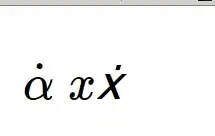
Compare that to the PDF output:

Here is the HTML file itself. I think the problem is the MATHML is not right? Is this a htlatex bug? or MATHML? Or MathJax? And how to correct it?
<!DOCTYPE html>
<html>
<head> <title></title>
<meta charset="UTF-8" />
<meta name="generator" content="TeX4ht (http://www.cse.ohio-state.edu/~gurari/TeX4ht/)" />
<link rel="stylesheet" type="text/css" href="t.css" />
<script type="text/javascript"
src="http://cdn.mathjax.org/mathjax/latest/MathJax.js?config=TeX-AMS-MML_HTMLorMML"
></script>
<style type="text/css">
.MathJax_MathML {text-indent: 0;}
</style>
</head><body
>
<!--l. 4--><p class="noindent" ><!--l. 4--><math
 xmlns="http://www.w3.org/1998/Math/MathML"
display="inline" ><mover
accent="true"><mrow
><mi
>α</mi></mrow><mo
class="MathClass-op">̇</mo></mover></math>
<!--l. 5--><math
 xmlns="http://www.w3.org/1998/Math/MathML"
display="inline" ><mi
>x</mi><mi
>ẋ</mi></math>
</p>

</body>
</html>
Although over all the math looks better in this new method (mathml/mathjax which I have no idea how it actually works), but there are few spots where the math does not render well in HTML. Here is another case
\documentclass[12pt]{article}%
\begin{document}
$\dot{x}_{1}^{2}$
\end{document}


 , after many hours trying many different combinations, I gave up on tex4ht+mathml+mathjax. It is not working. Back to using tex4ht+ png for math. At least png for math works. Also the suggestion to leave equations unchanged did not work for me. I give up :)