9

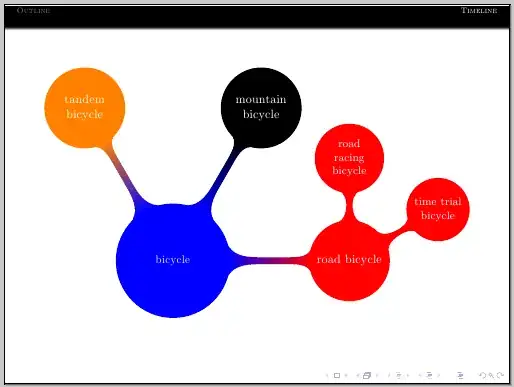
I'm in the process of creating a Beamer presentation using some tikz concepts, how do I make a mindmap fit to the slide? My code is as follows:

\documentclass[T]{beamer}

\definecolor{links}{HTML}{2A1B81}
\hypersetup{colorlinks,linkcolor=,urlcolor=red}

\usetheme{Frankfurt}
\usecolortheme{dolphin}
\usefonttheme{structuresmallcapsserif}
\usefonttheme{serif}
\usepackage{multicol}
\usepackage{graphicx}
\usepackage{xcolor}
\usepackage{caption}
\usepackage{hyperref}
\usepackage{tikz}
\usetikzlibrary{mindmap}
\usepackage[graphics,tightpage]{preview}

\setbeamertemplate{button}{\tikz
\node[
inner xsep=10pt,
draw=structure!80,
fill=structure!50,
rounded corners=4pt]  {\Large\insertbuttontext};}


\title{Presentation Template}
\setbeamercolor{author}{fg=yellow}
\author{asdfasdfa}
\setbeamercolor{date}{fg=yellow}
\date\today


\begin{document}

\begin{frame}
\titlepage
\end{frame}

\section*{Outline}


\begin{frame}
\begin{multicols}{2}
\frametitle{Contents}
\tableofcontents
\end{multicols} 
\end{frame}

\section{Timeline}
\begin{frame}
\frametitle{ Timeline}
\centering

\end{frame}

\begin{frame}
\begin{tikzpicture}
\path[mindmap,concept color=blue, text=white, transform shape]
node[concept]{bicycle}
    child[grow=0, concept color=red]{node[concept]{road bicycle}
        child[grow=30]{node[concept]{time trial bicycle}}
        child[grow=30]{node[concept]{road racing bicycle}}}
    child[grow=60, concept color=black]{node[concept]{mountain bicycle}}    
    child[grow=120, concept color=orange]{node[concept]{tandem bicycle}};
\end{tikzpicture}
\end{frame}
\end{document}
user28552
  • 273

2 Answers2

5

Another option would be to use \resizebox:

\documentclass[T]{beamer}

\definecolor{links}{HTML}{2A1B81}
\hypersetup{colorlinks,linkcolor=,urlcolor=red}

\usetheme{Frankfurt}
\usecolortheme{dolphin}
\usefonttheme{structuresmallcapsserif}
\usefonttheme{serif}
\usepackage{multicol}
\usepackage{graphicx}
\usepackage{xcolor}
\usepackage{caption}
\usepackage{hyperref}
\usepackage{tikz}
\usetikzlibrary{mindmap}
\usepackage[graphics,tightpage]{preview}

\setbeamertemplate{button}{\tikz
\node[
inner xsep=10pt,
draw=structure!80,
fill=structure!50,
rounded corners=4pt]  {\Large\insertbuttontext};}


\title{Presentation Template}
\setbeamercolor{author}{fg=yellow}
\author{asdfasdfa}
\setbeamercolor{date}{fg=yellow}
\date\today


\begin{document}

\begin{frame}
\titlepage
\end{frame}

\section*{Outline}


\begin{frame}
\begin{multicols}{2}
\frametitle{Contents}
\tableofcontents
\end{multicols} 
\end{frame}

\section{Timeline}
\begin{frame}
\frametitle{ Timeline}
\centering

\end{frame}

\begin{frame}
\resizebox{\textwidth}{!}{%
\begin{tikzpicture}
            \path[mindmap,concept color=blue, text=white, transform shape]
            node[concept,scale=0.8]{bicycle}
            child[grow=0, concept color=red]{node[concept]{road bicycle}
                child[grow=30]{node[concept]{time trial bicycle}}
                child[grow=90]{node[concept]{road racing bicycle}}}
            child[grow=60, concept color=black]{node[concept]{mountain bicycle}}    
            child[grow=120, concept color=orange]{node[concept]{tandem bicycle}};
        \end{tikzpicture}%
}
\end{frame}
\end{document}

enter image description here

Gonzalo Medina
  • 505,128
  • @GonzaloMedina how would I then make those nodes links within the presentation? – user28552 Apr 25 '13 at 00:53
  • 1
    @user28552 You can use the \hypertarget, \hyperlink mechanism to build links to other parts of the presentation, or \href to make them links to outer destinations. If you need some additional guidance, perhaps this deserves a new question. – Gonzalo Medina Apr 25 '13 at 00:56
4

You can change scale=<whatever you like> for a few of the nodes- also wrapping it in a \makebox[\textwidth] helps a little.

screenshot

You can also change the level distance if you like- it's a fairly manual process, but that's ok for a presentation, as they are very different from regular documents.

% arara: pdflatex
% !arara: indent: { overwrite: on}
\documentclass{beamer}

\usetheme{Frankfurt}
\usecolortheme{dolphin}
\usefonttheme{structuresmallcapsserif}
\usefonttheme{serif}
\usepackage{tikz}
\usetikzlibrary{mindmap}

\begin{document}

\begin{frame}
    \makebox[\textwidth][c]{%
        \begin{tikzpicture}
            \path[mindmap,concept color=blue, text=white, transform shape]
            node[concept,scale=0.8]{bicycle}
            child[grow=0, concept color=red]{node[concept]{road bicycle}
                child[grow=30]{node[concept]{time trial bicycle}}
                child[grow=90]{node[concept]{road racing bicycle}}}
            child[grow=60, concept color=black]{node[concept]{mountain bicycle}}    
            child[grow=120, concept color=orange]{node[concept]{tandem bicycle}};
        \end{tikzpicture}
    }
\end{frame}
\end{document}
cmhughes
  • 100,947