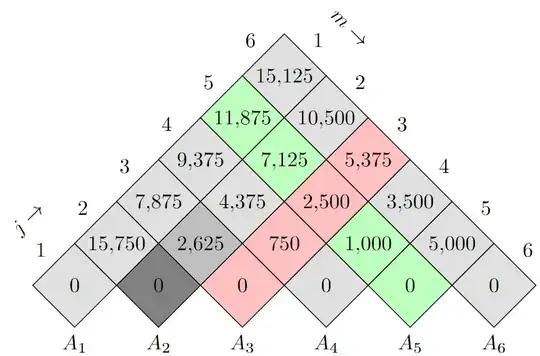
The diamond shape is only there for drawing and filling, the text is actually only a label (which is actually a node too) to the diamond node.
This works best only with an angle of 45.
One could also solve this with a custom coordinate system (x going ↗, y going ↘) instead of rotation, the squares/diamonds could have been drawn also with a rectangular path.
The size of the shape is manually set to
minimum size=1.414cm+0.4\pgflinewidth
The co-efficient of \pgflinewidth is found empirical and is chosen so that the lines overdraw eachother, as a grid would do that.
Update:
The macro that is used by remember isn't remembered anymore after the loops. I'm using global remember for this. (The key remember=\macro is still needed since global remember doesn't apply the same parsing that remember does.)
To add j → and m → I've used my custom /utils/exec={<cond>}{<true keys>}{<false keys>} key to add a label to a label. (We could've used \ifnum here, too, or we could also replace the \ifnums by /utils/ifs.)
The mathtools package is loaded for \mathrlap to easily place the →-labels.
Code
\documentclass[tikz]{standalone}
\usepackage{mathtools}
\usetikzlibrary{shapes.geometric}
\makeatletter
\pgfqkeys{/pgf/foreach}{
  global remember/.code=%
    \pgfutil@append@tomacro{\pgffor@remember@code}{\gdef\noexpand#1{#1}}}
\pgfqkeys{/utils}{if/.code n args={3}{%
  \pgfmathifthenelse{#1}{1}{0}\ifnum\pgfmathresult=0
  \expandafter\pgfutil@secondoftwo\else\expandafter\pgfutil@firstoftwo\fi
  {\pgfkeysalso{#2}}{\pgfkeysalso{#3}}}}
\makeatother
\begin{document}
\begin{tikzpicture}[
    rotate=-45,
    every label/.append style={text depth=+0pt},
    label position=center,
    every cell/.style={fill=gray!25},
    column 3/.style={fill=red!25},
    row 5/.style={fill=green!25},
    cell 2-2/.style={fill=gray},
    cell 3-2/.style={fill=gray!50},
    ]
\foreach \jRow[count=\jCount from 1, remember=\jCount, global remember=\jCount] in {%
        0,%
        {15750,0},%
        {7875,2625,0},%
        {9375,4375,750,0},%
        {11875,7125,2500,1000,0},%
        {15125,10500,5375,3500,5000,0}%
    } {
    \foreach \mCell[count=\mCount from 1, remember=\mCount] in \jRow {
        \node[
            diamond,
            minimum size=1.414cm+0.4\pgflinewidth,
            draw,
            every cell/.try,
            row \jCount/.try,
            column \mCount/.try,
            cell \jCount-\mCount/.try,
            label={\pgfmathprintnumber{\mCell}},
            alias=@lastnode,
            alias=@lastrow-\mCount
        ] at (\mCount-.5,\jCount-.5) {};
        \ifnum\mCount=1
            \path [late options={name=@lastnode,
              label={
                [/utils/if={\jCount==1}%
                  {label={[rotate=45,anchor=south]above left:$j\mathrlap{{}\to}$}}{}]
                above left:$\jCount$}}];
        \fi
    }
        \path [late options={name=@lastnode, label=below:$A_\jCount$}];
    }
    \foreach \jCountExtra in {1,...,\jCount}
        \path [late options={name=@lastrow-\jCountExtra, label={
          [/utils/if={\jCountExtra==1}%
            {label={[rotate=-45,anchor=south]above right:$m\mathrlap{{}\to}$}}{}]
           above right:$\jCountExtra$}}];
\end{tikzpicture}
\end{document}
Output


diamondshape or a matrix-like approach. How’d you want to have your input? – Qrrbrbirlbel Apr 26 '13 at 03:08