11

I'd like to create a presentation with a walking guy. I have to graphics, with a guy in two different positions. How do I make them appear in appropriate moments while moving right at the same time? Thanks for your help:)

\documentclass[a4paper]{article}

\usepackage[cp1250]{inputenc}
\usepackage{polski}
\usepackage{amsmath,amssymb,amsthm}
\usepackage{calc,ifthen}
\usepackage{pgf}
\usepackage{tikz}
\usepackage{animate}
\newcommand{\bt}{\begin{tikzpicture}}
\newcommand{\et}{\end{tikzpicture}}

\begin{document}
\bt
\draw (0,-0.25)circle(0.75cm);
\draw (0,-1)--(0,-3.5); 
\draw(0,-1.5)--(-1,-2.5)--(-0.5,-3)--(-0.25,-3); 
\draw(0,-1.5)--(1,-2.5)--(1.5,-2)--(1.25,-2); 
\draw(0,-3.5)--(0,-4.5)--(-0.5,-5.5)--(0,-5.5); 
\draw(0,-3.5)--(1,-4)--(0.5,-5)--(1,-5); 
\et
}
\end{animateinline}

\bt
\draw (0,-0.25)circle(0.75cm);
\draw (0,-1)--(0,-3.5);
\draw(0,-1.5)--(-1,-2)--(-0.75,-2.5)--(-0.5,-2.5);
\draw(0,-1.5)--(0.5,-2.75)--(1.25,-2.5)--(1,-2.35);
\draw(0,-3.5)--(0.5,-4.5)--(-0.5,-5)--(-0.25,-5.25);
\draw(0,-3.5)--(0.5,-5.5)--(1,-5.5);
\et
\end{document}
T. Verron
  • 13,552
Elphaba
  • 111
  • 6
    Welcome to TeX.sx! Could you please include the preamble of the document (make it both minimal and compilable) and describe what specific feature it is missing? – T. Verron Apr 27 '13 at 18:51
  • It looks like a few lines have been changed just after the \begin{document}, between your first code snippet and the new one. Most notably, your code lacks a \begin{animateinline} at the very least. Was it an intended change? On a side note, you can format code snippet by selecting the code and clicking the {} button above the editting field. – T. Verron Apr 27 '13 at 21:35
  • Also, it is still pretty hard to figure out what you really want. You are mentioning a beamer presentation. Do you expect the animation to be "beamer-style" (simulated by successive pages in the pdf document), or to use advanced pdf features as would the animate package you mentioned in the tags. It may be hard to draw a picture to explain what an animation should be, but if you could describe it more precisely, I'm sure it would help potential answerers. – T. Verron Apr 27 '13 at 21:39

1 Answers1

9

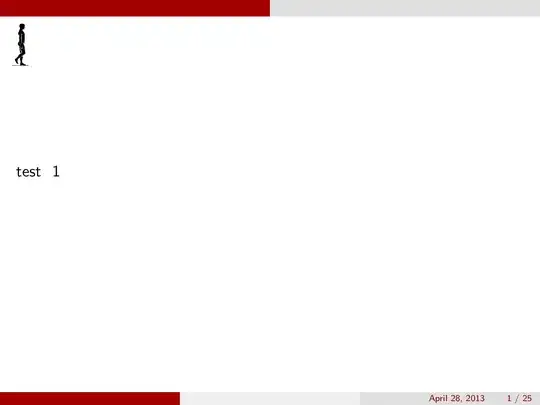
This can be done using a simple variation of a progress bar, as in Progress bar for latex-beamer; I used some of my own images man1, man2, but you can use your own:

\documentclass{beamer}
\usetheme{CambridgeUS}
\usepackage{tikz}

\makeatletter
\def\progressbar@progressbar{} % the progress bar
\newcount\progressbar@tmpcounta% auxiliary counter
\newcount\progressbar@tmpcountb% auxiliary counter
\newdimen\progressbar@pbwd %progressbar width
\newdimen\progressbar@tmpdim % auxiliary dimension

\progressbar@pbwd=\textwidth

% the progress bar
\def\progressbar@progressbar{%

\progressbar@tmpcounta=\insertframenumber
\progressbar@tmpcountb=\inserttotalframenumber
\progressbar@tmpdim=\progressbar@pbwd
\multiply\progressbar@tmpdim by \progressbar@tmpcounta
\divide\progressbar@tmpdim by \progressbar@tmpcountb

\begin{tikzpicture}[overlay]
\path (-20pt,0pt) -- ++ (\progressbar@pbwd,0pt);
\node at (\progressbar@tmpdim,-30pt) 
{
  \ifodd\progressbar@tmpcounta\relax
    \includegraphics[height=1cm]{man1}
  \else
    \includegraphics[height=1cm]{man2}
  \fi
};
\end{tikzpicture}%
}

\setbeamertemplate{background canvas}{\progressbar@progressbar}{}
\makeatother
\setbeamertemplate{navigation symbols}{}

\newcommand\testframe{%
\begin{frame}
test~ \thepage
\end{frame}
}
\newcommand\testV{\testframe\testframe\testframe\testframe\testframe}

\begin{document}

\testV\testV\testV\testV\testV

\end{document}

enter image description here

Gonzalo Medina
  • 505,128