10

I apologize if this has already been covered in some other posts, but I couldn't find it anywhere and I'm not even sure if "brace diagram" is the correct name in English.

I have found some examples of probability trees, and some others that are close (like this: Draw Curly Braces in TikZ), but while playing with them I couldn't get the correct output (The part of the first "text here" when out of boundaries into the brace).

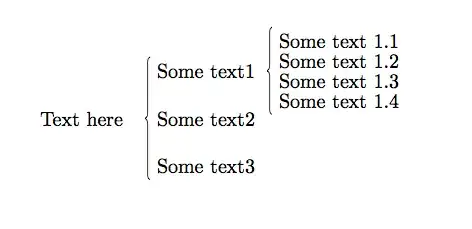
What I'm trying to do is something like this with TikZ:

enter image description here

I know there are some ways to do this with mathmode, but I'm really interested in learning a little more about TikZ and how it works for diagrams like this.

Mario S. E.
  • 18,609
  • It might be helpful if you were to post your TikZ code (in a working example) so that people can check it out and perhaps understand why it's not doing what you want. – Charles Staats May 03 '13 at 15:13
  • @CharlesStaats I don't have a tikzpicture code, that's why I have a graphic representation of what I'm trying to achieve. I want to know how this could be done with tikz. – Mario S. E. May 03 '13 at 15:16
  • If I'm correctly reading your question, you do have tikz code--it just doesn't give the right output: "The first part of 'text here' went out of the boundaries into the brace." – Charles Staats May 03 '13 at 15:31
  • @CharlesStaats it is the code in the linked question mentioned. I was just playing around with it changing the p1 for "text here" and as I mentioned, it went out of bounds – Mario S. E. May 03 '13 at 15:58
  • First, that particular problem will probably be solved by adding the key left to the relevant node, as in node [left,black,midway,xshift=-0.6cm] {\footnotesize $P_1$}; you will probably also need to adjust the xshift value after doing this. Second, braces in TikZ are generally used to add labels after the "main objects" have already been placed. Using them as part of the "structure" of a tree is certainly possible, but it hardly seems worth the effort when the cases environment is available. – Charles Staats May 03 '13 at 16:16
  • This question should also be helpful – henrique May 03 '13 at 17:03

4 Answers4

16
\documentclass{article}
\usepackage{tikz}
\usetikzlibrary{positioning,decorations.pathreplacing}

\begin{document}

\begin{tikzpicture}
\node (main) {Text here};
\begin{scope}[node distance=1em]
    \node [right=of main] (t2) {Some text2};
    \node [above=of t2]   (t1) {Some text1};
    \node [below=of t2]   (t3) {Some text3};
\end{scope}
 \draw[decorate,decoration={brace,mirror}] (t1.north west) -- (t3.south west);

\begin{scope}[node distance=.5em]
    \node [right =of t1,yshift= .5em] (st2) {Some text 1.2};
    \node [right =of t1,yshift=-.5em] (st3) {Some text 1.3};
    \node [right =of t1,yshift=  1.5em] (st1) {Some text 1.1};
    \node [right =of t1,yshift= -1.5em] (st4) {Some text 1.4};
\end{scope}
\draw[decorate,decoration={brace,mirror}] (st1.north west) -- (st4.south west);
\end{tikzpicture}

\end{document}

enter image description here

Alain Matthes
  • 95,075
13

Why tikz? Why not simply cases in an equation?

\documentclass{amsart}

\begin{document}

\begin{displaymath}
  \text{some text} \begin{cases}
    \text{some text}_1 & 
    \begin{cases}
      \text{text 1.1}\\
      \text{text 1.2}\\
      \text{text 1.3}\\
      \text{text 1.4}
    \end{cases}
    \\
    \text{some text}_2\\
    \text{some text}_3
  \end{cases}
\end{displaymath}

\end{document}

enter image description here

Moriambar
  • 11,466
Alex
  • 5,362
13

The schemata package is designed just for these brace diagrams:

\documentclass{article}
\usepackage{schemata}
\newcommand\AB[2]{\schema{\schemabox{#1}}{\schemabox{#2}}}

\begin{document}

\AB{text here}
{
\AB{Some text 1}
{
text 1.1 \\ 
text 1.2 \\ 
text 1.3 \\ 
text 1.4
}\\
Some text 2 \\ 
Some text 3
}  

\end{document}

MWE

Moriambar
  • 11,466
Fran
  • 80,769
11

An answer using the matrix library (updated according to @Qrrbrbirlbel's comment in @Alex's answer):

enter image description here

\documentclass{amsart}

\usepackage{tikz}
\usetikzlibrary{matrix,calc}
\begin{document}

\centering
text here
\begin{tikzpicture}
  \tikzset{
    every left delimiter/.style={xshift=1.5ex}, % shorten space b/w brace and text
    column 1/.style={anchor=base west}, % left-align column 1
    row sep=6ex, % consistent row spacing
    baseline={($(M.center)+(0,-.5ex)$)} % mid-align 'some text' and matrix 
  }

  \matrix(M)[matrix of math nodes,left delimiter=\{]
  {
    \text{some text}_1 
      \smash{
      \begin{cases}
        \text{text 1.1}\\
        \text{text 1.2}\\
        \text{text 1.3}\\
        \text{text 1.4}        
      \end{cases}
      }\\
    \text{some text}_2\\
    \text{some text}_3\\
  };
\end{tikzpicture}

\end{document}
Moriambar
  • 11,466
Herr K.
  • 17,946
  • 4
  • 61
  • 118