
The above can easily be created in MS word, but how can I create something like this in latex? Basically changing the columns for specific cells, merging a bunch of cells together, wrapping text in a cell?
The above can easily be created in MS word, but how can I create something like this in latex? Basically changing the columns for specific cells, merging a bunch of cells together, wrapping text in a cell?
To merge columns, you can use the \multicolumn command; to merge rows, you can use \multirow (from the multirow package); to have text wrapping, you can use columns of p{<length>} type; a little example:
\documentclass{article}
\usepackage[margin=3cm]{geometry}
\usepackage{tabularx}
\usepackage{array}
\usepackage{multirow}

\newlength\Colwd
\setlength\Colwd{1.2cm}

\begin{document}

\noindent\begin{tabular}{| p{\Colwd} | p{0.5\Colwd} | p{0.5\Colwd} *{7}{|p{\Colwd}} |}
\hline
& & \multicolumn{2}{p{1.5\Colwd}|}{} & \multicolumn{2}{p{2\Colwd}|}{\multirow{3}{*}{}} & & & & \\
\cline{1-4}\cline{7-10}
& & \multicolumn{2}{p{1.5\Colwd}|}{} & \multicolumn{2}{p{2\Colwd}|}{} & & & & \\
\cline{1-4}\cline{7-10}
& & \multicolumn{2}{p{1.5\Colwd}|}{} & \multicolumn{2}{p{2\Colwd}|}{} & & & & \\
\hline
& \multicolumn{2}{p{\Colwd}|}{} & & \multicolumn{6}{p{2\Colwd}|}{} \\
\hline
& \multicolumn{2}{p{\Colwd}|}{} & & \multicolumn{6}{p{2\Colwd}|}{} \\
\hline
& \multicolumn{2}{p{\Colwd}|}{} & & & & & & & \\
\hline
& \multicolumn{2}{p{\Colwd}|}{} & & & & & & & \\
\hline
\multicolumn{4}{|p{3\Colwd}|}{\multirow{5}{*}{}} & \multicolumn{3}{p{3\Colwd}|}{\multirow{5}{*}{}} & \multicolumn{3}{p{3\Colwd}|}{\multirow{5}{*}{}} \\
\multicolumn{4}{|p{3\Colwd}|}{} & \multicolumn{3}{p{3\Colwd}|}{} & \multicolumn{3}{p{3\Colwd}|}{} \\
\multicolumn{4}{|p{3\Colwd}|}{} & \multicolumn{3}{p{3\Colwd}|}{} & \multicolumn{3}{p{3\Colwd}|}{} \\
\multicolumn{4}{|p{3\Colwd}|}{} & \multicolumn{3}{p{3\Colwd}|}{} & \multicolumn{3}{p{3\Colwd}|}{} \\
\multicolumn{4}{|p{3\Colwd}|}{} & \multicolumn{3}{p{3\Colwd}|}{} & \multicolumn{3}{p{3\Colwd}|}{} \\
\hline
\end{tabular}

\end{document}
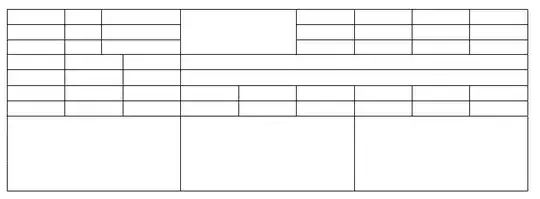
Since there was no definitive information about the real content for the cells, I set every one of them to be of p{...} type (paragraph-type); it's well known this kind of column is not very suitable for long texts. Narrow columns would be better set of type l, r, or c.


org-modein Emacs, "Save as CSV" in Excel and pgfplotstable, but when it comes to multirows and multicolumns I get sad, sigh in resignation and just go at it by hand after creating an initial template.
– Ricardo
May 07 '13 at 04:57


\usepackage{multirow}). Starting with a regular grid of cells, use\multirowand\multicolumnto define the cells you need. See e.g., http://www.andrewjpage.com/?archives/43-Multirow-and-multicolumn-spanning-with-latex-tables.html. – Andy Clifton May 06 '13 at 19:47excel2latex– Herr K. May 06 '13 at 20:13