The documentation of the nomenclature package includes code to put everything in a longtable environment, but this involves some hacking of the .ist file. A simpler approach that may be sufficient is just to define some helper macros that work within in an ordinary list:

\documentclass{article}

\usepackage{nomencl,etoolbox,ragged2e,siunitx}

\newcommand{\DimensUnits}[2]{\hfill\makebox[8em]{#1\hfill}%
\makebox[4em]{#2\hfill}\ignorespaces}
\newcommand{\insertnomheaders}{\item[\bfseries Symbol]%
\textbf{Description}\DimensUnits{\textbf{Dimensions}}{\textbf{Units}}}

\renewcommand\nomgroup[1]{%
  \item[\large\bfseries
  \ifstrequal{#1}{A}{Acronyms}{%
  \ifstrequal{#1}{R}{Roman Symbols}{%
  \ifstrequal{#1}{G}{Greek Symbols}{%
  \ifstrequal{#1}{S}{Superscripts}{%
  \ifstrequal{#1}{U}{Subscripts}{%
  \ifstrequal{#1}{X}{Other Symbols}{}}}}}}]
  \insertnomheaders
  }

\renewcommand*{\nompreamble}{\markboth{\nomname}{\nomname}}

\newcommand{\nomdescr}[1]{\parbox[t]{4cm}{\RaggedRight #1}}
\newcommand{\nomwithdim}[5]{\nomenclature[#1]{#2}%
{\nomdescr{#3}\DimensUnits{#4}{#5}}}

\makenomenclature

\begin{document}
\mbox{}
\nomwithdim{R}{\(a,b,c\)}{half axes of ellipsoid}{L}{\si{m}}
\nomwithdim{R}{\(C\)}{dimensionless coefficient (e.g.\ for drag model)}{--}{1}
\nomwithdim{G}{\( \varepsilon_0 \)}{vacuum permittivity}{F/L}{\si{F.m^{-1}}}

\printnomenclature[6em]
\end{document}
The optional argument to \printnomenclature sets the space available for the symbols. We then set each line as an \item whose label is the symbol, followed by a paragraph of fixed width containing the description, followed by a box for dimensions and finally a box for units. etoolbox has been loaded to avoid the deprecated ifthen package. sunitx has been loaded for printing the units.
Of course, to compile this you need to run the file through (pdf)latex, then run
makeindex file.nlo -s nomencl.ist -o file.nls
with "file" replaced (both times) by your jobname, i.e. where the main file is file.tex. You then need to run (pdf)latex again.
ADDED in response to comment Here is a version with different styling for different categories. UPDATED again Now with optional arguments to pass to the sorting keys.
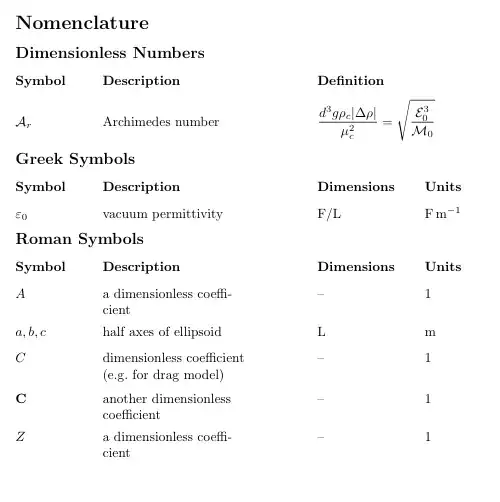
\documentclass{article}

\usepackage{nomencl,etoolbox,ragged2e,siunitx,mathtools}

\DeclarePairedDelimiter{\abs}{\lvert}{\rvert}

\newcommand{\DimensUnits}[2]{\hfill\makebox[8em]{#1\hfill}%
\makebox[4em]{#2\hfill}\ignorespaces}
\newcommand{\DefinitionCol}[1]{\hfill\parbox[t]{12em}{#1}\ignorespaces}

\newcommand{\nomsubtitle}[1]{\item[\large\bfseries #1]}

\renewcommand\nomgroup[1]{\def\nomtemp{\csname nomstart#1\endcsname}\nomtemp}

\newcommand{\nomstartR}{\nomsubtitle{Roman Symbols}%
  \item[\bfseries Symbol]%
  \textbf{Description}\DimensUnits{\textbf{Dimensions}}{\textbf{Units}}}
\newcommand{\nomstartG}{\nomsubtitle{Greek Symbols}%
  \item[\bfseries Symbol]%
  \textbf{Description}\DimensUnits{\textbf{Dimensions}}{\textbf{Units}}}
\newcommand{\nomstartD}{\nomsubtitle{Dimensionless Numbers}%
  \item[\bfseries Symbol]\textbf{Description}\DefinitionCol{\textbf{Definition}}}

\renewcommand*{\nompreamble}{\markboth{\nomname}{\nomname}}

\newcommand{\nomdescr}[1]{\parbox[t]{4cm}{\RaggedRight #1}}
\newcommand{\nomwithdim}[5]{\nomenclature[#1]{#2}%
{\nomdescr{#3}\DimensUnits{#4}{#5}}}
\newcommand{\nomtypeR}[5][]{\nomwithdim{R#1}{#2}{#3}{#4}{#5}}
\newcommand{\nomtypeG}[5][]{\nomwithdim{G#1}{#2}{#3}{#4}{#5}}
\newcommand{\nomtypeD}[4][]{\nomenclature[D#1]{#2}{\nomdescr{#3}\DefinitionCol{#4}}}
\makenomenclature

\begin{document}
\mbox{}
\nomtypeR[abc]{\(a,b,c\)}{half axes of ellipsoid}{L}{\si{m}}
\nomtypeR[C]{\(C\)}{dimensionless coefficient (e.g.\ for drag model)}{--}{1}
\nomtypeG{\( \varepsilon_0 \)}{vacuum permittivity}{F/L}{\si{F.m^{-1}}}
\nomtypeD{\( \mathcal A_r \)}{Archimedes number}{\(\displaystyle
\frac{d^3g\rho_c\abs{\Delta\rho}}{\mu_c^2} = \sqrt{\frac{\mathcal
E_0^3}{\mathcal M_0}} \)}
\nomtypeR[CC]{\(\mathbf{C}\)}{another dimensionless coefficient}{--}{1}
\nomtypeR[A]{\(A\)}{a dimensionless coefficient}{--}{1}
\nomtypeR[Z]{\(Z\)}{a dimensionless coefficient}{--}{1}

\printnomenclature[6em]
\end{document}
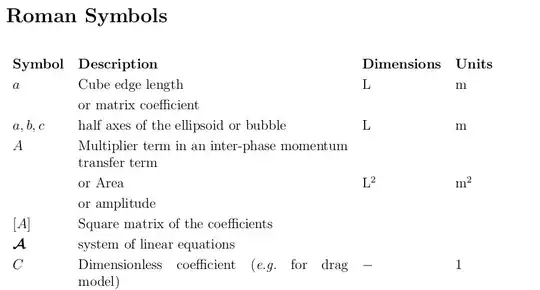

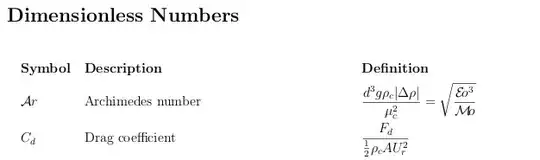


\nomgroupcode to write an appropriate\item[]followed by an appropriate header command. – Andrew Swann May 07 '13 at 13:48$S$}, {\textbf{S}}, {\(S\)}, {S} will be sorted differently. Is there a way sorting the symbols alphabetically? – KOF May 08 '13 at 00:004cmin\nomdescr– Andrew Swann May 08 '13 at 12:17\vspace(1em)seems not working – KOF May 08 '13 at 12:30\newcommand{\nomsubtitle}[1]{\vspace{7ex plus 2ex minus 1ex}% \item[\large\bfseries #1]\mbox{}\vspace{5ex plus 1ex minus 0.5ex}}will work. – Andrew Swann May 08 '13 at 19:18makeindex- I have added instructions to the answer. If that doesn't work then post a question giving details. – Andrew Swann May 14 '18 at 14:35