How to make indents as in the second image?
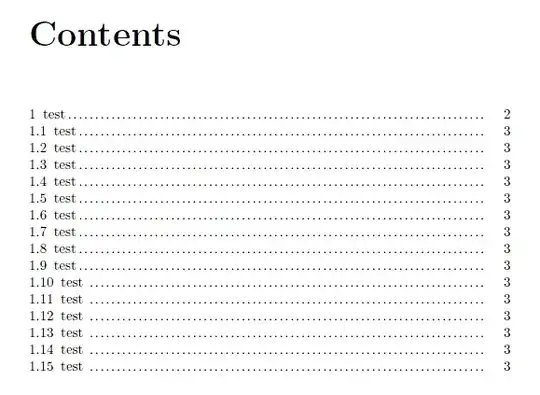
This is what it looks like now:

This is what it should look like:

MWE:
\documentclass[a4paper, 14pt, english]{extreport}

\usepackage[T2A]{fontenc}
\usepackage[utf8]{inputenc}
\usepackage[english]{babel}
\usepackage{tocloft}
\usepackage[a4paper, left=25mm, right=10mm, top=20mm, bottom=20mm]{geometry}

\linespread{1.3}
\renewcommand{\rmdefault}{ftm}
\frenchspacing

\renewcommand{\cftchapfont}{\normalsize  }
\renewcommand\cftchappagefont{\normalfont}

\renewcommand{\cftbeforechapskip}{0em}
\renewcommand{\cftparskip}{-1mm}
\renewcommand{\cftdotsep}{1}
\renewcommand{\cftpartleader}{\cftdotfill{\cftdotsep}}
\renewcommand{\cftchapleader}{\cftdotfill{\cftdotsep}}

\cftsetindents{chapter}{0pt}{10pt}
\cftsetindents{section}{0pt}{30pt}
\cftsetindents{subsection}{0pt}{40pt}
\cftsetindents{subsubsection}{0pt}{50pt}


\begin{document}

\tableofcontents
\thispagestyle{empty}
\addtocontents{toc}{\protect\thispagestyle{empty}}

\chapter{test}
\section{test}
\section{test}
\section{test}
\section{test}
\section{test}
\section{test}
\section{test}
\section{test}
\section{test}
\section{test}
\section{test}
\section{test}
\section{test}
\section{test}
\section{test}

\end{document}


tocloftmanual, it's not obvious how to achieve this. – lockstep May 13 '13 at 19:04