The following may be close to what you're looking for:
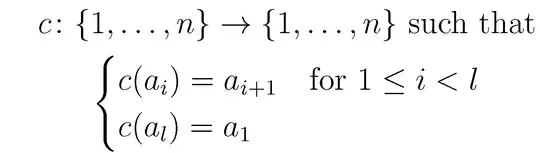
\documentclass[12pt]{article}
\usepackage{amsmath}
\begin{document}
\begin{gather*}
c \colon \{1, \dots, n\} \rightarrow \{1, \dots, n\} \text{ such that}\\
\begin{cases}
  c(a_i) = a_{i+1} & \text{for }1\le i<l\\
  c(a_l) = a_1
\end{cases}
\end{gather*}
\end{document}
Some comments:
- Use the
cases environment, provided by the amsmath package, to place a left curly brace ahead of two or more expressions.
- Don't use
... to create a typographical ellipsis; instead, use \dots.
- Use the
\text{ } command to write text material inside mathematical expressions.
- As pointed out in the comments by @SvendTveskæg and @daleif, it's better (typographically speaking) to use the command
\colon instead of :.
On the other hand, if you need the left-hand curly brace to span all three rows, you could do so with the following code:

\documentclass[12pt]{article}
\usepackage{amsmath}
\begin{document}
\begin{equation*}
\begin{cases}
  c \colon \{1, \dots, n\} \rightarrow \{1, \dots, n\} \text{ such that}\\
  c(a_i) = a_{i+1}  \text{ for $1\le i<l$}\\
  c(a_l) = a_1
\end{cases}
\end{equation*}
\end{document}
Observe, though, that this code doesn't make full use of the capabilities of the cases environment; for sure, one could replace \begin{cases} ... \end{cases} with a more basic \left\{\begin{array}{@{}l} ... \end{array}\right. construct.


