6

I have the following (Non-working) example.

\renewcommand*{\arraystretch}{1.8}
\begin{longtable}{lcl}
    \caption{Summary of proven determinants for falling}\\ \toprule
    \label{tab:FallPredictionVariables}
    \textbf{Author} &\textbf{Subject count (M:F)} & \textbf{Determinants}\\
    \midrule

    \noindent Author 1 &
    1780 (?) & 
    \begin{itemize}%[label={--},noitemsep,leftmargin=*,topsep=0pt,partopsep=0pt]
        \item Recent falls (last 2 months)
        \item Agitation
        \item Frequent toileting
        \item Visual impairment
    \end{itemize}\\

    \noindent Author 2 &
    311 (?) &
    \begin{itemize}%[label={--},noitemsep,leftmargin=*,topsep=0pt,partopsep=0pt]
        \item Posture sway
        \item Two or more falls in previous year
        \item Low hand grip strength
        \item Depressive state of mind
    \end{itemize}\\
        \bottomrule

\end{longtable}

However, it works OK outside a longtable environment:

\renewcommand*{\arraystretch}{1.8}
\begin{table}
\centering
    \caption{Summary of proven determinants for falling} 
    \label{tab:FallPredictionVariables}
    \begin{tabular}{lcp{60mm}}
    \toprule
    \textbf{Author} &\textbf{Subject count (M:F)} & \textbf{Determinants}\\
    \midrule

    \noindent Author 1 &
    1780 (?) & 
    \begin{itemize}[label={--},noitemsep,leftmargin=*,topsep=0pt,partopsep=0pt]
        \item Recent falls (last 2 months)
        \item Agitation
        \item Frequent toileting
        \item Visual impairment
    \end{itemize}\\

    \noindent Author 2 &
    311 (?) &
    \begin{itemize}[label={--},noitemsep,leftmargin=*,topsep=0pt,partopsep=0pt]
        \item Posture sway
        \item Two or more falls in previous year
        \item Low hand grip strength
        \item Depressive state of mind
    \end{itemize}\\
        \bottomrule

        \end{tabular}

\end{table}

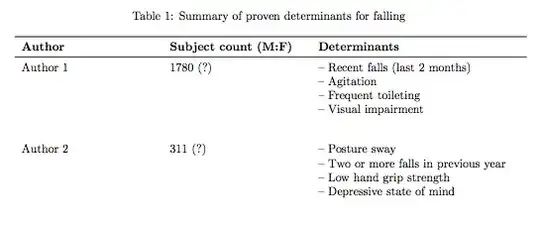
As you can see in the picture below, it does what I'm expecting (except there is some vertical space over the first item that I would like to remove, and the solutions posted in How to reduce vertical space itemize environment inside table only seem to work for tabularx environments).

enter image description here

I'm unable to make my code work inside longtable, and I really need it (the complete table is very long).

Any ideas for both things:

  1. To be able to have itemize inside longtable environment
  2. Eliminate the extra space for the first item

PS: This is the preamble for both examples:

\documentclass[a4paper,twoside,11pt,openright]{report}
\usepackage[T1]{fontenc}
\usepackage[utf8]{inputenc}
\usepackage{longtable}  
\usepackage[inline]{enumitem}   
\usepackage{booktabs}

\begin{document}
...
\end{document}
Troy
  • 13,741
Mario S. E.
  • 18,609
  • code snippets a good, but MWE are better :) – cmhughes May 17 '13 at 18:04
  • @cmhughes I'm really having a hard time telling the difference when to post the complete MWE or just the code snippet for the sake of space... I don't know if what I just did is the best approach – Mario S. E. May 17 '13 at 18:05
  • 1
    @MarioS.E.: Most of us can't debug code by eyes alone. We have to copy and paste into a document, see what happens, poke it, see what happens, curse it, see what happens, etc. ... With an MWE we can get more quickly to the poking-and-cursing stage. Without it we have to manually type repetitive things like \documentclass...\begin{document}... and so on. Also we have to guess what packages are being loaded (especially annoying with multi-library packages like tikz and pgfplots), and it's a barrier to actually solving the problem. So MWE is always good if you want easy help. :-) – Matthew Leingang May 17 '13 at 19:00
  • To the question: couldn't multiple rows work just as easily? – Matthew Leingang May 17 '13 at 19:03
  • @MatthewLeingang Yes, that is a valid approach – Mario S. E. May 17 '13 at 19:09
  • @MatthewLeingang Could you please write an answer with an example? I'm really intrigued if this could work for a longtable – Mario S. E. May 17 '13 at 19:11

3 Answers3

7

The following is a working example. Because lcr are for one-line entries, itemize shouldn't work with them. Compare the first part, improved, with the second, unchanged.

\documentclass[a4paper,twoside,11pt,openright]{report}
\usepackage[T1]{fontenc}
\usepackage[utf8]{inputenc}
\usepackage{longtable}  
%\usepackage[inline]{enumitem}   
\usepackage{enumitem}   
\usepackage{booktabs}


\begin{document}

\renewcommand*{\arraystretch}{1.8}
%\begin{longtable}{lcl}
\begin{longtable}{p{4cm}p{4cm}p{6cm}}
    \caption{Summary of proven determinants for falling}\\ \toprule
    \label{tab:FallPredictionVariables}
    \textbf{Author} &\textbf{Subject count (M:F)} & \textbf{Determinants}\\
    \midrule

    \noindent Author 1 &
    1780 (?) & \vspace{-\baselineskip}
    \begin{itemize}[label={--},noitemsep,leftmargin=*,topsep=0pt,partopsep=0pt]
        \item Recent falls (last 2 months)
        \item Agitation
        \item Frequent toileting
        \item Visual impairment
    \end{itemize}\\

    \noindent Author 2 &
    311 (?) &
    \begin{itemize}%[label={--},noitemsep,leftmargin=*,topsep=0pt,partopsep=0pt]
        \item Posture sway
        \item Two or more falls in previous year
        \item Low hand grip strength
        \item Depressive state of mind
    \end{itemize}\\
        \bottomrule

\end{longtable}

\end{document}

enter image description here

Troy
  • 13,741
5

Without a full MWE, I've taken some code from Przemysław Scherwentke's answer:

enter image description here

\documentclass{report}
\usepackage{longtable}% http://ctan.org/pkg/longtable
\usepackage{array,booktabs,enumitem}% http://ctan.org/pkg/{array,booktabs,enumitem}
\newcolumntype{P}[1]{>{\endgraf\vspace*{-\baselineskip}}p{#1}}

\begin{document}

\renewcommand*{\arraystretch}{1.8}
\begin{longtable}{p{4cm}p{4cm}P{6cm}}
  \caption{Summary of proven determinants for falling}\label{tab:FallPredictionVariables} \\
  \toprule
  \textbf{Author} &\textbf{Subject count (M:F)} & \multicolumn{1}{l}{\textbf{Determinants}} \\
  \midrule

  \noindent Author 1 &
  1780 (?) & 
  \begin{itemize}[label={--},noitemsep,leftmargin=*,topsep=0pt,partopsep=0pt]
    \item Recent falls (last 2 months)
    \item Agitation
    \item Frequent toileting
    \item Visual impairment
  \end{itemize}\\

  \noindent Author 2 &
  311 (?) & 
  \begin{itemize}[label={--},noitemsep,leftmargin=*,topsep=0pt,partopsep=0pt]
    \item Posture sway
    \item Two or more falls in previous year
    \item Low hand grip strength
    \item Depressive state of mind
  \end{itemize}\\
  \bottomrule
\end{longtable}

\end{document}

The P{<len>} column type (thanks to array) inserts a "vertical unskip" so that the first item aligns properly with the remainder of the table.

The assumption is that the last P-column only contains lists, of course. If not, a separate \multicolumn has to be issued like with the heading Determinants.

Troy
  • 13,741
Werner
  • 603,163
4

I thought you could achieve this effect without having to hack an itemize. Just use multiple rows of the table:

\documentclass{report}
\usepackage{longtable}% http://ctan.org/pkg/longtable
\usepackage{array,booktabs}

\begin{document}

\begin{longtable}{p{4cm}p{4cm}>{-- }p{6cm}}
  \caption{Summary of proven determinants for falling}\label{tab:FallPredictionVariables} \\
  \toprule
  \textbf{Author} &\textbf{Subject count (M:F)} & \multicolumn{1}{l}{\textbf{Determinants}} \\
  \midrule

  \noindent 
  Author 1 & 1780 (?) & Recent falls (last 2 months) \\
           &          & Agitation                    \\
           &          & Frequent toileting           \\ 
           &          & Visual impairment            \\[1.8\baselineskip]

  Author 2 & 311 (?)  & Posture sway                 \\
           &          & Two or more falls in previous year \\
           &          & Low hand grip strength \\
           &          & Depressive state of mind \\               
\end{longtable}
\end{document}

sample code output

Troy
  • 13,741
Matthew Leingang
  • 44,937
  • 14
  • 131
  • 195