27

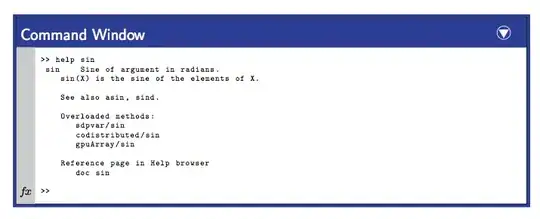
hello i am trying to set up style for script box.

so far i got \begin{script*} >> help \end{script*} working and displaying enter image description here

i want final version to look some what similar to this picture

enter image description here

and have second comment that will use more or less same environment

for example

enter image description here

i'm sure that it can be done with latex, but i don't have enough experience and knowledge.

any help will be appreciated thank you!

[UPDATE] HERE is the final version that i have decide to stay with, it uses tikz and mdframed enter image description here

\documentclass{article}
\usepackage[dvipsnames]{xcolor}
\usepackage{listings}
\definecolor{topBlue}{RGB}{42,93,147}
\definecolor{bottomBlue}{RGB}{10,60,113}
\definecolor{sideline}{RGB}{235,235,237}
\definecolor{frameBlue}{RGB}{17,74,135}
\usepackage{tikz}

\usepackage[framemethod=TikZ]{mdframed}
\usetikzlibrary{calc,shapes.geometric}

\newcommand{\triangcirc}{\tikz{
\node[draw=frameBlue,inner ysep=4pt,
      color=frameBlue,
      top color=topBlue,
      bottom color=bottomBlue,
      text=white,
      align=flush left,
      font=\textbf\textsf,
      text width=\textwidth] (a) {Command Window};
\node[circle,white,draw,inner sep=3pt] (c) at ([xshift=-3mm]a.east) {};
\node[isosceles triangle,
      white,
      fill,
      rotate=-90,
      anchor=apex,
      isosceles triangle apex angle=60,
      inner sep=1.2pt] (t) at ([yshift=1.5pt]c.south) {};}}

\mdfdefinestyle{commandline}
{leftmargin=0pt, rightmargin=0pt,innerleftmargin=-0.5pt,innerrightmargin=7.5pt,
 middlelinecolor=frameBlue,
 middlelinewidth=1.2pt,
 frametitlerule=false,
 backgroundcolor=white,
 frametitle={\triangcirc},
 frametitleaboveskip=-0.5pt,
 frametitlebelowskip=0pt,
 singleextra={\draw[sideline,line width=12pt] 
      ($(O)+(7pt,1pt)$) -- ($(O|-P)+(7pt,-\mdfframetitleboxtotalheight)-(0,1pt)$);
      \node[inner sep=0pt,color=black]at ($(O)+(7pt,9pt)$) {$\scriptstyle f\!x$}; }
}

\lstnewenvironment{script} {\lstset{language=Matlab,xleftmargin=5mm,basicstyle=\footnotesize,,breaklines=true,aboveskip=-2pt,belowskip=0pt}} {}
\surroundwithmdframed[style=commandline]{script}

\begin{document}
\begin{script}
>> help sin
 sin    Sine of argument in radians.
    sin(X) is the sine of the elements of X.

    See also asin, sind.

    Overloaded methods:
       sdpvar/sin
       codistributed/sin
       gpuArray/sin

    Reference page in Help browser
       doc sin

>> 
\end{script}

\end{document}

and THANKS FOR BOTH ANSWERS!!!

vveliev
  • 550
  • 2
    Have a look at the mdframed package. I don't know it very well, but IIRC it provides a lot of nice frames. You could try to combine it with e.g. the listings package. – Uwe Ziegenhagen May 19 '13 at 21:35
  • @Uhh. That can be very easily done with PythonTeX for Python command shell. Maybe you can e-mail the author to see how is done. – Predrag Punosevac May 19 '13 at 21:38
  • Incase you want exactly "MATLAB like command box" a good screenshot capture in .png might be one of many ways. – texenthusiast May 19 '13 at 22:06
  • 1
    have a look at the tcolorbox package too... – cmhughes May 19 '13 at 22:22
  • Which version do you use. – Marco Daniel May 20 '13 at 08:02
  • @Marco Daniel. personally i prefer Tikz version for it's look , but i'm working right not on creating environment such that, in my main file i can simply type \begin{scrip}>> help...\end{script}, and it will produce this window for me. – vveliev May 20 '13 at 08:13
  • 2
    Please see the edit of Alan's answer. – Marco Daniel May 20 '13 at 08:27
  • @Marco Daniel. that is amazing thank you very much :) – vveliev May 20 '13 at 08:40
  • Why does this not work with a standalone document i.e. by replacing article to standalone i receive the following error: Missing \endgroup inserted \begin{script} – KatyB Mar 06 '14 at 09:13
  • @Kate I will assume that it has to do with what is included in "standalone" packages, rules. You may need to add additional in order to make it work – vveliev Mar 09 '14 at 05:10

2 Answers2

23

Just a quick cook-up if mdframed doesn't have a direct support for this (I doubt that it doesn't though). The basic functionality is there such as shrinking via depending on the vertical size etc. but I didn't test it extensively and I got lazy for the triangle of the $fx$ part. Probably a better font would make it look way nicer.

\documentclass{article}
\usepackage{tikz,listings,amssymb}
\lstset{language=Matlab,basicstyle=\tiny\ttfamily,breaklines=true}
\usetikzlibrary{shapes.geometric}


\begin{document}
\begin{tikzpicture}
\node[draw,inner ysep=3pt,
      top color=blue!60!black,
      bottom color=blue,
      text=white,
      align=flush left,
      font=\tiny\ttfamily,
      text width=\textwidth] (a) {Command Window};
\node[circle,white,draw,inner sep=1.9pt] (c) at ([xshift=-3mm]a.east) {};
\node[isosceles triangle,
      white,
      fill,
      rotate=-90,
      anchor=apex,
      isosceles triangle apex angle=60,
      inner sep=0.8pt] (t) at ([yshift=0.5pt]c.south) {};

\node[
      anchor=north west,
      minimum width=\textwidth-3mm,
      align=flush left,
      font=\tiny\ttfamily,
      text width=\textwidth-3mm,
      inner sep=0
     ] (l) at ([xshift=3mm]a.south west)
    {%
\begin{lstlisting}[aboveskip=0pt,belowskip=0pt]
>> help sin
 sin    Sine of argument in radians.
    sin(X) is the sine of the elements of X.

    See also asin, sind.

    Overloaded methods:
       sdpvar/sin
       codistributed/sin
       gpuArray/sin

    Reference page in Help browser
       doc sin

>> 
\end{lstlisting}%
};

\filldraw[fill=blue!10,draw=white] ([yshift=-0.3pt]a.south west) rectangle (l.south west);
\draw ([xshift=0.3pt]a.south west) rectangle ([xshift=2mm+0.7pt]l.south east);
\node[anchor=south east,inner xsep=0.5pt,inner ysep=1pt] (f) at (l.south west) {$\scriptstyle f\!x$};
\end{tikzpicture}


\end{document}

enter image description here

percusse
  • 157,807
18

Here's a version using mdframed.

Revised version

I've updated the answer to include the grey bar that was missing from the earlier answer, and I've removed the dependency on an Apple font by using percusse's code for the circled triangle. Because mdframed allows breaks across pages, this solution will be slightly more flexible than a solution that puts the code in a TikZ node.

\documentclass{article}
\usepackage[dvipsnames]{xcolor}
\definecolor{DarkBlue}{rgb}{.11,.23,.60}

\usepackage[framemethod=TikZ]{mdframed}
\usetikzlibrary{calc,shapes.geometric}

\newcommand{\triangcirc}{\tikz{
\node[circle,white,draw,inner sep=3pt] (c) {};
\node[isosceles triangle,
      white,
      fill,
      rotate=-90,
      anchor=apex,
      isosceles triangle apex angle=60,
      inner sep=1.5pt] (t) at ([yshift=0.5pt]c.south) {};}}

\mdfdefinestyle{commandline}
{leftmargin=5pt, rightmargin=10pt,innerleftmargin=15pt,
 middlelinecolor=DarkBlue,
 middlelinewidth=2pt,
 backgroundcolor=white,
 frametitle={Command Window\hfill\triangcirc},
 frametitlefont={\normalfont\sffamily\color{white}\hspace{-1.25em}},
 frametitlebackgroundcolor=DarkBlue,
 singleextra={\draw[black!20,line width=12pt] node[inner sep=0pt,color=black]
      at ($(O)+(7pt,9pt)$) {$\scriptstyle f\!x$} 
      ($(O)+(7pt,1pt)$) -- ($(O|-P)+(7pt,-\mdfframetitleboxtotalheight-1pt)$);}}

\newmdenv[style=commandline]{cmdline}
\usepackage{listings}
\lstset{language=Matlab,basicstyle=\tiny\ttfamily,breaklines=true}
\begin{document}
\begin{cmdline}
\begin{lstlisting}[aboveskip=0pt,belowskip=0pt]
>> help sin
 sin    Sine of argument in radians.
    sin(X) is the sine of the elements of X.

    See also asin, sind.

    Overloaded methods:
       sdpvar/sin
       codistributed/sin
       gpuArray/sin

    Reference page in Help browser
       doc sin

>> 
\end{lstlisting}%
\end{cmdline}
\end{document}

output of code


The following code simplify the complete method by defining on environment script which results in your required output:

\documentclass{article}
\usepackage[dvipsnames]{xcolor}
\definecolor{DarkBlue}{rgb}{.11,.23,.60}

\usepackage[framemethod=TikZ]{mdframed}
\usetikzlibrary{calc,shapes.geometric}

\newcommand{\triangcirc}{\tikz{
\node[circle,white,draw,inner sep=3pt] (c) {};
\node[isosceles triangle,
      white,
      fill,
      rotate=-90,
      anchor=apex,
      isosceles triangle apex angle=60,
      inner sep=1.5pt] (t) at ([yshift=0.5pt]c.south) {};}}

\mdfdefinestyle{commandline}
{leftmargin=5pt, rightmargin=10pt,innerleftmargin=15pt,
 middlelinecolor=DarkBlue,
 middlelinewidth=2pt,
 frametitlerule=false,
 backgroundcolor=black!10!white,
 frametitle={Command Window\hfill\triangcirc},
 frametitlefont={\normalfont\sffamily\color{white}\hspace{-1.25em}},
 frametitlebackgroundcolor=DarkBlue,
 singleextra={\draw[black!20,line width=12pt] 
      ($(O)+(7pt,1pt)$) -- ($(O|-P)+(7pt,-\mdfframetitleboxtotalheight)-(0,1pt)$);
      \node[inner sep=0pt,color=black]at ($(O)+(7pt,9pt)$) {$\scriptstyle f\!x$}; }
}

\usepackage{listings}
\lstnewenvironment{script} {\lstset{language=Matlab,basicstyle=\tiny\ttfamily,breaklines=true,aboveskip=0pt,belowskip=0pt}} {}
\surroundwithmdframed[style=commandline]{script}

\begin{document}
\begin{script}
>> help sin
 sin    Sine of argument in radians.
    sin(X) is the sine of the elements of X.

    See also asin, sind.

    Overloaded methods:
       sdpvar/sin
       codistributed/sin
       gpuArray/sin

    Reference page in Help browser
       doc sin

>> 
\end{script}

\end{document}

enter image description here

Alan Munn
  • 218,180
  • this code does look smaller and more simpler, but i was not able to compile it due to "Apple Symbols". And another think that i'm not sure how to add left side line (grey with fx inside.) – vveliev May 20 '13 at 02:04
  • Do you think mdframed helps incase of a longer of screen output(may be multiple help sin help cos etc..) version ? – texenthusiast May 20 '13 at 04:01
  • @vveiliev I've updated the code to add the missing elements and removed the need for the Apple font. (No longer needs XeTeX either). – Alan Munn May 20 '13 at 04:12
  • 1
    @texenthusiast Yes, mdframed can break across pages, which might be useful for longer listings. – Alan Munn May 20 '13 at 04:13
  • it does look good but 2 things , there is some offsets introduced when zoom-in as well as black borders, another think that i cant find how to set frame-background colour to blend from one colour to another. – vveliev May 20 '13 at 05:22
  • 1
    @vveliev: The background color is controlled by the option backgroundcolor. Where do you have an offset? – Marco Daniel May 20 '13 at 08:00
  • @ Marco Daniel. Well if you zoom in , to inside of top left corner you can see that grey color slightly overlaps with frametitle – vveliev May 20 '13 at 08:17
  • 1
    @vveliev: Fixed the dimension in the example. – Marco Daniel May 20 '13 at 08:36
  • 1
    @vveliev I think it's fair to accept this answer instead of mine. It's great and also involves the author of mdframed who confirmed to include these in the manual for a future release. Note that mdframed has the option to use TikZ as the underlying graphics engine hence it's not quite a choice between TikZ and mdframed. – percusse May 21 '13 at 11:16
  • @percusse, :) will it's really is hard to pick. Both answers are good and involve each other. – vveliev May 21 '13 at 19:30