1

I tried to create my own "List of things" with help of this post: Define your own list of

Now my questions:

  1. I don't want to use the command \algorithm {Text}. Instead I want to use a container like \begin{algorithm}...\end{algorithm}. How can I do this? (optional)
  2. The List of Algorithms is empty even I use the first command. How can I fill it?
  3. The headline looks different to the headlines of the "normal" lists.

Here is my example:

\documentclass[a4paper, oneside, 12pt, listof=totoc, bibliography=totoc, titlepage, headinclude = false, footinclude = false, mpinclude = false, BCOR = 0mm, DIV = calc]{scrartcl}
\usepackage[ngerman]{babel}
\usepackage[T1]{fontenc}
\usepackage[utf8]{inputenc}
\usepackage{lmodern}
\usepackage{graphicx}
\makeatletter

\def\ScaleIfNeeded{%
\ifdim\Gin@nat@width>\linewidth
\linewidth
\else
\Gin@nat@width
\fi
}\makeatother

\usepackage{setspace}
\onehalfspacing       
\usepackage[a4paper, left=3 cm, right=4 cm, top=3 cm, bottom=1.5 cm]{geometry}
\usepackage{fancyhdr} 
\usepackage{longtable}
\usepackage{bibgerm}
\usepackage{eurosym}
\usepackage{booktabs}
\usepackage{array}
\usepackage{color} 
\usepackage{tabularx}
\usepackage{pdflscape}
\usepackage[justification=RaggedRight, singlelinecheck=false]{caption}
\usepackage[pageanchor=false]{hyperref} 
\usepackage{listings} 
\usepackage{algorithm}
\usepackage{etoolbox} 
\usepackage{pdfpages} 
\usepackage[scaled]{uarial}
\usepackage[printonlyused]{acronym}
\usepackage{bigstrut}
\usepackage{multirow}
\usepackage{acronym}
\usepackage{ulem}
\usepackage{tocloft}
\fancypagestyle{plain}{}
\pagestyle{fancy}
\fancyhf{}
\fancyhead[C]{- \thepage \ -}
\addtolength{\headwidth}{\marginparsep}
\addtolength{\headwidth}{0.5\marginparwidth}
\renewcommand{\headrulewidth}{1pt}
\setcounter{secnumdepth}{5}
\setlength{\parindent}{0pt}

\newcommand{\listalgorithm}{Algorithmenverzeichnis}
\newlistof{Algorithmen}{algo}{\listalgorithm}
\newcommand{\Algorithmen}[1]{%
\refstepcounter{Algorithmen}
\par\noindent\textbf{Algorithmen \theAlgorithmen. #1:}
\addcontentsline{algo}{Algorithmen}
{\protect\numberline{\thechapter.\theAlgorithmen}#1}\par}

\begin{document}
    listalgorithm
    \newpage
    \Algorithmen{My Algorithm}
     \includegraphics[width=\ScaleIfNeeded]{../Bilder/node_init.png}

The last two lines should look like (this is optional)

\begin{Algorithm}
    \caption{My Algorithm}
    \includegraphics[width=\ScaleIfNeeded]{../Bilder/node_init.png}
\end{Algorithm}

And the heading of this algorithm list looks like:

List of Algorithm

But it should look like:

List of Algorithm

I hope I could explain my problem well enough ;)

P.S.: I searched for some posts but they did not fit to my problem :/


Edit: Okay I have tried both answers now and both are working.
My code looks nearly the same like the solutions, so I won't post it again. But I explain what my problem was.

cgnieder:
Everything works fine and looks how it should. My first problem was that I used the "algorithm" package and named the new toc algorithms too. So the package overwrote my commands. After I deleted it everything was fine.

Gonzalo:
Your solution nearly works fine too. The list looks like it should (bold headline and entries) but my other lists are not linked (anchored) in the pdf's menu. That seemes to be a problem with the "hyperref" package. After I commented and compiled nothing worked. But when I recommended it the list was created fine (except the anchors).

Because of the remaining problem and that the "tobasic" package is a class implemented package I chose cgnieders answer as my accepted one.

I thank you very much. You both helped me a lot!! Thank you!

lockstep
  • 250,273
j0chn
  • 241
  • ...I made an edit to your question since the markdown wasn't really helping. If this was not correct, please edit your question accordingly. – Werner May 23 '13 at 20:28

2 Answers2

3

1) You can easily turn your command into an environment with the same functionality (see code below):

2) and 3) Use \listofAlgorithmen

\documentclass[a4paper, oneside, 12pt, listof=totoc, bibliography=totoc, titlepage, headinclude = false, footinclude = false, mpinclude = false, BCOR = 0mm, DIV = calc]{scrartcl}
\usepackage[ngerman]{babel}
\usepackage[T1]{fontenc}
\usepackage[utf8]{inputenc}
\usepackage{lmodern}
\usepackage[demo]{graphicx}
\usepackage{tocloft}

\makeatletter
\def\ScaleIfNeeded{%
\ifdim\Gin@nat@width>\linewidth
\linewidth
\else
\Gin@nat@width
\fi
}
\makeatother

\newcommand{\listalgorithm}{Algorithmenverzeichnis}
\newlistof{Algorithmen}{algo}{\listalgorithm}
\newenvironment{Algorithmen}[1]
  {\refstepcounter{Algorithmen}
  \par\noindent\textbf{Algorithmen \theAlgorithmen. #1:}\par\nobreak\noindent
  \addcontentsline{algo}{Algorithmen}
    {\protect\numberline{\thesection.\theAlgorithmen} #1}\ignorespaces%
  }
  {\par}

\begin{document}

\listoffigures
\listofAlgorithmen

\section{Test Section}
\begin{Algorithmen}{My Algorithm}
\includegraphics[width=\ScaleIfNeeded]{../Bilder/node_init.png}
\end{Algorithmen}

\end{document}

An image of the result:

enter image description here

Just out of curiosity, why don't you use one of the numerous dedicated packages to typeset algorithms?

I removed some packages from the original code that were not relevant for the problem. I also changed some chapter-related commands since the class used has to be scrartcl.

The demo option for graphicx simply replaces actual figures with black rectangles; do not use that option in your actual document.

Gonzalo Medina
  • 505,128
  • Thanks for the fast answer. 1. I tested the algorithms and listings environment but algorithms had "ugly" lines above and below the picture and I thought it would be easer to create a new one instead of renamin listings (I am not allowed to use listings as caption). If I use your code the environment works but the list itselfs looks like in my post. (small headline no entries) – j0chn May 23 '13 at 20:29
  • @jOchn and are you using \listofAlgorithmen as suggested in my answer to generate the list? Notice also the change to screprt since you are using chapter-related commands. – Gonzalo Medina May 23 '13 at 20:37
  • Ah okay I did not change to screprt. But I can't switch to screprt because LaTeX does not find that class and I use a lot of sections subsections and paragraphs. Can we change your solution to the scrartcl class? – j0chn May 23 '13 at 20:40
  • @j0chn sure. Give me some seconds and I'll update the answer. – Gonzalo Medina May 23 '13 at 20:41
  • @j0chn With KOMA-Script I think the natural way would be to declare a new float with the built-in \DeclareNewToc (I used it in my answer here http://tex.stackexchange.com/a/96493/5049 for example) – cgnieder May 23 '13 at 20:44
  • @j0chn please see my updated answer. Notice that now you can't use \chapter. – Gonzalo Medina May 23 '13 at 20:46
  • GonzaloMedina: If I use your code my list is still empty and has no correct heading (I used \listalgorithm instead of \listofAlgorithmen, because I would get errors with that). @cgnieder: Your code nearly works. The only problem is that the algorithms are not listed and it is in english (even I gave it a german text). – j0chn May 23 '13 at 21:00
  • @j0chn my code works as expected, as the image shows. Did you process twice your document? – Gonzalo Medina May 23 '13 at 21:09
  • @j0chn It works as advertised. I'll add an answer in a sec. – cgnieder May 23 '13 at 21:12
  • GonzaloMedina: When I test your coding in a new file wihtout anything of mine it works fine. But if I want to implement it in my code it doesn't @cgnieder: Your code works fine now. The problem was that I forgot to remove the "algorithm" package. So this package overwrote your commands. But it works fine now. I will post myworking code. The one of cgnieder and the one of Gonzalo aswell. – j0chn May 23 '13 at 21:21
3

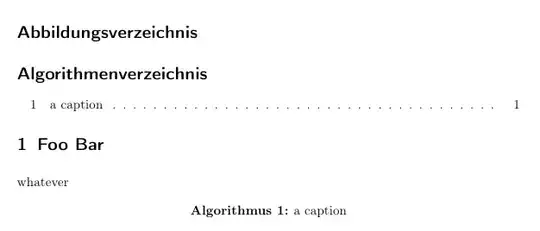
I believe the most natural way with KOMA-Script would be to declare a new float via \DeclareNewTOC the same way I used in my answer to New figure environment. Note that you have to add a \caption{} and compile twice to get the list updated the same way as with the default floats {figure} and {table}:

enter image description here

\documentclass{scrartcl}
\usepackage[T1]{fontenc}
\usepackage[utf8]{inputenc}
\usepackage[ngerman]{babel}

\DeclareNewTOC[%
  type=algorithm,%
  types=algorithms,% used in the \listof.. command
  float,% define a floating environment
  floattype=4,% see below
  name=Algorithmus,%
  listname={Algorithmenverzeichnis}%
]{loa}

% About the `floattype' option:
% The numerical float type of the defined floats. Float types with common bits
% cannot be reordered. At the standard classes figures has float type 1 and tables
% has floatype 2. If no float type was given, 16 will be used.

% bold caption labels:
\setkomafont{captionlabel}{\bfseries}

% uncomment if you want the `algorithms' numbered with 1.1 , 1.2, ... :
% \renewcommand\thealgorithm{\thesection.\arabic{algorithm}}

\begin{document}

\listoffigures

\listofalgorithms

\section{Foo Bar}

\begin{algorithm}
 whatever
 \caption{a caption}
\end{algorithm}

\end{document}
cgnieder
  • 66,645