2

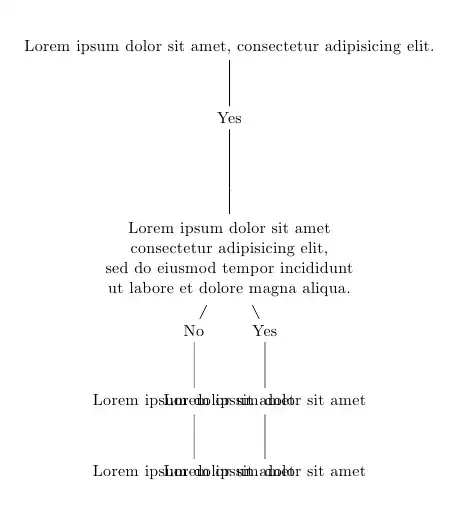
I'm trying to make a decision tree with Tikz, but the text in my nodes overlap. Does anyone know how to fix that? Thanks so much!

\begin{tikzpicture}  
    \node {{Lorem ipsum dolor sit amet, consectetur adipisicing elit.}}  
        child {  
            node {Yes}  
            child {   
            child {  
                    node {\begin{tabular}{c}  
                Lorem ipsum dolor sit amet\\ 
                consectetur adipisicing elit, \\  
                sed do eiusmod tempor incididunt \\  
                ut labore et dolore magna aliqua.  
                \end{tabular}}  
                    child {  
                node {No}  
                child { node {Lorem ipsum dolor sit amet}  
                    child { node {Lorem ipsum dolor sit amet}  
                    }  
                }  
            }  
                    child {  
                node {Yes}  
                child { node {Lorem ipsum dolor sit amet}  
                    child { node {Lorem ipsum dolor sit amet}  
                    }  
                }  
            }  
        }  
            }  
    }  
    ;  
\end{tikzpicture}

Here is a picture of my TeX:
enter image description here

2 Answers2

5

The powerful forest package (manual, ) sets the sibling distance automatically so that nodes do not overlap.

By adding the option for tree={grow=east,anchor=center} to the forest environment (without the usual bracket [ … ]!):

\begin{forest} for tree={grow=east,anchor=center}
   [{Lorem ipsum dolor sit amet, consectetur adipisicing elit.}
      …
   ]
\end{forest}

we’ll get a horizontal layout (the anchor=center is needed for the multi-lined node).

Code

\documentclass[tikz,convert=false]{standalone}
\usepackage{forest}
\begin{document}
\begin{forest}
[{Lorem ipsum dolor sit amet, consectetur adipisicing elit.}
  [Yes
    [{Lorem ipsum dolor sit amet\\
     consectetur adipisicing elit, \\
     sed do eiusmod tempor incididunt \\
     ut labore et dolore magna aliqua.},align=center
      [No
        [Lorem ipsum dolor sit amet
          [Lorem ipsum dolor sit amet]
        ]
      ]
      [Yes
        [Lorem ipsum dolor sit amet
          [Lorem ipsum dolor sit amet]
        ]
      ]
    ]
  ]
]
\end{forest}
\end{document}

Output (growing north to south)

enter image description here

Output II (growing west to east)

enter image description here

Moriambar
  • 11,466
Qrrbrbirlbel
  • 119,821
2

You can use the text width=<length> and/or align=<value> options to allow automatic text wrapping or manual line change commands; you can so that on a per-node basis:

\node[text width=3cm] {text};

or define a style for a group of nodes, or apply the style for all of the nodes using every node/.style.

Also, there's no need for the tabular environment; you can also use the sibling distance=<length> option if needed:

\documentclass{article}
\usepackage{tikz}

\begin{document}


\begin{tikzpicture}[
every node/.style={text width=3cm,align=center},
level 3/.style={sibling distance=4cm}
]
    \node {{Lorem ipsum dolor sit amet, consectetur adipisicing elit.}}  
        child {  
            node {Yes}  
            child {   
            child {  
                    node[text width=6cm] {  
                Lorem ipsum dolor sit amet\\ 
                consectetur adipisicing elit, \\  
                sed do eiusmod tempor incididunt \\  
                ut labore et dolore magna aliqua.  
                }  
                    child {  
                node {No}  
                child { node {Lorem ipsum dolor sit amet}  
                    child { node {Lorem ipsum dolor sit amet}  
                    }  
                }  
            }  
                    child {  
                node {Yes}  
                child { node {Lorem ipsum dolor sit amet}  
                    child { node {Lorem ipsum dolor sit amet}  
                    }  
                }  
            }  
        }  
            }  
    }  
    ;  
\end{tikzpicture}

\end{document}

enter image description here

Gonzalo Medina
  • 505,128
  • Awesome, that's super helpful! Question: is there a way to set sibling distance for each individual node? Right now, if I do multiple branches, one of them still overlaps: http://i.imgur.com/MzolYs4.jpg – Photosynthesis May 24 '13 at 02:13