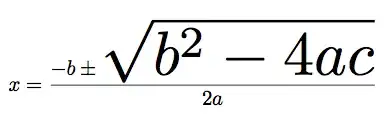
As part of an image that I am generating I need the ability to shrink or grow part of a math expression by a numerically controlled/arbitrary amount. Can anyone think of a way to do this? For example I would like to shrink or grow the radical and everything in it, but leave the rest of the standard quadratic formula standard size.
Asked
Active
Viewed 213 times
2

1 Answers
1
You might have some luck using the \scalebox command in the graphicx package. In the example below, I have defined a \grow{n}{...} command that scales the given expression by a factor n.
\documentclass{article}
\usepackage{graphicx}

\newcommand\grow[2]{\ensuremath{\scalebox{#1}{$#2$}}}
\begin{document}
\[
x = \frac{-b \pm \grow{3}{\sqrt{b^2 - 4ac}}}{2a}
\]
\end{document}

John Wickerson
- 14,559
-
1
-
-
-
@Werner Hm. But I'd need
\ensuremathif I'd used araiseboxormakebox, no? – John Wickerson May 27 '13 at 16:13 -
@JohnWickerson: It depends. Some people are strictly opposed to
\ensuremath. I've had my own problems with it and therefore base most of my decisions on whether it is really necessary. I mean, what's a couple of$s between friends? ;)\scalebox,\raiseboxand\makeboxinternally switch to text mode via\hboxand text inside math is fine. It's about trying to maintain the current math style which is difficult. Consider\sum_{i=1}in your case. – Werner May 27 '13 at 18:33
scalerelpackage as a possibility – Steven B. Segletes May 28 '13 at 10:32