General points can be computed using the calc library of tikz. An expression of the form
($x!t!y$)
will find the point a fraction t along the line from x to y. Combining this with drawing directives |- and -| for "vertical then horizontal" and vice versa gives:

\documentclass{article}

\usepackage{tikz}
\usetikzlibrary{calc}

\begin{document}

\begin{tikzpicture}
  \node[rectangle,fill=blue!30,draw] (A) at (6,4) {Node 1};
  \node[rectangle,fill=blue!30,draw] (B) at (0,0) {Node 2};
  \draw[dashed,->] (A.south) |- ($(A)!.7!(B)$) -| (B.north);
\end{tikzpicture}

\end{document}
There are different ways to change the arrow. Firstly, just writing
\draw[dashed,->,>=stealth]
will give another shape. Loading the tikz library arrows gives plenty to choose between. Making the line thicker will also make the arrow more prominent, e.g. the combination
\draw[dashed,->,>=stealth,very thick]

Note that you could start your picture with \begin{tikzpicture}[>=stealth,very thick] to make all arrowheads of stealth type, and all lines very thick.
For more control over the arrow, you can use the decorations mechanism. In your case this could look like:
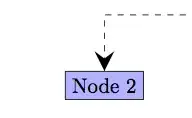
from the following code
\documentclass{article}

\usepackage{tikz}
\usetikzlibrary{calc,arrows,decorations.markings}

\begin{document}

\begin{tikzpicture}[>=stealth,decoration={markings,mark=at position 1 with
  {\arrow[scale=3]{>}}}]
  \node[rectangle,fill=blue!30,draw] (A) at (6,4) {Node 1};
  \node[rectangle,fill=blue!30,draw] (B) at (0,0) {Node 2};
  \draw[dashed,postaction={decorate}]
  (A.south) |- ($(A)!.7!(B)$) -| (B.north);
\end{tikzpicture}

\end{document}
See the pgf manual for further details and constructions. Another illustration of arrow tips via decorations may be found at TikZ: Large arrow tips at the end of smooth curves.


pathortholibrary that's demonstrated in Vertical and horizontal lines in pgf-tikz that does exactly this kind of thing. – Jake Jun 02 '13 at 13:10