2

I used the 3d TikZ library to draw a circle in the z-y plane around a line along the x axis. But since the circle is drawn on top of the line, it does not look like the line passes through the circle.

How can I fix this? The solution that comes to mind is to draw two semicircles or two line segment, but that would get messy with complex shapes. Is there a more general solution or a better package to achieve this?
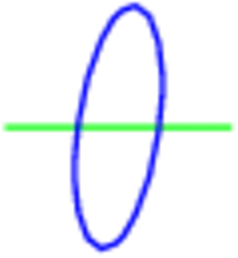
enter image description here

\documentclass{minimal}
\usepackage{tikz}
\usetikzlibrary{3d}
\begin{document}
\begin{tikzpicture}
    \begin{scope}[canvas is xy plane at z=0]
        \draw[color=green,very thick] (0,0) -- (2,0);
    \end{scope}
    \begin{scope}[canvas is zy plane at x=1]
        \draw[color=blue,very thick] (0,0) circle (1);
    \end{scope}
\end{tikzpicture}
\end{document}
Tim N
  • 10,219
  • 13
  • 63
  • 88

1 Answers1

1

This what you are looking for:

\documentclass[convert = false]{standalone}
\usepackage{tikz, tikz-3dplot}
\usetikzlibrary{3d}
\usetikzlibrary{arrows, decorations.markings, intersections, backgrounds}
\begin{document}
\tdplotsetmaincoords{60}{130}
\begin{tikzpicture}
  \begin{scope}[canvas is xy plane at z=0]
    \path[color=green,very thick, name path global = line]
    (0,0) coordinate (O) -- (2,0) coordinate (E);
  \end{scope}
  \begin{scope}[canvas is zy plane at x=1]
    \draw[color=blue, name path global = circ] (0,0) circle (1);
  \end{scope}
  \path[name intersections = {of = line and circ}];
  \begin{scope}[on background layer]
    \draw (O) -- ($(intersection-2)$) coordinate (P1);
  \end{scope}
  \draw ($(intersection-2)-(.015,0)$) -- (E);
\end{tikzpicture}
\end{document}

enter image description here

dustin
  • 18,617
  • 23
  • 99
  • 204