9

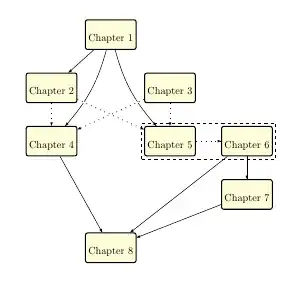
Please look at the complex chapter dependency diagram EXAMPLE in the given image. It explains how each chapter is dependent on the previous one. I am sure diagrams of this type can be done (hard coded, I would say) in Tikz. I DON'T NEED THE HELP TO IMPLEMENT IT IN TIKZ. I was looking for more of a package kind of out-of-the-box solution, where you can mention the dependencies and the package will automatically generate the diagram for you. Is there any solution as such. I searched in TeX.SX for similar questions and found that in all cases, TikZ is the recommended option. This feature or package if implemented will be useful for people like me as we are required to include a chapter reading order or dependency diagram.

enter image description here

UPDATE: The ideal solution for the above diagram should be something like

\chapter{Chapter 1}
bla bla bla

\chapter{Chapter 2}
\RequiredDependency{chapter1_label}

\chapter{Chapter 3}

\chapter{Chapter 4}
\RequiredDependency{chapter1_label}
\RecommendedDependency{chapter2_label,chapter3_label}

and so on. Once I do this, the above diagram should be generated.

dineshdileep
  • 1,429

2 Answers2

10

prerex package is intended to draw prerequisite charts like these ones It's based on TikZ and its README file starts with:

prerex, version 6.5.3: Macros for prerequisite charts, with associated editor and viewer applications.

This package consists of

prerex.sty: a LaTeX package for producing charts of course nodes linked by arrows representing pre- and co-requisites,

prerex: an interactive program for creating and editing chart descriptions, and

vprerex: ("visual prerex") a GUI and previewer for prerex.

I've never used before, but (without using its interactive program) I wrote next code to produce something similar to your example.

\documentclass{article}
\usepackage{geometry}
\geometry{noheadfoot, vmargin=1.0in, hmargin=0.5in}
\usepackage{prerex}
\usetikzlibrary{fit}


\begin{document}
\thispagestyle{empty}
\setcounter{diagheight}{50}


\begin{chart}%\grid
\reqhalfcourse 45,45:{}{Chapter 1}{}
\reqhalfcourse 35,36:{}{Chapter 2}{}
\reqhalfcourse 55,36:{}{Chapter 3}{}
\reqhalfcourse 35,27:{}{Chapter 4}{}
\reqhalfcourse 55,27:{}{Chapter 5}{}
\reqhalfcourse 68,27:{}{Chapter 6}{}
\reqhalfcourse 68,18:{}{Chapter 7}{}
\reqhalfcourse 45,9:{}{Chapter 8}{}

\prereq 45,45,35,36:
\prereq 68,27,68,18:

\prereqc 45,45,35,27;-30:
\prereqc 45,45,55,27;-30:
\prereqc 35,27,45,9;0:
\prereqc 68,18,45,9;0:
\prereqc 68,27,45,9;0:

\coreq 55,27,68,27:
\coreq 35,36,35,27: 
\coreq 35,36,55,27: 
\coreq 55,36,55,27: 
\coreq 55,36,35,27: 

\begin{pgfonlayer}{courses}
\draw[dashed] ([shift={(-1mm,-1mm)}]x55y27.south west) rectangle ([shift={(1mm,1mm)}]x68y27.north east);
\end{pgfonlayer}
\end{chart}

\end{document}

enter image description here

Ignasi
  • 136,588
  • How to change the color inside the boxes from yellow to something else? – MrPajeet Aug 03 '22 at 10:44
  • @MrPajeet According to the manual all command have a version without default color. As exaemple: \reqhalfcoursec 45,45:{}{Chapter 1}{}{red} where the last argument is the background color. – Ignasi Aug 04 '22 at 09:53
  • It didn't work, this did though: https://tex.stackexchange.com/a/652910/87628 – MrPajeet Aug 05 '22 at 16:19
9

The CVS version of TikZ contains a graph drawing library that automatically lays out the components of a graph.

Here's what it comes up with automatically:

\tikz \graph [layered layout]
{
C1 -> {C2, C4, C5},
C2 ->[densely dashed] {C4, C5},
C3 ->[densely dashed] {C4, C5},
C5 -> {C7, C8},
C4 -> C8,
C7 -> C8
};

So you'll have to do quite a bit of nudging to get it to look decent. I think this is a case where a manual approach works better: the network isn't really complicated enough to make an automated approach necessary, and it's much easier to get something pleasing to human eyes if the layout is done by a human.

\documentclass[border=5mm]{standalone}


\usepackage{tikz}
\usetikzlibrary{graphs, graphdrawing}
\usegdlibrary{layered}


\begin{document}

\tikz \graph [layered layout]
{
C1 -> {C2, C4, C5},
C2 ->[densely dashed] {C4, C5},
C3 ->[densely dashed] {C4, C5},
C5 -> {C7, C8},
C4 -> C8,
C7 -> C8
};

\end{document}
Jake
  • 232,450