I changed to using 2 columns, and many equations do not fit any more. I heard about breqn package, so I am trying to see if it will help.
Using breqn package on auto-generated code, which compiles OK with \begin{align*} and \end{align*}
I am getting an error which I do not understand. MWE is below. Please note the line of code here is auto-generated. So I kept it as is. There was other lines, but kept the one giving the error
This works:
\documentclass{article}
\usepackage{amsmath}
\usepackage{amsfonts}
\usepackage{amssymb}
\begin{document}
\begin{align*}
q^{\prime}(t) &= \operatorname{Re}\left(  \overset{\hat{B}}{\overbrace{\left(  \omega_{n}q_{0}e^{i\frac{\pi}{2}}+q_{0}^{\prime}\right)  }}e^{i\omega_{n}t}\right)
\end{align*}
\end{document}
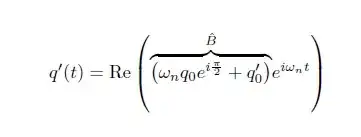
While this gives the error. I used dmath and removed the &, that is all.
\documentclass{article}
\usepackage{amsmath}
\usepackage{amsfonts}
\usepackage{amssymb}
\usepackage{breqn}
\begin{document}

\begin{dmath}
q^{\prime}(t) = \operatorname{Re}\left(  \overset{\hat{B}}{\overbrace{\left(  \omega_{n}q_{0}e^{i\frac{\pi}{2}}+q_{0}^{\prime}\right)  }}e^{i\omega_{n}t}\right)

\end{dmath}
\end{document}
error
(/usr/share/texlive/texmf-dist/tex/latex/amsfonts/umsb.fd)
! Double subscript.
<recently read> \mathsub

l.9 ...^{i\frac{\pi}{2}}+q_{0}^{\prime}\right)  }}
                                                  e^{i\omega_{n}t}\right)
?
question: What do I need to fix the above so I can use breqn? Using Tex Live 2012 debian package on Linux mint.


\overset{<top>}{\overbrace{..}}is causing a problem. The correct way to use it would be\overbrace{..}^{<top>}. Another problem is the empty/blank line which is prohibited (it doesn't appear in the firstalignexample). – Werner Jun 15 '13 at 05:45