5

I've bought the legacy sans and serif font package and I've inserted it into my TeX/LaTeX distribution, through pltotf, vptovf an similar utilities.

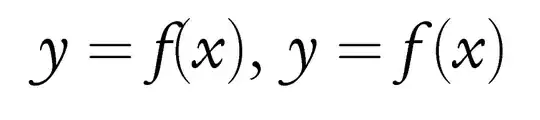
Then I've created a package that allows me to use that fonts in math mode, as I've shown. However, I need to increase the stretch of some glyph boxes, for example the "f"-italic one, as shown in the picture below

stretch of "f" glyph

To get the second output, actually I need to add manually the \, instruction. So, how can I create the OML font encoding of legacy font, in order to adjust the skip between math glyphs?

In addition, is this the right way to get the results I mean? I must say that I wont create a command like \def\f{f\,}, because in my opinion it is a trivial resolution

Martino
  • 1,400
  • TeX adds the italic correction after a "math italic" letter (if nonzero). – egreg Jun 18 '13 at 10:45
  • But I must insert the font as OT1, because it is the only encoding I have, and this encoding does not allow to add the italic correction, instead of OML – Martino Jun 18 '13 at 10:49
  • What's the italic correction for f in the font? – egreg Jun 18 '13 at 10:55
  • I mean that in cmmi the width of some glyphs are wider than the same glyphs in cmri – Martino Jun 18 '13 at 11:47
  • @egreg the interword space \fontdimen2 must be zero for TeX to automatically insert the italic correction. –  Jun 18 '13 at 12:24
  • @jfbu Yes, of course; that's why a special font is used, with the interword space set to zero. This is not encoding dependent, but font dependent. Making a virtual font out of the given is quite easy (but tedious). – egreg Jun 18 '13 at 12:25
  • @egreg well, the OP seems to use a font where the interword space is not zero; so he does not get the italic correction you seemed to be asking for. –  Jun 18 '13 at 12:26
  • @egreg it is possible to set manually \fontdimen2 but if I recall correctly the assignment is global. So it is a bit complicated if the font is to be used both for text and math, as there is no hook in TeX for when exiting from math mode (which we would use to restore this font parameter). –  Jun 18 '13 at 12:32
  • @jfbu The problem is exactly that assignments to \fontdimen are global; it's easier to create a copy of the font and assign \fontdimen2=0pt to the copy. – egreg Jun 18 '13 at 12:34
  • @egreg: Yes, agreed. –  Jun 18 '13 at 12:36
  • Anyway, I don't understand what I must do. What do you mean to create a copy of the font? How can it works only in math mode? – Martino Jun 18 '13 at 12:43

1 Answers1

6

It's my first time with the tools I will describe below, but let me explain what I just tried (I am sure at least one crucial step is likely to be wrong and will have to be corrected.)

[edited below to make such a presumably necessary addition to the steps]

[of course in the .tex source below, this is just for testing, and I brutally reassigned the letters symbol font without caring at all for the Greek alphabet; naturally, some additional steps are missing here to separate the Greek letters from the Latin letters, and only re-assign the Latin letters to use the Times Italic font in the T1 encoding]

  1. I created a temporary directory
  2. I then did tftopl ptmri8r.tfm ptmmi8r.pl. In this way I obtained a human-readable form of the font metrics for the Times font, from psnfss.
  3. In my text editor I opened ptmmi8r.pl and then replaced (SPACE R 0.25) with (SPACE R 0.0).

Near the top of the file ptmmi8r.pl created in step 2 there is:

(FONTDIMEN
   (SLANT R 0.277)
   (SPACE R 0.25)   <-- this is the 0.25 which I replace with 0.0
   (STRETCH R 0.15)
   (SHRINK R 0.0599985)
   (XHEIGHT R 0.440991)
   (QUAD R 1.0)
   (EXTRASPACE R 0.0599985)
   )

continued (sorry I don't know how to resume enumeration with 4, 5, 6...):

  1. I saved the file and then did pltotf ptmmi8r.pl ptmmi8r.tfm. I now have this file ptmmi8r.tfm in my working directory.

  2. I created a file ptmm.map with the single line: ptmmi8r NimbusRomNo9L-ReguItal "TeXBase1Encoding ReEncodeFont" <8r.enc <utmri8a.pfb This required a bit of research as I had to dig out the pdftex.map file from my installation to just copy the line with ptmri8r to the one above.

  3. I then created the following test file, to be compiled with pdftex. And it works.

However: there seems to be a checksum in the tfm file, and I don't know if modifying the font dimension 2 parameter needs an update in the checksum.

However two: it seems that the standard psnfss use of the Times font is via a virtual font ptmri8t and there must be excellent reasons for it. I tried doing the same steps as above but with the vftovp and vptovf tools, but somehow never managed to understand what to do exactly.

Update: ok, so perhaps I now understand some additional steps necessary to get correctly the files for T1 encoding. Additionally to the above, I have done:

  1. vftovp ptmri8t.vf ptmri8t.tfm ptmmi8t.vpl
  2. I have edited the produced ptmmi8t.vpl in two places: first the fontdimen 2, and then a bit further down the FONTNAME entry: I changed it into (FONTNAME ptmmi8r)
  3. after these two edits, I did vptovf ptmmi8t.vpl ptmmi8t.vf ptmmi8t.tfm
  4. then \DeclareFontShape {T1}{ptmm}{m}{it} uses ptmmi8t and not ptmmi8r.

end of update

Again, my only knowledge in this area dates back to thirty minutes ago, from reading page 9 of the font installation guide, then typing man tftopl and man pltotf. I hope the font experts will come to correct my steps: the only goal was to get a copy of an existing font with its interword space set to zero, so that TeX would automatically insert italic corrections in math mode.

\documentclass{article}
\usepackage[T1]{fontenc}
\usepackage[utf8]{inputenc}

% for pdf output only
\pdfmapfile{+ptmm.map}
% ptmmi8r NimbusRomNo9L-ReguItal "TeXBase1Encoding ReEncodeFont" <8r.enc <utmri8a.pfb

\DeclareFontFamily{T1}{ptmm}{}

% earlier versions had ptmmi8r, but certainly this was wrong

% now that files ptmmi8t.vf and ptmmi8t.tfm have also been prepared
% (see update above)
% additionally to ptmmi8r.tfm, the following presumably should be done:

% (does not matter for the Latin letters in math, but I guess does matter 
% for accented letters or other symbols in text, with `\usefont{t1}{ptmm}{m}{it}`

\DeclareFontShape{T1}{ptmm}{m}{it}{
   <-> ptmmi8t
}{}

\SetSymbolFont{letters}{normal}{T1}{ptmm}{m}{it}

\DeclareMathVersion {standardinterword}
\SetSymbolFont {letters}{standardinterword}{T1}{ptm}{m}{it}

\usepackage{times}

\begin{document}\thispagestyle{empty}

$f(x)$

% with the edit done for correctly generating also files for T1,
% we can compare the original with the font without interword space: 

{\usefont{T1}{ptmm}{m}{it} àé ù}

{\usefont{T1}{ptm}{m}{it} àé ù}

$abcdefghijklmnopqrstuvwxyz$

\textit{abcdefghijklmnopqrstuvwxyz}

\mathversion{standardinterword}

$abcdefghijklmnopqrstuvwxyz$

\mathversion{normal}
$abcdefghijklmnopqrstuvwxyz$

\end{document} 

times with italic corrections in math

with diacritics and with and without interword space

  • what do you mean with "from psnfss"? – Martino Jun 18 '13 at 17:07
  • is there also a ileki8r.vf file? –  Jun 18 '13 at 17:11
  • I mean from the files considered as required part of any LaTeX distribution and dealing with the Times, Helvetica, etc..., fonts. –  Jun 18 '13 at 17:12
  • Ok. In addition, yes: I've also ileki8r.vf. Following the instructions you suggest, my TeX distribution does not recognize ilem font family. – Martino Jun 18 '13 at 17:26
  • Well if there is also a .vf file, then maybe you could try vftovp ileki8r.vf ileki8r.tfm tobeedited.vpl and then edit the tobeedited.vpl file, rename it, and do then vptovf renamed.vpl renamed.vf renamed.tfm. However I am at my wits ends here and you are going to need support by someone knowledgeable from then on... –  Jun 18 '13 at 17:32
  • You may mean ileki8t.vf or ileki8t.vf. Anyway, the instruction does not work because of a mismatch. In addition, my shell shows that Character 0 does not exists! – Martino Jun 18 '13 at 17:49
  • yes maybe I meant ileki8t.vf. Not being an owner of Legacy Sans I can't test further. –  Jun 18 '13 at 18:59
  • I've followed all steps above, but I can't see any results: I use dvips and ps2pdf utilities, so I must insert the line p+ ilem.map into config.ps. Moreover, I obtained *.vf files, but they seem not work (in fact the italic glyphs don't produce the correction I mean) – Martino Jun 19 '13 at 10:02
  • Hi Lorenzo. It is a long time since I last looked at config.ps. To activate a new map file I would rather add a line to a suitable updmap.cfg and then do updmap (details vary as I am sometimes on TL2010 and at other times on a TL2012; on the latter I own the texmf-local tree and do updmap-sys (not as root)). Have you tested with pdflatex? (using \pdfmapfile as above, and all font files in the same repertory as the tex source of the document) –  Jun 19 '13 at 12:59
  • Not yet: I think that it's the same if I create t1ilem.fd file with your instruction above, and then use \SetSymbolFont{letters}{normal}{T1}{ilem}{m}{it} in my documents. Anyway, I can actually use ilemi# font but it has not its italic correction. – Martino Jun 19 '13 at 13:43
  • you can use \/ to force the use of the italic correction, perhaps you could check this way if the font file actually does provide one? –  Jun 19 '13 at 13:48
  • \/ does not work in math mode with legacy font. Maybe I've to create also ilemi8c.vf and ilemi7t.vf, in order to obtain all encodings of the font. I will retry all instructions, and then post what I will get – Martino Jun 19 '13 at 13:55
  • I cannot definitely get the glyph skip I need. I've tried this creating also ilemi7t.tfm and ilemi8c.tfm files, but it does not work. – Martino Jun 19 '13 at 16:40