Here's a possibility using TikZ (an advantage is the easy integration with beamer overlay specification):
\documentclass{beamer}
\usepackage{tikz}

\begin{document}

\begin{frame}
\begin{tikzpicture}
\node[anchor=south west,inner sep=0] (image)
  at (0,0)
  {\includegraphics[width=\textwidth,height=6cm]{example-image-a}};
\begin{scope}[x={(image.south east)},y={(image.north west)}]
\node<2-> at  (0.78,0.75) {%
  \begin{tabular}{@{}ll@{}}
  RMSE & 0.059m \\
  NSE & 0.798
  \end{tabular}%
};
\node<3-> at  (0.78,0.20) {%
  \begin{tabular}{@{}ll@{}}
  RMSE & 0.042m \\
  NSE & 0.298
  \end{tabular}%
};
\end{scope}
\end{tikzpicture}
\end{frame}

\end{document}

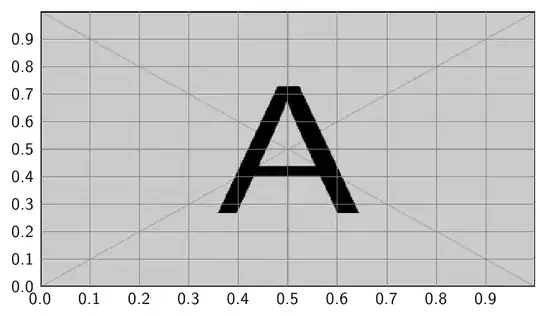
The other advantage of this approach is that the coordinates for placement are relative to the image: (0,0) represents the bottom left corner, and (1,1) is the top right corner. A grid can also easily be placed for additional visual help:
\documentclass{beamer}
\usepackage{tikz}

\newcommand\MyGrid{%
\draw[help lines,xstep=.1,ystep=.1] (0,0) grid (1,1);
\foreach \x in {0,1,...,9} { \node [anchor=north] at (\x/10,0) {0.\x}; }
\foreach \y in {0,1,...,9} { \node [anchor=east] at (0,\y/10) {0.\y}; }
}

\begin{document}

\begin{frame}
\begin{tikzpicture}
\node[anchor=south west,inner sep=0] (image)
  at (0,0)
  {\includegraphics[width=\textwidth,height=6cm]{example-image-a}};
\begin{scope}[x={(image.south east)},y={(image.north west)}]
\MyGrid
\end{scope}
\end{tikzpicture}
\end{frame}

\end{document}
This is an adaptation of the method described in Drawing on an image with TikZ.


