I would like to convert the fist letter of each word in all my section headings to capitals automatically. Is it possible?
ie
\section{This is my first section}
Section 1. This Is My First Section
I would like to convert the fist letter of each word in all my section headings to capitals automatically. Is it possible?
ie
\section{This is my first section}
Section 1. This Is My First Section

I'm not sure if there are any problems with this approach to making the titlecaps automatic for all sections, but it works for the example given. Check the titlecaps documentation for quirks on how to handle different kinds of non-standard text in its argument.
Note how it is able to handle an "exluded words" list, font styles, fontsize changes, as well as diacritics and national symbols like \ae.
\documentclass{article}
\usepackage{titlecaps}
\let\svsection\section
\def\section#1{\svsection{\titlecap{#1}}}
\begin{document}
\section{This is my first section}

Tah dah  But if you didn't like ``my,'' ``for,'' or ``an'' capitalized, except as the first word:

\Addlcwords{my for an}

\section{for an \ae ncore, my \textit{section} for \small \c consideration}

done.
\end{document}
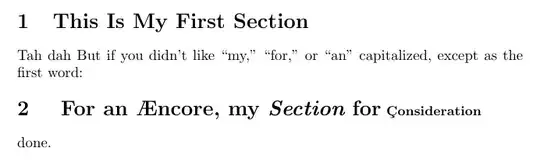
UPDATE: I did find that the section redefinition above will break \tableofcontents unless care is taken. If that is a necessary ingredient of your work, then this approach below will work. Renewing the \def of \section must occur after the \tableofcontents. Also, the \Addlcwords must occur before the \tableofcontents. Furthermore, fontsize changes in a section heading will also break the \tableofcontents, so I have removed them from this example.
EDITED to handle optional arguments in \section, as shown in section 3 below.
\documentclass{article}
\usepackage{titlecaps}
\let\svsection\section
\Addlcwords{is for an of}
\begin{document}
\tableofcontents

\renewcommand\section[2][\relax]{%
  \ifx\relax#1%
    \svsection{\titlecap{#2}}%
  \else%
    \svsection[\titlecap{#1}]{\titlecap{#2}}%
  \fi%
}
\section{This is my first section}

Tah dah  But if you didn't like ``my,'' ``for,'' or ``an'' capitalized, except as the first word:


\section{for an \ae ncore, my \textit{section} for \c consideration}

\section[table of contents title]{document title}

done.

\end{document}


\titlecap for all my section headings. That is to say I have written my entire document but fancy making the first letters of my sections capitalised retrospectively.
– HCAI
Jun 23 '13 at 20:59
\xspace inside a section headers will result a compilation failures.
– Jack Miller
May 21 '15 at 09:02
\chapter{long} and \chapter[short]{long}? How to renew both commands?
– Jack Miller
May 21 '15 at 10:07
\section, since article has no \chapter) to show how optional arguments can be handled.
– Steven B. Segletes
May 21 '15 at 10:22
\let\svchapter\chapter, then \renewcommand{\chapter}[2][\relax]{ \ifx\relax#1 \svchapter{\titlecap{#2}} \else \svchapter[\titlecap{#1}]{\titlecap{#2}} \fi }
– Jack Miller
May 21 '15 at 10:31
Here another working example just like Steven's. This one includes \chapter as well. Includes a workaround for problems when creating PDF bookmark and another workaround for problems when creating the bibliography (the comments below).
\documentclass{book}
\usepackage{titlecaps}
\usepackage[bookmarks]{hyperref}
\let\svchapter\chapter
\let\svsection\section
\let\svsubsection\subsection
\let\svsubsubsection\subsubsection
\Addlcwords{is for an of}
\begin{document}
    \tableofcontents

    \chapter{First chapter}

    %CAPS FOR CHAPTER HEADERS
    \renewcommand{\chapter}[2][\relax]{%
        \ifx\relax#1%
        %\texorpdfstring FIXES LATEX WARNING. PROBLEM: PDF BOOKMARKS ARE NOT CAPITALIZED
        \svchapter{\texorpdfstring{\titlecap{#2}}{#2}}%
        \else%
        \svchapter[\texorpdfstring{\titlecap{#1}}{#1}]{\texorpdfstring{\titlecap{#2}}{#2}}%
        \fi%
    }

    %CAPS FOR SECTION HEADERS
    \renewcommand{\section}[2][\relax]{%
        \ifx\relax#1%
        \svsection{\texorpdfstring{\titlecap{#2}}{#2}}%
        \else%
        \svsection[\texorpdfstring{\titlecap{#1}}{#1}]{\texorpdfstring{\titlecap{#2}}{#2}}%
        \fi%
    }
    \renewcommand{\subsection}[2][\relax]{%
        \ifx\relax#1%
        \svsubsection{\texorpdfstring{\titlecap{#2}}{#2}}%
        \else%
        \svsubsection[\texorpdfstring{\titlecap{#1}}{#1}]{\texorpdfstring{\titlecap{#2}}{#2}}%
        \fi%
    }
    \renewcommand{\subsubsection}[2][\relax]{%
        \ifx\relax#1%
        \svsubsubsection{\texorpdfstring{\titlecap{#2}}{#2}}%
        \else%
        \svsubsubsection[\texorpdfstring{\titlecap{#1}}{#1}]{\texorpdfstring{\titlecap{#2}}{#2}}%
        \fi%
    }

    \section{This is my first section}

    Cite: \cite{lamport94}


    \section{for an \ae ncore, my \textit{section} for \c consideration}

    \subsection[table of contents title]{document title}

    done.

    %RE-SET CHAPTER COMMAND. OTHERWISE BIBLIOGRAPHY WILL BREAK.
    \renewcommand{\chapter}{\svchapter}

    \begin{thebibliography}{9}

        \bibitem{lamport94}
        Leslie Lamport,
        \emph{\LaTeX: a document preparation system},
        Addison Wesley, Massachusetts,
        2nd edition,
        1994.

    \end{thebibliography}

\end{document}

Another alternative should you wish to have unnumbered (starred) sections as part of the document, you can use the following
\usepackage{titlecaps}

\let\svsection\section
\DeclareDocumentCommand\section{ s m }{% s = star, m = mandatory arg
   \IfBooleanTF{#1}{%
      \svsection*{\titlecap{#2}}
   }{%
     \svsection{\titlecap{#2}}
   }%
}
Note: If you are doing it on all levels you need to start with subsubsection and work towards the section. Going the other way seems to give me errors.
