I want to put my problem description the way it is done in the image i.e. centred, justified and with a little margin on both sides. I am able to do the rest of math correctly

I want to put my problem description the way it is done in the image i.e. centred, justified and with a little margin on both sides. I am able to do the rest of math correctly
All you have to do is to put the text "Given a topic ... being redundant." in a quote environment:
\begin{quote}
  \itshape
  Given a topic ..... being redundant.
\end{quote}

KOMA-Script has an {addmargin} environment taking a mandatory argument to set both margins and an optional argument to define the different margins.
\documentclass{scrartcl}

\usepackage{lipsum}

\begin{document}
\lipsum[1]
\begin{addmargin}{2em}
   \lipsum[2]
\end{addmargin}
\lipsum[1]
\end{document}

But I recommend to define a now environment in terms of logical markup (your text seems not to be a quote …). With such a defined environment later changes are easy and can be made consistently.
\documentclass{scrartcl}

\usepackage{lipsum}

\newenvironment{definition}{%
    \addvspace{\baselineskip}%
    \begin{addmargin}{3em}%
        \itshape\noindent
}{%
    \end{addmargin}%
    \vspace{\baselineskip}%
}

\begin{document}
\lipsum[1]
\begin{definition}
   \lipsum[2]
\end{definition}
\lipsum[1]
\end{document}

Furthermore there are some packages offering a better interface to define theroem like environments …

Just for the record since I myself use quote for this.
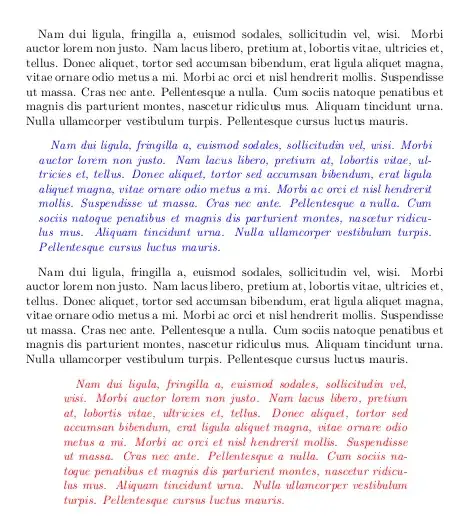
If you want increase the margins just as the paragraph indentation (\parindent) a simple solution without environments is {\narrower .... }. Aside from personal preferences about what markup is more clear, with this method is easy increase the margin x2, x3, etc. times the paragraph indentation, but a \st{disavantage} "feature" of this command is that in tests without any indentation (\setlength{\parindent}{0em}) the "quotes" are just as normal text.
\documentclass{article}
\usepackage{lipsum,xcolor}
\setlength{\parskip}{2ex}
\setlength{\parindent}{1em}
\begin{document}
\lipsum[2] % normal margin
{\em\color{blue}\narrower \lipsum[2]} % margin + parindent (+1em)
\lipsum[2] % normal margin
{\narrower\narrower\narrower\em\color{red} \lipsum[2]}% (+ 6em)
\lipsum[2] % normal margin
\end{document}

\narrower, which is a foreign command to LaTeX (and can give unexpected results), I would suggest the quoting package that allows for easy customizations.
– egreg
Jul 01 '13 at 10:26


quotingpackage can be used. – egreg Jul 01 '13 at 11:34