Is there a way to prevent "boldification" of the glossary entry names and symbols in the Glossary chapter?
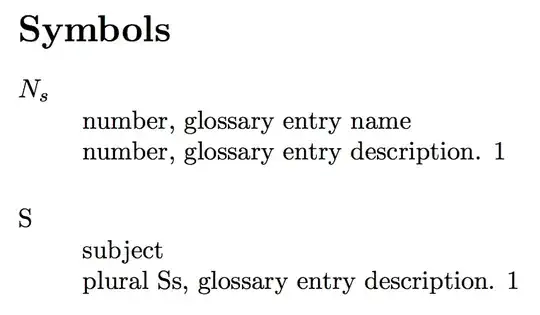
I have managed to produce newglossarystyle similar to altlist based on list that includes the symbol property in the glossaryentryfield.
However, some of my entries have symbol and name formatted in plain text (e.g. "Ss") but other entries include math (e.g. "\ensuremath{N_s}").
In the main text the above are nicely displayed, however the in the Glossary chapter plain text entries are getting bold, but math aren't. This looks inconsistent and ugly.
Is there a way to prevent this "boldification" of the glossary entry names and symbols in the Glossary chapter?
\makeatletter
\newglossarystyle{altlistSymbol}{%
    \glossarystyle{list}%
    \renewcommand*{\glossaryentryfield}[5]{%
        \item[\glsentryitem{##1}\glstarget{##1}{##4}]%
        \mbox{}\newline%\mbox{}\par\nobreak\@afterheading%
        {##2}%
        \mbox{}\newline%\mbox{}\par\nobreak\@afterheading%
        {##3}\glspostdescription\space {##5}}%
    \renewcommand{\glossarysubentryfield}[6]{%
        \par
        \glssubentryitem{##2}%
        \glstarget{##2}{\strut}##4\glspostdescription\space {##6}}%
}
\makeatother
Moving the \glstarget{##1}{##4} outside the item[...] seems to be a dirty trick and it changes the left-positioning of the text.
\item[\glsentryitem{##1}]\glstarget{##1}{##4}%
Also, changing all of may entries to mathmode is unfeasible.
MWE:
% arara: xelatex
% arara: makeglossaries
% arara: xelatex
% arara: makeglossaries
% arara: xelatex
% arara: xelatex

\documentclass[a4paper,10pt]{article}
\usepackage{glossaries}
\newglossary[slg]{symbols}{sym}{sbl}{Symbols}
\makeglossaries

\newglossaryentry{number}{
type            = {symbols},
name            = {number, glossary entry name},
symbol          = {\ensuremath{N_s}},
sort            = {n},
description     = {number, glossary entry description}
}

\newglossaryentry{subject}{
type            = {symbols},
name            = {subject},
plural          = {subjects},
symbol          = {S},
symbolplural    = {Ss},
sort            = {s},
description     = {plural \glsentrysymbolplural{subject}, glossary entry description}
}

\makeatletter
\newglossarystyle{altlistSymbol}{%
    \glossarystyle{list}%
    \renewcommand*{\glossaryentryfield}[5]{%
        \item[\glsentryitem{##1}\glstarget{##1}{##4}]%
        \mbox{}\newline%\mbox{}\par\nobreak\@afterheading%
        {##2}%
        \mbox{}\newline%\mbox{}\par\nobreak\@afterheading%
        {##3}\glspostdescription\space {##5}}%
    \renewcommand{\glossarysubentryfield}[6]{%
        \par
        \glssubentryitem{##2}%
        \glstarget{##2}{\strut}##4\glspostdescription\space {##6}}%
}
\makeatother

\begin{document}
\null
\glsaddall

\printglossary[type=symbols,style=altlistSymbol]

\end{document}


{description}list so you could try and add a redefinition of\descriptionlabelto the definition of the glossary style:\renewcommand*\descriptionlabel[1]{\hspace\labelsep\normalfont#1}(this is the standard definition but without\bfseries) – cgnieder Jul 01 '13 at 09:37\glsnamefontas described in the glossaries FAQ – Nicola Talbot Jul 01 '13 at 14:14nameonly and if a symbol is contained in theitemas in my example (glstarget{##1}{##4}), then unfortunately it will still be in boldSo far I have found using: \renewcommand\descriptionlabel[1]{\hspace\labelsep\normalfont #1} \printglossaries \renewcommand\descriptionlabel[1]{\hspace\labelsep\normalfont\bfseries #1}
(as proposed by @cgnieder) working quite fine.
But, the hint with
– NeuroTeX Jul 01 '13 at 19:00\glsnamefontis still very useful, handy, insightful and "general understanding broadening"