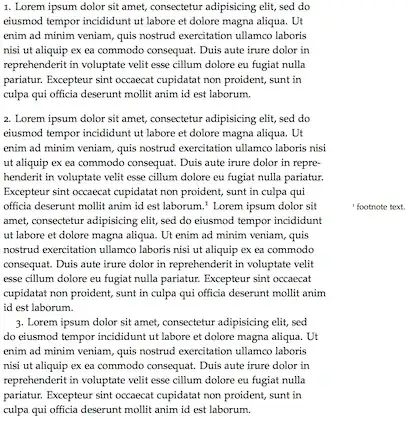
In the example below, paragraphs 1 and 2 are not indented and are separated by some vertical space, as requested by \parindent=0pt\parskip=10pt. However, paragraph 3 reverts to the default (some parindent, no parskip).
If I enclose \footnote(...} in a group as in {\footnote(...}}, then all is well.
Is this a bug in tufte-handout.cls? It works as expected in article.cls.
\documentclass{tufte-handout}
\def\SOMETEXT{ Lorem ipsum dolor sit amet, consectetur adipisicing elit, sed do eiusmod tempor incididunt ut labore et dolore magna aliqua. Ut enim ad minim veniam, quis nostrud exercitation ullamco laboris nisi ut aliquip ex ea commodo consequat. Duis aute irure dolor in reprehenderit in voluptate velit esse cillum dolore eu fugiat nulla pariatur. Excepteur sint occaecat cupidatat non proident, sunt in culpa qui officia deserunt mollit anim id est laborum.}
\begin{document}
\parindent=0pt\parskip=10pt

1.\SOMETEXT

2.\SOMETEXT\footnote{footnote text.}\SOMETEXT

3.\SOMETEXT

\end{document}


\footnoteinside a group because then the parameters are restored. – lhf Jul 03 '13 at 19:09\footnoteresets those parameters. – lhf Jul 03 '13 at 21:36\@tufte@reset@par) and one for margin notes, sidenotes, captions, and so forth (\@tufte@margin@par). Whenever Tufte-LaTeX starts to typeset margin material, it switches to the\@tufte@margin@parparagraph settings. – godbyk Jul 04 '13 at 02:11