12

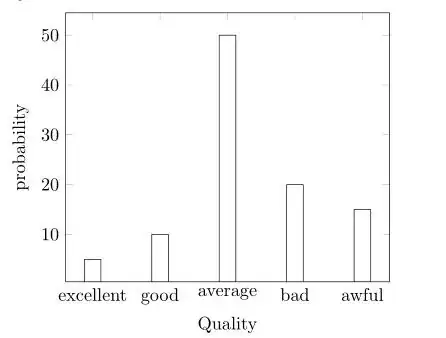
I am a newbie in TeX. And I need to use Tikz to make a copy of this histogram

enter image description here

Of course, I am able to make something similar. Unfortunately, I need a replica (90%) of it. Can anybody help me?

What I have:

\begin{tikzpicture}
\begin{axis}[
    symbolic x coords={excellent, good, average, bad, awful},
        ylabel = {probability},
        xlabel = {Quality},
    xtick=data]
    \addplot[ybar,fill=white] coordinates {
        (excellent,5)
        (good,10)
        (average,50)
    (bad, 20)
    (awful,15)
    };
\end{axis}
\end{tikzpicture}

enter image description here

Torbjørn T.
  • 206,688
Dmitry
  • 229

2 Answers2

29

Perhaps something like this.

\documentclass[11pt]{standalone}
\usepackage[T1]{fontenc}
\usepackage{pgfplots}

\pgfplotsset{
  compat=newest,
  xlabel near ticks,
  ylabel near ticks
}

\begin{document}
  \begin{tikzpicture}[font=\small]
    \begin{axis}[
      ybar,
      bar width=20pt,
      xlabel={Quality},
      ylabel={Probability},
      ymin=0,
      ytick=\empty,
      xtick=data,
      axis x line=bottom,
      axis y line=left,
      enlarge x limits=0.2,
      symbolic x coords={excellent,good,average,bad,awful},
      xticklabel style={anchor=base,yshift=-\baselineskip},
      nodes near coords={\pgfmathprintnumber\pgfplotspointmeta\%}
    ]
      \addplot[fill=white] coordinates {
        (excellent,5)
        (good,10)
        (average,50)
        (bad,20)
        (awful,15)
      };
    \end{axis}
  \end{tikzpicture}
\end{document}

enter image description here

15

Here are a collection of settings that would fix tiny details. You can comment them out to see what they are doing. The arrow heads are from DIN conform arrowheads and hatching in TikZ?

\documentclass{standalone}
\usepackage{pgfplots}
\pgfplotsset{compat=1.8}
\makeatletter
% https://tex.stackexchange.com/questions/52786/din-conform-arrowheads-and-hatching-in-tikz
\pgfarrowsdeclare{DIN}{DIN}
{
  \pgfutil@tempdima=0.5pt%
  \advance\pgfutil@tempdima by.25\pgflinewidth%
  \pgfutil@tempdimb=7.29\pgfutil@tempdima\advance\pgfutil@tempdimb by.5\pgflinewidth%
  \pgfarrowsleftextend{+-\pgfutil@tempdimb}
  \pgfutil@tempdimb=.5\pgfutil@tempdima\advance\pgfutil@tempdimb by1.6\pgflinewidth%
  \pgfarrowsrightextend{+\pgfutil@tempdimb}
}
{
  \pgfutil@tempdima=0.5pt%
  \advance\pgfutil@tempdima by.25\pgflinewidth%
  \pgfsetdash{}{+0pt}
  \pgfsetmiterjoin
  \pgfpathmoveto{\pgfpointadd{\pgfqpoint{0.5\pgfutil@tempdima}{0pt}}{\pgfqpoint{-4mm}{0.5mm}}}
  \pgfpathlineto{\pgfqpoint{0.5\pgfutil@tempdima}{0\pgfutil@tempdima}}
  \pgfpathlineto{\pgfpointadd{\pgfqpoint{0.5\pgfutil@tempdima}{0pt}}{\pgfqpoint{-4mm}{-0.5mm}}}
  \pgfpathclose
  \pgfusepathqfillstroke
}
\pgfarrowsdeclarereversed{DIN reversed}{DIN reversed}{DIN}{DIN}
\makeatother
\begin{document}
\begin{tikzpicture}
\begin{axis}[
    symbolic x coords={excellent, good, average, bad, awful},
        ylabel = {probability},
        xlabel = {Quality},
        ytick=\empty,ymin=0,
        axis x line=bottom,
        axis y line=left,
        enlarge x limits=0.2,
        axis line style={-DIN,ultra thin},
        xtick=data,
        nodes near coords={\pgfmathprintnumber\pgfplotspointmeta\%},
        ylabel near ticks,
        xticklabel style={anchor=base,yshift=-3mm},
        xtick style={draw=none},
        every axis x label/.style={at={(current axis.south east)},anchor=north west}
    ]
    \addplot[ybar,fill=white] coordinates {
        (excellent,5)
        (good,10)
        (average,50)
    (bad, 20)
    (awful,15)
    };
\end{axis}
\end{tikzpicture}
\end{document}

enter image description here

percusse
  • 157,807
  • 7
    @Dmitry The polite way to thank people on TeX.SE is to accept the answer that satisfies you, and vote it up. You can vote up more than one answer if several are helpful. – Ethan Bolker Jul 13 '13 at 13:07
  • @EthanBolker I think it's OK to express joy and appreciation for the help one receives :) – tommy.carstensen Feb 24 '15 at 16:34
  • 3
    @tommy.carstensen Why not joy and enthusiasm AND a check and an upvote? – Ethan Bolker Feb 24 '15 at 19:19
  • @percusse How can I set up the width and height of the whole histogram? – Matthias Jun 02 '15 at 08:06
  • 1
    @Matthias You can use the width and height keys. If you use only one of those keys, the other one is changed according to the aspect ratio of the box. You need to give both of them to change the aspect ratio, – percusse Jun 02 '15 at 08:08
  • @percusse Thx. Is it also possible to give the width in relative to the page wdith or something like this. As one can do it with including Images? I feel uncomfortable to do this in pt.. – Matthias Jun 02 '15 at 08:11
  • 1
    @Matthias Sure you can always use width = .8\textwidth and so on. – percusse Jun 02 '15 at 08:14