11

In OpenOffice and LibreOffice, one can specify the height (depth?) of the column separator rule in a multi-column section. It can be e.g. 50% of the columns’ height. I would like to be able to do the same in LaTeX, with multicol.

I came upon this question about changing the appearance of the column separator. I find this very interesting, but it is not quite what I am looking for. For one thing, I do not yet know enough plain TeX to adequately modify the provided solution for my needs.

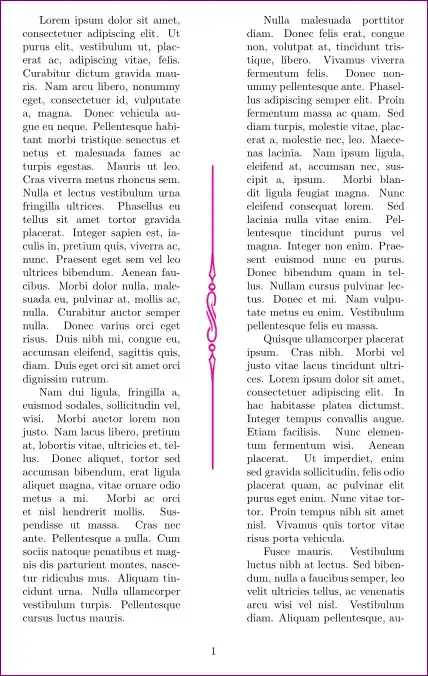
How can I achieve something like this:

text text text   text text text
text text text | text text text
text text text   text text text

Where, as in OO/LibO, the column separator does not span the full height of the columns?

I’d like to go even further and be able to create fancier separators, for example:

text text text   text text text
text text text | text text text
text text text • text text text
text text text | text text text
text text text   text text text

or other similar patterns, with rules and symbols such as bullets.

I am open to solutions based on environments other than multicols, but ideally it would be an environment that keeps the benefits of multicols and the possibility of changing width as in adjmulticol.

1 Answers1

10

This should be a starting point.

This works only for full page multicolumns. If multi columns span only a part of the page, then

{\makebox[\textheight][c]{\pgfornament[color = magenta,width=.5\textheight]{88}}

needs to be tweeked. Also the ornaments can be changed as per taste.

\documentclass{article}

\usepackage{multicol}
\usepackage[object=vectorian]{pgfornament} %%  http://altermundus.com/pages/tkz/ornament/index.html
\usepackage{lipsum}

%% another definition from David
%\makeatletter
%\def\columnseprulecolor\vrule\@width\columnseprule{%
%\vbox to \ht\mult@rightbox{\leaders\vbox{\kern2pt\hbox{.}\kern2pt}\vfill}}
%\makeatother

\def\columnseprulecolor{%
\rotatebox{90}{\makebox[\textheight][c]{\pgfornament[color = magenta,width=.5\textheight]{88}}}
    }%
%% Change color and ornament here.


\setlength\columnsep{60pt}

\begin{document}

\begin{multicols}{2}
\lipsum
\end{multicols}

\end{document}

enter image description here

  • This is very nice! If I understand correctly, any PGF graphic could be used? As you point out, the dimensions of the box have to be adjusted manually if the columns don’t span the whole text height. Would there be another, more automatic way, for example by specifying that the graphic will always span only half the height of the tallest column? Also, I would like to be able to use simple rules and symbols. I am trying to tweak the code in the linked question, but it will take me some time to wrap my head around all this rule and leader stuff. – Christian Gagné Jul 18 '13 at 14:29
  • All that being said, your answer sketches a general solution and thus I accept it. Relying on TeX’s rules and leaders exclusively would not allow for the level of sophistication that I am looking for. I guess I have to apply the advice that is often given on this site: learn PGF/TikZ! – Christian Gagné Jul 19 '13 at 13:34
  • Using \textheight isn't a good idea in case of multicols that don't spread over the whole page (e. g. with a heading above). To get multicols' column height, change \textheight to the package's internal command @colroom and surround the whole definition by \makeatletter and \makeatother. – dessert Apr 22 '16 at 08:00