6

I created a picture for a random charge distribution and it currently looks like this

\documentclass{article}

\usepackage{tikz}
\usetikzlibrary{intersections, decorations,circuits.ee.IEC, calc, decorations.markings, patterns}

\usepackage{pgfplots}
\pgfplotsset{compat=newest}

\begin{document}

\begin{tikzpicture}

\definecolor{mygray}{gray}{0.8}

\draw [fill=mygray, decoration={random steps, segment length =.5cm, amplitude=.5cm}, decorate , rounded corners=.3cm] (-.5,0) -- (-.25, 3) -- (1,2) -- (1.2,-.5) -- (-.5,0);

\draw[->] (-.5,0) -- (4,0);
\draw[->] (0,-.5) -- (0,4);
\draw[->] (0,0) -- (45:4) node[right]{$\vec r$};

\end{tikzpicture}

\end{document}
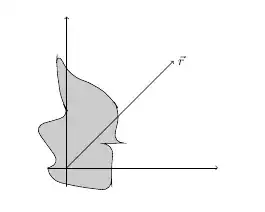
An example of the result of the code above

My question now is: How can I manage to get a random 3D shape? Best regards

Edit: Added the packages to provide a minimal example, sry for that.

malin
  • 3,727
  • 4
  • 23
  • 35
Rainer
  • 377
  • Since you have alreadt asked six questions before this, you should know that people want a MWE in order to spend their time on helping. P.S. I cannot help myself but I am just mentioning it. – Svend Tveskæg Jul 29 '13 at 14:11
  • you might be interested in http://tex.stackexchange.com/questions/13473/which-package-can-easily-write-a-graph-as-an-arbitrary-curve-or-area-just-for . I suppose that question might already be the best possible answer. But I keep wondering: what qualifies a "random 3d shape"? Is that a 3d volume? If so, is it just the outline? That would be 2d. Is is some shaded rounded organic shape with lightning and all? Then you should use matlab, it has something like that (I did something like it with matlab's smooth3, patch, and isosurface functions). – Christian Feuersänger Jul 29 '13 at 20:25
  • My bad with the minimal example, I thought it is sufficent to provide the code for the tikzpicture itself. I'm sorry and it won't happen again. – Rainer Jul 30 '13 at 09:06

1 Answers1

2

Here's something that creates "round" blobs, where you can influence the look via several parameters. For reasons unknown to me, it sometimes produces a dimension too large error, which however does not break it.

Code

\documentclass[tikz,border=2mm]{standalone}
\usetikzlibrary{decorations.pathmorphing}

\begin{document}

\pgfmathtruncatemacro{\mynumsides}{20}
\pgfmathsetmacro{\myradius}{2}
\pgfmathsetmacro{\myradiusdeviation}{0.9}
\pgfmathsetmacro{\myangledeviation}{10}
\pgfmathsetmacro{\myrandomlength}{0.2}
\pgfmathsetmacro{\myrandomamplitude}{0.1}
\newcommand{\mycolor}{red!80!yellow}
\pgfmathsetmacro{\myopacity}{0.4}
\pgfmathsetmacro{\myroundedcorners}{0.1}

\begin{tikzpicture}
    \draw[->] (-.5,0) -- (4,0);
    \draw[->] (0,-.5) -- (0,4);
    \draw[->] (0,0) -- (45:4) node[right]{$\vec r$};
    \pgfmathtruncatemacro{\maxindex}{\mynumsides-1}
    \pgfmathsetmacro{\angle}{360/\mynumsides}
    \fill[decoration={random steps,segment length=\myrandomlength cm,amplitude=\myrandomamplitude cm},decorate,ball color=\mycolor,opacity=\myopacity,rounded corners=\myroundedcorners cm,shift={(\myradius,\myradius)}]   (rand*\myangledeviation:\myradius+rand*\myradiusdeviation)
    \foreach \x in {1,...,\maxindex}
    {   -- (\x*\angle+rand*\myangledeviation:\myradius+rand*\myradiusdeviation)
    }
    -- cycle;
\end{tikzpicture}

\end{document}

Output

enter image description here

Alternate Output

\pgfmathtruncatemacro{\mynumsides}{20}
\pgfmathsetmacro{\myradius}{2}
\pgfmathsetmacro{\myradiusdeviation}{0.1}
\pgfmathsetmacro{\myangledeviation}{2}
\pgfmathsetmacro{\myrandomlength}{0.1}
\pgfmathsetmacro{\myrandomamplitude}{0.05}
\newcommand{\mycolor}{blue}
\pgfmathsetmacro{\myopacity}{0.4}
\pgfmathsetmacro{\myroundedcorners}{0.02}

enter image description here

Tom Bombadil
  • 40,123