11

Is it possible to make inline comments in LaTeX that do not extend until the end of the line?

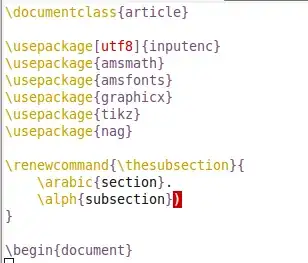
The actual problem I'm trying to solve is vim's annoying highlighting of the non-curly end-bracket here:

\renewcommand{\thesubsection}{
    \arabic{section}.
    \alph{subsection})
}

Update

Screenshot

Tim N
  • 10,219
  • 13
  • 63
  • 88
  • 3
    VIM does not highlight ) in any way for me. Also note that your definition introduces three spaces, which will appear when the command is used. Add % at line ends to remove the spaces. Finally, how about trying titlesec for this task? – Andrey Vihrov Mar 06 '11 at 10:47
  • 4
    Wouldn't \renewcommand...{%( fix your paren problem? – Ulrich Schwarz Mar 06 '11 at 10:51
  • @Andrey: I added a picture. Thanks for the % tip; I didn't think it would work because of the indentation. I'll look inteo titlesec. – Tim N Mar 06 '11 at 10:55
  • @Ulrich: For some reason, it does not. I figured that vim is smart enough to understand that it is commented out. – Tim N Mar 06 '11 at 10:55

2 Answers2

15

You could create a command, which gobbles its argument, such as in the comment here: Control command arguments:

\newcommand{\comment}[1]{}

If you just wish to gobble a character, name it so and use it like

\newcommand*{\commentchar}[1]{}
Text \commentchar()

which results in Text ).

Another way, shown by Joseph on LaTeX-Community.org is defining an active character for that, such as in this minimal example:

\documentclass{article}
\catcode`\|=\active
\def|#1|{}
\begin{document}
Text |ignored|Text
\end{document}

You have to take care of the spacing (blanks before and after) and possible side effects. This environment-way is fine, though again vim might unserstand that it's commented out, unlinke the \commentchar way.
Stefan Kottwitz
  • 231,401
  • 2
    Thanks, this is exactly what I was looking for. What does the asterisk in your \commentchar definition do? – Tim N Mar 06 '11 at 11:06
  • 4
    @Tim It defines a macro that is not \long, meaning that TeX will fail with an error if the paragraph ends while reading the argument. – Andrey Vihrov Mar 06 '11 at 11:27
  • Maybe you'd also want to use \ignorespaces, see https://tex.stackexchange.com/a/276698/35642 – thiagowfx Jun 16 '17 at 18:20
1

Stefan already explained well but maybe it can be helpful too. So take a glance.

\documentclass{article}
\newcommand{\ignore}[1]{}

\begin{document}

first sentence.\ignore{second sentence.} third sentence.

\end{document}

Output: first sentence. third sentence.

plante
  • 1,349
suza
  • 11
  • 1