5

Sir, I have small issues with two newcommand

  1. I have this definition that I do not like:

    \def\DDbar {\ensuremath{\kern -0.1em \stackrel{\kern 0.1em \textsf{\fontsize{5pt}{1em}\selectfont(---)}}{D}\kern -0.3em}\xspace}
    

    do you know how to improve it? What I need is something similar to this

    \def\Dbar    {\kern 0.2em\overline{\kern -0.2em \PD}{}\xspace}
    

    where, instead of a single bar, I want a bar within parentheses.

  2. My second issue is with

    \def\sPlot  {\ensuremath{\hbox{$_s$}{\mathcal P}lot}\xspace}
    

    it shows what I want but why on earth do I need the $_s$ inside an \ensuremath? Is that because of \hbox? If I take the $$ away the command will not work in normal text writing.

Thank again for your precious help.

lockstep
  • 250,273
leoredi
  • 781
  • Can you submit a working example for the first part please? – Thruston Aug 12 '13 at 10:15
  • 1
    For the second question (which might be better as a separate question): you need the math markers inside the hbox because tex goes back into restricted horizontal mode inside the hbox, so you need to turn on maths again to make the underscore work. – Thruston Aug 12 '13 at 10:18

3 Answers3

5

Here are a couple of suggestions.

For the first command \stackrel causes the whole construction to be centered vertically, meaning that the D does not sit on the baseline. Instead you can use \overset from the amsmath package. Instead of switching to text mode for the emdash, you can use a LaTeX \rule:

 \rule[0.3ex]{1em}{0.4pt}

produces a rule 1em long (like an emdash), with the standard line thickness of 0.4pt but raised 0.3ex. Putting your bracketed expression in a \smash statement allows it to be lowered a bit closer to the D.

For the second command, no you do not need the \hbox maneuvers, just {}_s will do to produce the lowered s. I'd don't like the mixed fonts for the word plot, but if you insist on this then write the last part as \mathit{lot} to get no math kerning, and then move it closer to the P with a negative kern.

Sample output

\documentclass{article}

\usepackage{xspace,amsmath}

\newcommand*{\DDbar}{\ensuremath{\overset{\smash[b]{(\rule[0.3ex]{1em}{0.4pt})}}D}\xspace}

\newcommand*{\sPlot}{\ensuremath{{}_s{\mathcal P}\mkern-2mu\mathit{lot}}\xspace}

\begin{document}

Text \DDbar text \sPlot.

\end{document}

By the way I am not a fan of the \ensuremath...\xspace combinations, I would prefer to just define math mode commands \DDbar etc. and then write \( \DDbar \) if I need somewhere in text. I have also used \newcommand* instead of \def as egreg pointed out: \newcommand is a LaTeX user level command and will alert you if the command is already defined, see What is the difference between \def and \newcommand? and What's the difference between \newcommand and \newcommand*?.

Andrew Swann
  • 95,762
5

Here are a \parenbar and \xbar commands for avoiding the bar cover too much its argument. The commands have an optional argument for adjusting the amount of shifting; for instance, if the symbol is upright, \parenbar[0]{\Phi} seems more adequate.

\documentclass{article}
\newcommand\DDbar{\parenbar{D}}
\newcommand{\parenbar}[2][4]{%
  \mkern#1mu
  \sbox0{$#2$}%
  \makebox[0pt][r]{\raisebox{\ht0}{$\scriptscriptstyle($}}%
  \overline{\mkern-#1mu#2\mkern-1mu}%
  \makebox[0pt][l]{\raisebox{\ht0}{$\scriptscriptstyle)$}}%
  \mkern1mu
}
\newcommand{\xbar}[2][4]{%
  \mkern#1mu
  \overline{\mkern-4mu#2\mkern-1mu}%
  \mkern1mu
}

\begin{document}
$X\DDbar X\xbar{D} X$

$\parenbar[1]{\Phi}$

$A\xbar{A}A$
\end{document}

enter image description here

For the second question, see Andrew Swann's answer:

\newcommand{\sPlot}{%
  {}_s\mathcal{P}\mkern-2mu\mathit{lot}%
}

without \ensuremath and \xspace is the way to go.

egreg
  • 1,121,712
  • Thanks. Anyhow if I remove the \ensuremath and the \ensuremath when I am in normal mode (is it call this way?) and I write for example \sPlot ciao what I will see is the correct sPlot but no space between it and ciao, this is no good for me as I speak a lot about this sPlot and is never in an equation. – leoredi Aug 12 '13 at 15:55
  • @leoredi you should write $\sPlot$ ciao or \(\sPlot\) ciao. – cgnieder Aug 12 '13 at 16:17
  • Sir, I understand that but, as I said, this is no good for me. I will use \sPlot solely in text mode. So, my question is if there is a better way of modifying the wonderful definition of @egreg s.t. I can use it without the $ or the \(\. Thanks – leoredi Aug 12 '13 at 16:23
  • @leoredi What's so difficult in typing $\sPlot$? – egreg Aug 12 '13 at 17:37
  • Nothing but its two more characters every time. Then I might as well put it in the definition no? – leoredi Aug 12 '13 at 21:15
1

Here's some possibilities:

\documentclass{article}
\usepackage{stackengine}
\usepackage{scalerel}
\usepackage{xspace}
\begin{document}
\def\Dbar    {\kern 0.2em\overline{\kern -0.2em D}{}\xspace}
\( \Dbar \)

\def\useanchorwidth{T}
\def\DDbar {\stackon[-1.5pt]{$D$}{\ensuremath{\kern.18em \textsf{\fontsize{6pt}{1em}\selectfont{\tiny(}---{\tiny)}}}}\xspace}
\(\DDbar\)

\def\sPlot  {\ensuremath\ThisStyle{\hbox{$\SavedStyle_s$}{\mathcal P}lot}\xspace}
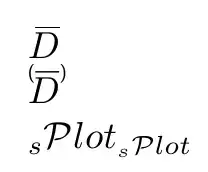
\( \sPlot_{\sPlot} \)
\end{document}

The vertical gap of \DDbar can be further tailored by playing with the -1.5pt parameter.

For the \sPlot, I made it so that it will work as expected in \subscriptstyle as well as \textstyle, if that is important to you.

enter image description here