7

I am arranging four images as follows.

\documentclass{article}
\usepackage[demo]{graphicx}
\usepackage{subcaption, tabu}
\begin{document}
\begin{figure}[t]
\begin{tabular}{c|c} %vertical line I added | between cc
\subcaptionbox{}{\includegraphics[width = 0.45\columnwidth]{a}}&
\subcaptionbox{}{\includegraphics[width = 0.45\columnwidth]{c}}\\
\hline
\subcaptionbox{}{\includegraphics[width = 0.45\columnwidth]{b}}&
\subcaptionbox{}{\includegraphics[width = 0.45\columnwidth]{d}}
\end{tabular}   
\caption{Overall caption}
\label{fig:xxx}
\end{figure}
\end{document}

I would like to move the subcaptions (that is (a), (b), (c), (d)) closer to the images and potentially even onto them as the images are mostly white.

The current answer at Subfigures with number inside figure doesn't seem to move the caption vertically sadly. The answer to my question looks like it might be How can I modify vertical space between figure and caption? but \setlength{\belowcaptionskip}{0pt} has no effect for me.

What is the right way to do this?

Moriambar
  • 11,466
Simd
  • 6,785

1 Answers1

7

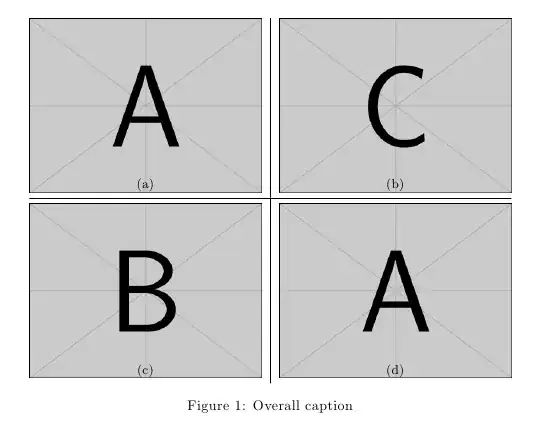
Use the skip key in \captionsetup for subfigures; in the example below I used a negative value so that the label overlaps the subfigures (as requested in a comment):

\documentclass{article}
\usepackage{graphicx}
\usepackage{subcaption}

\captionsetup[subfigure]{skip=-10pt}

\begin{document}

\begin{figure}
\centering
\begin{tabular}{@{}c|c@{}}
\subcaptionbox{}{\includegraphics[width = 0.45\linewidth]{example-image-a}}&
\subcaptionbox{}{\includegraphics[width = 0.45\linewidth]{example-image-c}}\\
\hline
& \\[-1.88ex]
\subcaptionbox{}{\includegraphics[width = 0.45\linewidth]{example-image-b}}&
\subcaptionbox{}{\includegraphics[width = 0.45\linewidth]{example-image-a}}
\end{tabular}
\caption{Overall caption}
\label{fig:xxx}
\end{figure}

\end{document}

enter image description here

Notice that in floating objects \label should go after \caption. Also, using just t for the positioning of floats is almost a recipe for disaster; I would suggest you not to use any specifier at all, or if you really need it, to use something less restrictive.

Moriambar
  • 11,466
Gonzalo Medina
  • 505,128
  • Not sure if is obvious, but one can set the skip to be a negative length, placing the subcaptions on top of the subfigures. – Torbjørn T. Aug 12 '13 at 21:05
  • Unfortunately adding \captionsetup[subfigure]{skip=-1pt} in the preamble moves one of the images up over the horizontal lines rather than just moving the subcaptions it seems. – Simd Aug 12 '13 at 21:16
  • @Lembik which horizontal lines? Why a negative value? – Gonzalo Medina Aug 12 '13 at 21:17
  • There is a horizontal line (the \hline) and the right bottom figure goes over it if I use \captionsetup[subfigure]{skip=0pt} or anything negative. I am trying to move the subcaptions for space reasons and as my image is mostly white it doesn't matter if they go over it. – Simd Aug 12 '13 at 21:20
  • @Lembik something else must be going on in your document; see my updated answer for an example using a negative value; no problem like the one you mention. – Gonzalo Medina Aug 12 '13 at 21:50
  • Your new version works perfectly. Thank you. I am not sure what the key difference was. – Simd Aug 13 '13 at 05:56