3

I'd like to use a custom floating environment for lstlistings so as to be able to draw frames around the listings using mdframed.

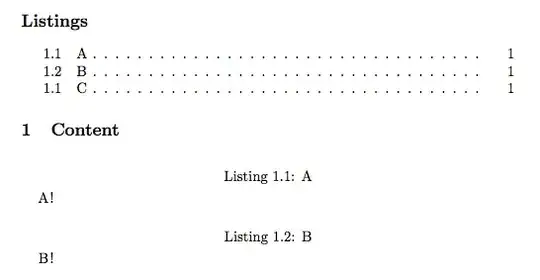
My float uses the same counter as lstlisting, and also appears in the List of Listings. However, the corresponding line in the List of Listings is not indented like the other lines are.

My Questions:

  1. Why is that?
  2. What can I do to make the entries for the custom float look the same?

Minimal example:

\documentclass[a4paper,oneside,article,final]{memoir}
\usepackage{listings}

\newfloat[chapter]{myfloat}{lol}{Listing}
\newlistentry{myfloat}{lol}{0}

\begin{document}
\lstlistoflistings
\chapter{Content}

\begin{lstlisting}[caption={A}]
  A!
\end{lstlisting}

\begin{lstlisting}[caption={B}]
  B!
\end{lstlisting}

\begin{myfloat}[b]
  \begin{lstlisting}
    C!
  \end{lstlisting}
  \caption{C}
\end{myfloat}

\end{document}

I'd post what it looks like (already made the screenshot), but apparently one needs 10 reputation to post images :/

1 Answers1

3

Indentation for listof... entries in memoir are specified by the command \cftsetindents. This takes three arguments:

  • this list entry type: in this case myfloat
  • the indentation for the contents line
  • the width to leave for the entry's number

For the latter two, using the values from memoir's section contents line

\cftsetindents{section}{1.5em}{2.3em}

is exactly what you want:

Sample output

\documentclass[a4paper,oneside,article,final]{memoir}
\usepackage{listings}

\newfloat[chapter]{myfloat}{lol}{Listing}
\newlistentry{myfloat}{lol}{0}
\cftsetindents{myfloat}{1.5em}{2.3em}

\begin{document}
\lstlistoflistings
\chapter{Content}

\begin{lstlisting}[caption={A}]
  A!
\end{lstlisting}

\begin{lstlisting}[caption={B}]
  B!
\end{lstlisting}

\begin{myfloat}[b]
  \begin{lstlisting}
    C!
  \end{lstlisting}
  \caption{C}
\end{myfloat}

\end{document}

See section 9.2 of the memoir manual for a good explanation and more things you can tune.

Andrew Swann
  • 95,762
  • I haven't noticed until now: the numbering is not correct :/ any idea why? I thought by using "lol" it automatically uses the same counter as lstlisting, but if myfloat precedes a lstlisting, myfloat doesn't increment the counter, and if myfloat comes after an lstlisting, then the latter doesn't increment it - I'm confused. (should I make this a new question?) – Kevin Bader Aug 15 '13 at 08:08
  • got it:
    \makeatletter
    \AtBeginDocument{\let\c@myfloat\c@lstlisting}
    \makeatother


    :)

    – Kevin Bader Aug 15 '13 at 14:40