I want to create an environment that generates special tables and graphs. Inside the environment the user should be able to execute predefined commands that either modify the behavior of the final drawing or add elements that should be drawn.
The problem I am currently facing is that each command that is executed consumes some horizontal space even though it isn't outputting anything.
Is there any way to define commands that do not have any impact to the output at all?
Consider the following example:
\documentclass{article}

\newenvironment{test}{x}{y}
\newcounter{somecounter}
\newcommand{\somecommand}[1]{%
\setcounter{somecounter}{#1}%
}

\begin{document}

\section*{Test 1}
\begin{test}%
\somecommand{42}
\end{test}

\section*{Test 2}
\begin{test}
\end{test}
\end{document}
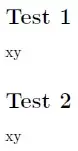
This is how the result looks like:

What I want is to define the command somecommand in a way that Test 1 would look just like Test 2. Is there any way to achieve this? Maybe I could put the command in an invisible box of or box with the height and width of 0?
If that can't be done, is there a way to calculate how much space a command would need, so that I could (programmatically) insert a negative horizontal and vertical space?



%. A linebreak introduces a space, so there are two spaces in the definition of your macro, and one in the use of the environment. See the questions linked to in http://meta.tex.stackexchange.com/a/2429/586 for details. – Torbjørn T. Aug 25 '13 at 12:09%after\newcommand{\somecommand}[1]{, and one after\setcounter{somecounter}{#1}. That takes care of the two in the macro definition. To remove the last, add a%after\begin{test}in Test 1. If you do that, do you still get exactly the same in both tests? – Torbjørn T. Aug 25 '13 at 13:07