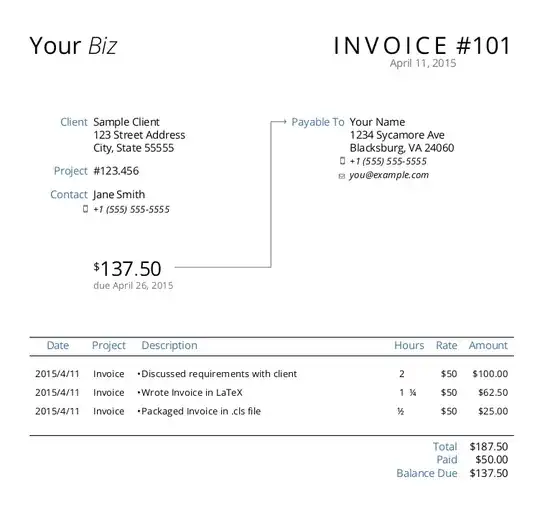
This is an old question, but here is a minimal that can display a fairly easy to understand invoice table. Add your logo and tax, if required.
The code automatically auto-increments the item counter and calculates totals.
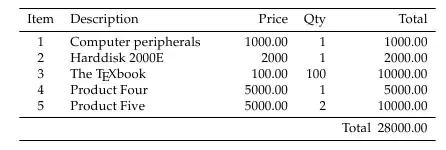
It uses the fp package for calculations to ensure accuracy. It uses a longtable, as some invoices are rather long.
Here is the MWE. Embellish it with your logo and other details to customize it.
\usepackage{fp}
\usepackage{booktabs}
\usepackage{ragged2e}
\usepackage{longtable}
\newcounter{cnt}
\setcounter{cnt}{0}
\def\inc{\stepcounter{cnt}\thecnt}
\gdef\TotalHT{0}
\newcommand{\product}[3]{%
\inc    &\FPmul\temp{#2}{#3}\FPround\temp{\temp}{2}\temp
%% Totalize
\FPadd\total{\TotalHT}{\temp}%
\FPround\total{\total}{2}%
\global\let\TotalHT\total%
\\ }
\newcommand{\totalttc}{
\TotalHT }
\begin{document}
\RaggedRight
\begin{longtable}{cp{4.2cm}rrr}
\toprule
Item &Description & Price & Qty & Total\\
\midrule
\product{Computer peripherals}{1000.00}{1}
\product{Harddisk 2000E}{2000}{1}
\product{The \TeX book}{100.00}{100}
\product{Product Four}{5000.00}{1}
\product{Product Five}{5000.00}{2}
\midrule
&&&& Total \totalttc\\
\bottomrule
\end{longtable}
\end{document}