4

I would like to draw an integration contour which is pretty easy I think, but I am a newbie at the Tikz package. The integration contour goes from

-iinfinity to +iinfinity

parallel to the Imaginary axis but not exactly on it, rather slightly to the left (or right) of it. The integration contour also has a semicircle on it somewhere near the origin but not exactly on the origin.

I guess I'm looking for an indented contour but not the usual ones where one go from -infinity to + infinity with a jump over a pole as in the following picture contour but like I said I would like it to go vertically.
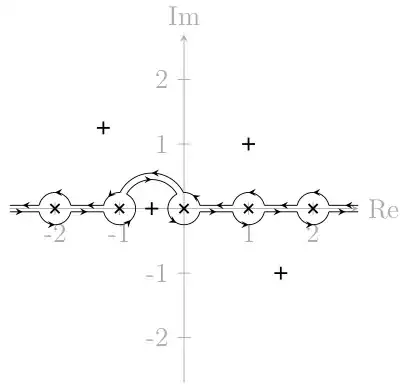
Indented contour

I also found this picture, I want something very close to this. If I get some help getting what is in the picture in the link I think I can manage doing the rest myself.

indented integration contour

Please, any help would be appreciated, thanks.

Zkit
  • 53
  • 1
    Not sure of what you want. Could you provide a hand-made sketch? Also, perhaps this question can help: http://tex.stackexchange.com/questions/103176/drawing-complex-integration – JLDiaz Aug 31 '13 at 20:35
  • Hey JLDiaz I just added a link with a picture. That's pretty close to what I want. Any suggestions where to start? Thanks. – Zkit Aug 31 '13 at 20:40
  • @Zkit TeX syntax doesn't work on TeX-SX. It's a deliberate choice. So $$ is just noise. – percusse Aug 31 '13 at 20:42
  • OK that sucks, but I fixed it now. – Zkit Aug 31 '13 at 20:46
  • Zkit any reason for reverting back the edits? – percusse Aug 31 '13 at 20:54
  • I haven't reverted any edits? I just edited it myself adding a link, at the same time I think someone else was editing. – Zkit Aug 31 '13 at 20:57
  • Look at the history of edits – percusse Aug 31 '13 at 20:57
  • I think it looks nice now, but I can change something if you don't like it and can't change it. I just want to solve this contour problem. – Zkit Aug 31 '13 at 21:01

1 Answers1

7

Here is a first approximation, based on the answer to the question Drawing complex integration.

Is this close to what you want?

\documentclass{article}
\usepackage{tikz}
\begin{document}
\usetikzlibrary{calc,decorations.markings}

\begin{tikzpicture}
\draw (0,-5.5) -- (0,5.5);  % Axis
\draw (-5.5,0) -- (5.5,0);   
\foreach \y in {-5,...,5} {
  \draw (-4pt,\y) -- (4pt,\y) node[pos=0,left] {\y};
  \draw (\y,-4pt) -- (\y,4pt) node[pos=0,below] {\y};
}

\node at (0,-1.5) {$\times$}; % Pole

% Contour line
\draw[thick,red,xshift=2pt,
decoration={ markings,  % This schema allows for fine-tuning the positions of arrows
      mark=at position 0.2 with {\arrow{latex}}, 
      mark=at position 0.6 with {\arrow{latex}},
      mark=at position 0.8 with {\arrow{latex}}, 
      mark=at position 0.98 with {\arrow{latex}}}, 
      postaction={decorate}]
  (0,-5) -- (0,-1.7) arc (-90:90:.2) -- (0,5);
\draw[thick,red,xshift=2pt,
decoration={ markings,
      mark=at position 0.2 with {\arrow{latex}}, 
      mark=at position 0.4 with {\arrow{latex}},
      mark=at position 0.6 with {\arrow{latex}}, 
      mark=at position 0.8 with {\arrow{latex}}}, 
      postaction={decorate}]
 (0,5) arc (90:-90:5) -- (0,-5);
\end{tikzpicture}
\end{document}

Result

JLDiaz
  • 55,732
  • Ohh that's beautiful brother, thank you for your effort! I will soon fill in with comments, let me just play around with your example for a minute. Thanks again bro. – Zkit Aug 31 '13 at 21:53
  • For the markings at regular intervals, TikZ provides mark=between positions .2 and .8 step .2 with \arrow{latex}. For the irregular marking I’d define an style mark at as follows: \pgfset{decoration/mark at/.style 2 args={@mark/.style={mark=at position ##1 with {#2}},@mark/.list={#1}}} that can be used as mark at={.2,.6,.8,.98}{\arrow{latex}}} in the decoration key. (You can also use it for regular markings: mark at={.1,.2,...,.9}{\arrow{latex}}.) – Qrrbrbirlbel Aug 31 '13 at 23:15