I have written a modified wrapfig package, I was a little tired of having ugly page breaks when a wrapfig object coincides with the end of the page. It works by putting the content into a box, measures the height, and then uses the needspace package to enforce minimum space requirements, pretty simple.
Here is the code:
%-----------------------------------------------------
%Ensures no ugly page breaks by
%first measuring the minimum amount of space required
%Using a savebox.
%-----------------------------------------------------
\NeedsTeXFormat{LaTeX2e}
\ProvidesPackage{adpwrapfig}[2013/07/28 ADP's Wrapfig Class]

%Requirements.
\RequirePackage{wrapfig,calc,needspace,etoolbox,ifthen}

%Objects in this class.
\newlength{\@@wf@ht}%
\newsavebox{\@@wf@savebox}%
\newcounter{@@wf@cnt}

%Create a boolean switch, for the case when the user specifies
%the number of lines, and,
\newbool{@@wf@alwaysspace}\booltrue{@@wf@alwaysspace}

%Backup existing definitions.
\let\@wf\wrapfigure\let\@endwf\endwrapfigure

%-----------------------------------------------------
%Redefine the wrapfigure environment.
%-----------------------------------------------------
\renewenvironment{wrapfigure}[3][-1]{%
    \setcounter{@@wf@cnt}{#1}\def\@inpA{#2}\def\@inpB{#3}%

    %Process the box.
    \begin{lrbox}{\@@wf@savebox}%
        \minipage{\@inpB}%
}{  %<<<<<<BODY CONTENT
        \endminipage%
    \end{lrbox}%

    %Determine the required height
    \settoheight{\@@wf@ht}{\usebox{\@@wf@savebox}}%

    %Min Required Vertical Space.
    \def\@wf@ns{\Needspace{\dimexpr\@@wf@ht+\intextsep\relax}}

    %Enforce the required height
    \ifthenelse{\the@@wf@cnt<1}{\@wf@ns}{\ifbool{@@wf@alwaysspace}{\@wf@ns}{}}%

    %Now execute the existing environment
    \ifthenelse{\the@@wf@cnt>0}%
        {\@wf[\the@@wf@cnt]{\@inpA}{\@inpB}} %TRUE, When Lines are Specified
        {\@wf{\@inpA}{\@inpB}}               %FALSE, When Not.
            \usebox{\@@wf@savebox}%
    \@endwf%
}
The Difference is quite clear with the following MWE:
\documentclass[a5paper]{article}
\usepackage[margin=1in]{geometry}

\usepackage[demo]{graphicx}
\usepackage{lipsum,caption}

\usepackage{wrapfig}    %Standard
\usepackage{adpwrapfig} %Modified

\begin{document}
    \lipsum[1-2]

    \begin{wrapfigure}{l}{0.5\linewidth}
        \includegraphics[width=\linewidth,height=2.95in]{demo}
        \captionof{figure}{This is my caption for this use of this figure}
    \end{wrapfigure}
    \lipsum[1-10]

\end{document}
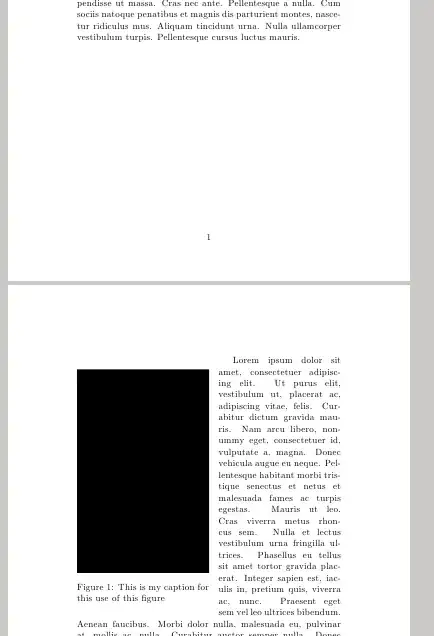
Which creates the following two different outputs if the package is used or not.
Standard Output (Carries paragraph wrapping over to next page)

New Output: (Does not produce the error)
My question is, I would like to remove the use of minipages, in favor of a box primative, however, I cant seem to get it to work in context.
Can someone offer some suggestions?
Cheers.
UPDATE: Based on David Carlisle's Solution to my initial question, and, suggestion by Barbara Beeton, an update is as follows. In summary, A hook was patched into the needspace package to determine if a page break would follow, and in that situation, the contents get retracted by \intextsep to achieve top alignment.
%-----------------------------------------------------
%Ensures no ugly page breaks by
%first measuring the minimum amount of space required
%Using a savebox.
%-----------------------------------------------------
\NeedsTeXFormat{LaTeX2e}
\ProvidesPackage{adpwrapfig}[2013/07/28 ADP's Wrapfig Class]

%Requirements.
\RequirePackage{wrapfig}
\RequirePackage{calc,needspace,etoolbox,ifthen,caption}

%Objects in this class.
\newsavebox{\@@wf@savebox}          %Box to save.
\newlength{\@@wf@ht}                %Height
\newlength{\@@wf@wd}                %Width
\newcounter{@@wf@cnt}               %Linecount if specified
\newcommand{\@@wf@capprop}{0.95}    %Caption Proportion
\newbool{@@wf@break}                %For needspace page break hook

%Create a boolean switch, for the case when the user specifies
%the number of lines, and, @@wf@bre@kreq
\newbool{@@wf@alwaysspace}\booltrue{@@wf@alwaysspace}

%Backup existing definitions.
\let\@wf\wrapfigure\let\@endwf\endwrapfigure

%Patch the neespace commands.
\patchcmd{\@sneedsp@}{\break}{\booltrue{@@wf@break} \break}{}{}
\patchcmd{\@needsp@}{\break}{\booltrue{@@wf@break} \break}{}{}

%-----------------------------------------------------
%Redefine the wrapfigure environment.
%-----------------------------------------------------
\renewenvironment{wrapfigure}[3][-1]{%
    \setcounter{@@wf@cnt}{#1}%
    \def\@inpA{#2}%
    \setlength{\@@wf@wd}{#3}
%Process the box.
    \setbox\@@wf@savebox\vbox\bgroup\bgroup%
        \setlength\hsize\@@wf@wd
        \textwidth\hsize
        \linewidth\hsize
        \@parboxrestore
        \@minipagerestore
        \@setminipage
        \captionsetup{width=\@@wf@capprop\linewidth}
}{  %<<<<<<BODY CONTENT
        \par\egroup\egroup%
    \@@wf@ht\ht\@@wf@savebox%

    %Command to enforce the required height
    \def\@ns{\Needspace{\dimexpr\@@wf@ht+\intextsep\relax}}

    %Two conditions on whether to enforce
    \ifthenelse{\the@@wf@cnt<1}{\@ns}{}%
    \ifbool{@@wf@alwaysspace}{\@ns}{}%

    %Start with not requiring pagebreak.
    %needspace has been patched to set this to true if
    %it intends to enforce a break.
    \boolfalse{@@wf@break}

    %Now execute the existing environment
    \par\ifthenelse{\the@@wf@cnt>0}%
        {\@wf[\the@@wf@cnt]{\@inpA}{\@@wf@wd}} %TRUE, When Lines are Specified
        {\@wf{\@inpA}{\@@wf@wd}}               %FALSE, When Not.
            %Resolve the hook made by needspace, retracting by intxtsep
            %Retrace
                    \ifbool{@@wf@break}{\vspace*{-\intextsep}}{}
            %Execute
            \usebox{\@@wf@savebox}%
                    %Tighten
                    \ifbool{@@wf@break}{\vspace*{-2\intextsep}}{\vspace*{-\intextsep}}%
    \@endwf%
}

\endinput
%Tada.


