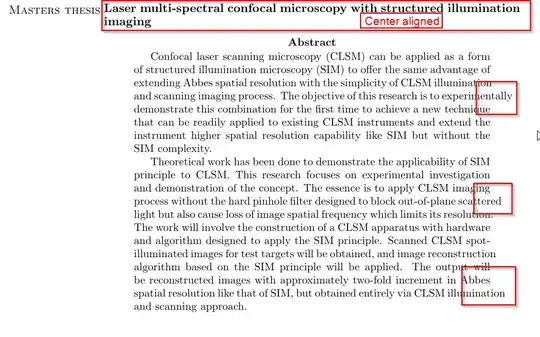
- How can I force justify the paragraph. As you can see the words are flowing out.
MWE : Download
MWE : Download

The suggestions in the comment in the first post should be sufficient when you take care only some specific cases. Please find below a general solution.
You did not provide a minimum-working-example which is often a pre-condition (please read mandatory) to get an answer.
Anyway, your provided example (retrieved using online OCR) did not produce the adverse effects you mentioned under default settings in my computer.
Then to force the effects, I tried these settings,
a5paper, \hyphenpenalty 9999
\tolerance 50. As you can see, these mean, narrow width paper, very high penalty for hyphenation, very low tolerance. This made a number words to jut out at the right hand margin.
So, in order to get rid of the situation, you will have to do the opposite.
Please try the following,
\hyphenpenalty.\tolerance.You will want to tweak the last two values until your problem is solved.
Here is the code I played with. This did not produce any jutting-out, even with A5 paper. So, the scenario must be better for you, where the paper size should be either A4 or letter, I presume.
\documentclass{article}

\usepackage[a5paper]{geometry}

\hyphenpenalty 200
\tolerance 2000

\begin{document}

\begin{center}
  MASTERS THESIS\\
  Laser multi-spectral confocal microscopy with structured
  illumination imaging
\end{center}

\begin{abstract}
  Confocal laser scanning microscopy (CLSM) can be applied as a form
  of structured illumination microscopy (SIM) to offer the same
  advantage of extending Abbes spatial resolution with the simplicity
  of CLSM illumination and scanning imaging process. The objective of
  this research is to experimentally demonstrate this combination for
  the first time to achieve a new technique that can be readily
  applied to existing CLSM instruments and extend the instrument
  higher spatial resolution capability like SIM but without the SIM
  complexity. Theoretical work has been done to demonstrate the
  applicability of SIM principle to CLSM. This research focuses on
  experimental investigation and demonstration of the concept. The
  essence is to apply CLSM inn process without the hard pinhole filter
  designed to block out-of-plane scattered light but also cause loss
  of image spatial frequency which limits its resolution. The work
  will involve the construction of a CLSM apparatus with hardware and
  algorithm designed to apply the SIM principle. Scanned CLSM
  spot-illuminated images for test targets will be obtained, and image
  reconstruction algorithm based on the SIM principle will be
  applied. The output will be reconstructed images with approximately
  two-fold increment in spatial resolution like that of SIM, but
  obtained entirely via CLSM illumination and scanning approach.
\end{abstract}


\end{document}


experi\-mentally,scat\-teredandillumi\-nationin the relevant words to suggest hyphenation points. – ChrisS Sep 02 '13 at 03:32\showhyphens{illumination experimentally scattered}and you will see the results. clearly something else is going on. – barbara beeton Sep 02 '13 at 13:33