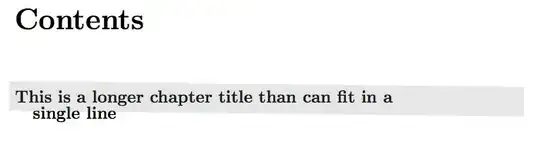
Using this answer, I have highlighting for chapters in my Table of Contents.
For long chapter names, however, the box is wonky, because P1.north west and P1.north east do not span the entire line:
north west       north east                                      line end
-------------------------------------------------------------------------
This is a longer chapter heading than can fit in an entire line this is a
longer chapter heading than.
This is a problem both with and without the use of page numbers. When \cftpagenumbersoff{chapter} is used:

and with page numbers:

My current projects ToC does not use page-numbers. Future projects will, and a solution that works for both would be ideal.
How can I correctly highlight a long ToC entry using this approach?
MWE:
\documentclass{report}
\usepackage{tocloft}
\usepackage{tikz}
\usepackage{xcolor}
% command to make a hidden node
\newcommand*{\hnode}[1]{%
    \tikz[remember picture] \node[minimum size=0pt,inner sep=0pt,outer sep=5pt] (#1) {};}
% create a node at the beginning of the chapter entry
\renewcommand{\cftchapfont}{\hnode{P1}\bfseries\Large}
\renewcommand{\cftchappagefont}{\bfseries}
% create a node at the end of the chap page number and draw the gray box
\renewcommand{\cftchapafterpnum}{%
  \hnode{P2}\tikz[remember picture,overlay]
  \draw (P1.north west)  [line width={25pt}, gray,opacity=.2] -- (\textwidth,0 |- P2);}
  %\draw (P1.north west)  [line width={25pt}, gray,opacity=.2] -- (P2.north east);}


\begin{document}
\cftpagenumbersoff{chapter}
\tableofcontents
\addcontentsline{toc}{chapter}{This is a longer chapter title than can fit in a single line}
\end{document}
My attempt, which hasn't thus far worked: Conceptually, if I were to implement a solution, I would first check whether a chapter heading will span multiple lines (count characters, perhaps?). I'd then use a pre-determined cm value, with a pre-determined node height, as the bottom-right TikZ node coordinate.
I thought \linelength would work (without page numbers the highlighting is ragged, and in my head my attempt was going to have a neat side-effect of fixing that):
\draw (P1.north west) [line width={25pt}, gray,opacity=.2] -- (\textwidth,0 |- P2);}
But that resulted in a highlighting extending far past the last word on the line, and the box is not horizontal.
The intersection coordinate isn't strictly needed, but I don't know why - I thought I'd have to specify the y coordinate.