Load babel and use the desired localization (whether as a global option for the class or as local option for babel (in this case load exsheets after babel)):
\documentclass[spanish]{article}
\usepackage[utf8]{inputenc}
\usepackage{babel}
\usepackage{exsheets}

\begin{document}
\begin{question}
¿Cómo te llamas?
\end{question}
\end{document}

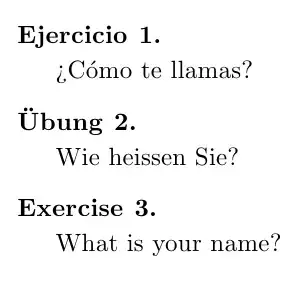
In a multi-lingual document you can use, for example. \selectlanguage, (after registering the languages tobabel) or the environmentotherlanguage` for switching languages:
\documentclass{article}
\usepackage[utf8]{inputenc}
\usepackage[ngerman,english,spanish]{babel}
\usepackage{exsheets}

\begin{document}
\begin{question}
¿Cómo te llamas?
\end{question}

\selectlanguage{ngerman}
\begin{question}
Wie heissen Sie?
\end{question}

\selectlanguage{english}
\begin{question}
What is your name?
\end{question}

\end{document}
If you want to change the string used in the localization, you can use
\DeclareTranslation{<Language>}{exsheets-exercise-name}{<New string>}
For example, when using the spanish modulo for babel, to change the default "Ejercicio" to "Cuestión", one would use
\DeclareTranslation{Spanish}{exsheets-exercise-name}{Cuestión}
A complete example:
\documentclass{article}
\usepackage[utf8]{inputenc}
\usepackage[spanish]{babel}
\usepackage{exsheets}

\DeclareTranslation{Spanish}{exsheets-exercise-name}{Cuestión}

\begin{document}
\begin{question}
¿Cómo te llamas?
\end{question}
\end{document}

A similar procedure can be applied with polyglossia (in case of XeLaTeX).
The documentation also gives advise on how to proceed if the desired localization is not available and offers an example for Danish:
\DeclareTranslation{Danish}{exsheets-exercise-name}
{\O{}velse}
\DeclareTranslation{Danish}{exsheets-question-name}
{Opgave}
\DeclareTranslation{Danish}{exsheets-solution-name}
{Opl\o{}sning}
To answer the bonus question, the question environment has an associated type which determines the string used in the title; in English, the default type is exercise, which causes the question environment to be titled "Exercise"; if you want the title to be "Question", you have to use the exam type:
\documentclass{article}
\usepackage[utf8]{inputenc}
\usepackage{exsheets}


\begin{document}
\begin{question}
What is your name?
\end{question}

\begin{question}[type=exam]
What is your name?
\end{question}
\end{document}


typekey. I'll update my answer. – Gonzalo Medina Sep 11 '13 at 01:46