12

I have a problem using \sisetup{output-exponent-marker = \text{e}} in my table. I use the S-columns provided from the siunitx package. It does change to the 'e' notation but it does not delete the \times before the 'e'.

Here is a small extract of my LaTex file, with a small version of the table. I want to use the 'e' notation as this saves a lot of space, it will be a very large table finally.

I hope someone can help. Many thanks in advance. Gerlind

\documentclass[fontsize=12pt,DIV14,BCOR15mm,oneside, headings=small,headsepline, appendixprefix,bibliography=totoc]{scrbook}

\usepackage[latin1]{inputenc}           % Zus{\"a}tzliche Sonderzeichen
\usepackage[UKenglish]{babel}       % English Language and Hyphenation

\usepackage{times}                          % Festlegung der Schrift
\usepackage[T1]{fontenc}                % Verwendete Zeichentabelle

\usepackage{rotating}

\usepackage[bf,footnotesize,width=.9\textwidth,format=hang]{caption}    

\usepackage{array}

\usepackage{siunitx}

\usepackage{multirow} % Multirow command for tables

% To increase space of some rows in tables, especially needed in header row before \hline
\newcommand\T{\rule{0pt}{2.6ex}}       % Top strut
\newcommand\B{\rule[-1.2ex]{0pt}{0pt}} % Bottom strut

\usepackage{scrpage2}


\begin{document}

\begin{table}[htbp]
\begin{center}
\footnotesize
\sisetup{output-exponent-marker = \text{e}, table-format=+1.4e+2}
\begin{tabular}{ll|SS}
MRE Sample & $N$ & \multicolumn{1}{c}{$\mu_1 [Pa]$} & \multicolumn{1}{c}{$\alpha_1 [-]$}   \B \\  \hline
\multirow{3}{3cm}{Isotropic $10\%$ MREs} & 1 & 1.5030e+05 & 4.2384e+00 \T \\ 
& 2 & 6.7175e+05 & 8.4376e-01 \\
& 3 & 9.5378e-06 & 9.0545e-05  \B \\ \hline 
\end{tabular}
\end{center}
\caption[]{Wrong scientific notation}
\label{tab:example}
\end{table}

\end{document}

enter image description here

2 Answers2

15

This might be a bug in siunitx, but it's easy to find a workaround: just set exponent-product to empty.

\documentclass{article}

\usepackage{siunitx}
\usepackage{booktabs}

\begin{document}

\begin{table}[htbp]
\centering
\footnotesize
\sisetup{
  output-exponent-marker = \text{e},
  table-format=+1.4e+2,
  exponent-product={},
  retain-explicit-plus
}
\begin{tabular}{llSS}
\toprule
MRE Sample & $N$ & \multicolumn{1}{c}{$\mu_1 [Pa]$} & \multicolumn{1}{c}{$\alpha_1 [-]$} \\
\midrule
Isotropic $10\%$ MREs & 1 & 1.5030e+05 & 4.2384e+00 \\
                      & 2 & 6.7175e+05 & 8.4376e-01 \\
                      & 3 & 9.5378e-06 & 9.0545e-05 \\
\bottomrule
\end{tabular}
\caption{Right scientific notation}
\label{tab:example}
\end{table}

\end{document}

In this case I set also retain-explicit-plus for symmetry. I also changed the table to use booktabs, without vertical rules, of course. I removed also \multirow, because setting “Isotropic...” at the middle is no clearer than setting at the top of the affected rows. Just separate different groups with a \midrule.

enter image description here

egreg
  • 1,121,712
  • So many roads to Rome … – Qrrbrbirlbel Sep 11 '13 at 14:40
  • It is strange anyway that the format +1.4e+2 isn't kept. – karlkoeller Sep 11 '13 at 14:47
  • @karlkoeller that means only how many digits are expected. I don't think it's possible to pad with zeros. – egreg Sep 11 '13 at 14:53
  • 1
    To center some entry -- say, $\mu_1 [Pa]$ -- in a column of type S, it suffices to wrap it in a pair of curly braces, i.e., to write {$\mu_1 [Pa]$}. No need to write \multicolumn{1}{c}{$\mu_1 [Pa]$}. :-) – Mico Sep 11 '13 at 16:44
  • Many thanks for your help. It's the first time I asked a questions and it worked. @egreg I used 'multirow' to save some space. I know about the 'booktabs' and the discussion about vertical lines, but I am still not convinced as these tables are going in the appendix and are just huge. A special thanks to you ! – Gerlind Schubert Sep 11 '13 at 16:47
5

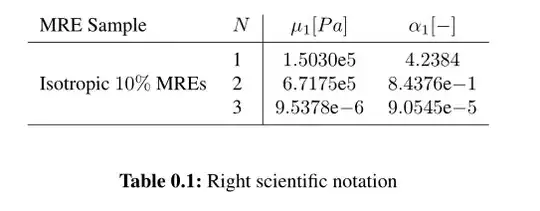
The option output-exponent-marker seems to work only for \numbers inside tables. So, you should replace numbers like 1.5030e+05 with \num{1.5030e+05}

\documentclass[fontsize=12pt,DIV14,BCOR15mm,oneside, headings=small,headsepline, appendixprefix,bibliography=totoc]{scrbook}

\usepackage[latin1]{inputenc}           % Zus{\"a}tzliche Sonderzeichen
\usepackage[UKenglish]{babel}       % English Language and Hyphenation

\usepackage{times}                          % Festlegung der Schrift
\usepackage[T1]{fontenc}                % Verwendete Zeichentabelle

\usepackage{rotating}

\usepackage[bf,footnotesize,width=.9\textwidth,format=hang]{caption}

\usepackage{array}

\usepackage{siunitx}

\usepackage{multirow} % Multirow command for tables

% To increase space of some rows in tables, especially needed in header row before \hline
\newcommand\T{\rule{0pt}{2.6ex}}       % Top strut
\newcommand\B{\rule[-1.2ex]{0pt}{0pt}} % Bottom strut

\usepackage{scrpage2}


\begin{document}

\begin{table}[htbp]
\begin{center}
\footnotesize
\sisetup{table-format=+1.4e+2, output-exponent-marker = \text{e} }
\begin{tabular}{ll|SS}
MRE Sample & $N$ & \multicolumn{1}{c}{$\mu_1 [Pa]$} & \multicolumn{1}{c}{$\alpha_1 [-]$}   \B \\  \hline
\multirow{3}{3cm}{Isotropic $10\%$ MREs} & 1 & \num{1.5030e+05} & \num{4.2384e+00} \T \\
& 2 & \num{6.7175e+05} & \num{8.4376e-01} \\
& 3 & \num{9.5378e-06} & \num{9.0545e-05}  \B \\ \hline
\end{tabular}
\end{center}
\caption[]{Right scientific notation}
\label{tab:example}
\end{table}

\end{document} 

Output

enter image description here

karlkoeller
  • 124,410
  • Great, many thanks for your quick answer. Using \num solves the problem I had originally, but you are right the alignment does not work anymore. Problem when using 'l' instead of 'S' as column specifier is that the '-' is smaller than the '+', so the right side of the numbers is not aligned :( But thanks anyway, using 'l' is far better than what I had before. Gerlind – Gerlind Schubert Sep 11 '13 at 14:30