I am making a presentation in beamer. I would like to show some equations with description using overlays.
code:
\documentclass[12pt]{beamer}
\usepackage[beamer,markings]{hf-tikz}
\usepackage{tikz}
\usetikzlibrary{calc}
\begin{document}

\begin{frame}[t]
\frametitle{Total Electron Content}
        \uncover<1->{
        \begin{equation*}
            n_{ion} = 1- \frac{40.3 N_e}{f^2}
        \end{equation*}
        }

        \uncover<2->{
        \begin{equation*}
            \Delta \rho_{ion}=\frac{40.3}{f^2}\tikzmarkin<{1,3}>[mark at=0.93]{col}(0.2,-0.5)(-0,0.7)\int_S N_e\mathrm{d}S\tikzmarkend{col}
        \end{equation*}
        }
\uncover<3->{
\begin{tikzpicture}[remember picture,overlay]
\coordinate (col-aa) at ($(col)+(-2,-1.8)$);
\node[align=right,left] at (col-aa) {\small{TEC}};
\path[-stealth,red,draw] (col-aa) -| ($(col)+(1,-1.55)$);
\end{tikzpicture}
}
\end{frame}
\end{document}
This works OK since the first slide does not show the highlighted equation. The \tikzmarkin<{1,3}> can be there and would not affect anything.
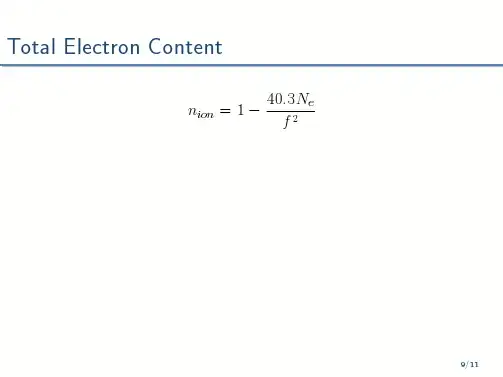
However in case I would like to put the equation on the slide 1 and than highlight it on the 2nd, it does not work. It needs the \tikzmarkin{col} specified from the beginning, but, I do not want to show it there.
part of the code:
\begin{frame}[t]
\frametitle{Total Electron Content}
        \begin{equation*}
            \Delta \rho_{ion}=\frac{40.3}{f^2}\tikzmarkin<2>[mark at=0.93]{col}(0.2,-0.5)(-0,0.7)\int_S N_e\mathrm{d}S\tikzmarkend{col}
        \end{equation*}

\uncover<2>{
\begin{tikzpicture}[remember picture,overlay]
\coordinate (col-aa) at ($(col)+(-2,-1.8)$);
\node[align=right,left] at (col-aa) {\small{TEC}};
\path[-stealth,red,draw] (col-aa) -| ($(col)+(1,-1.55)$);
\end{tikzpicture}
}
\end{frame}
error:
! Package pgf Error: No shape named col is known.

See the pgf package documentation for explanation.
Type  H <return>  for immediate help.
 ...

l.20 \end{frame}

?
Is it possible to make it work somehow?

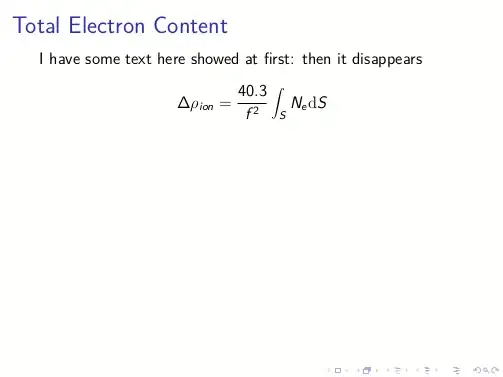

\uncoverthe content is also processed on the slides where it is not shown, the\tikzmarkin<2>on the other hand only definescolon the specified slides, apparently. Either you use\only<2>on thetikzpicture(as it isoverlayed, there wouldn’t be any difference anyway) or you change thehf-tikzstyles (somehow) toinvisibleon slide1. – Qrrbrbirlbel Sep 18 '13 at 12:03\uncover<2>with\only<2>did all what I needed...the problem was the 'process all' behaviour of\uncoverI was not considering. Please, make your comment as an answer so that I can accept it. – MasterPJ Sep 18 '13 at 12:16