You can use TikZ. Here's a very minimal example,
\documentclass{article}
\usepackage{tikz}
\begin{document}

\begin{tikzpicture}[every node/.style={circle,inner sep=2pt,fill=black}]
  \node (A) at (0,0) {};
  \node (B) at (1,1) {};
  \node (C) at (0,1) {};
  \node (D) at (1,0) {};

  \draw (A) -- (B)
        (A) -- (C)
        (A) -- (D)
        (B) -- (D);
\end{tikzpicture}
\end{document}

You can use pstricks
\documentclass{article}
\usepackage{pstricks,pst-node}
\begin{document}
\begin{pspicture}[showgrid=false](1,1)
\pnode(0,0){A}
\pnode(1,1){B}
\pnode(0,1){C}
\pnode(1,0){D}

\rput(A){\psdot}
\rput(B){\psdot}
\rput(C){\psdot}
\rput(D){\psdot}

\psline(A)(B)
\psline(A)(C)
\psline(A)(D)
\psline(B)(D)
\end{pspicture}
\end{document}
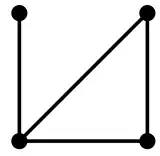
While this following example could be done a bit more efficiently, it does show that you can make very nicely connected graphs:
\documentclass{article}
\usepackage{tikz}
\usetikzlibrary{calc}
\pagestyle{empty}
\begin{document}

\begin{tikzpicture}
  \def\mycircleofnodes{C0}
  \foreach \x in {0,30,...,330}
    {
      \node[circle,fill=black,inner sep=2pt] (C\x) at (\x:3) {} ;
      \ifnum\x>0\relax\xdef\mycircleofnodes{\mycircleofnodes,C\x}\fi
    }
  \foreach \x in {0,30,...,330}
    {
      \foreach \y in \mycircleofnodes
        {
          \draw (\y) -- (C\x);
        }
    }
\end{tikzpicture}

\end{document}

If you don't want to connect every node to each other, then you can do something along the following lines:
\documentclass{article}
\usepackage{tikz}
\usetikzlibrary{calc}
\pagestyle{empty}
\begin{document}

\begin{tikzpicture}
  \def\mycircleofnodes{C0}
  \foreach \x in {0,1,...,11}
    {
      \node[circle,fill=black,inner sep=2pt] (C\x) at (\x*30:3) {} ;
      \ifnum\x>0\relax\xdef\mycircleofnodes{\mycircleofnodes,C\x}\fi
    }

  \foreach \x/\y in {0/1,0/2,0/3,0/4,0/5,0/6,0/7,%
                     2/4,%
                     5/6,5/7,5/10,%
                     8/9,8/11}
    {
      \draw (C\x) -- (C\y);
    }

\end{tikzpicture}

\end{document}

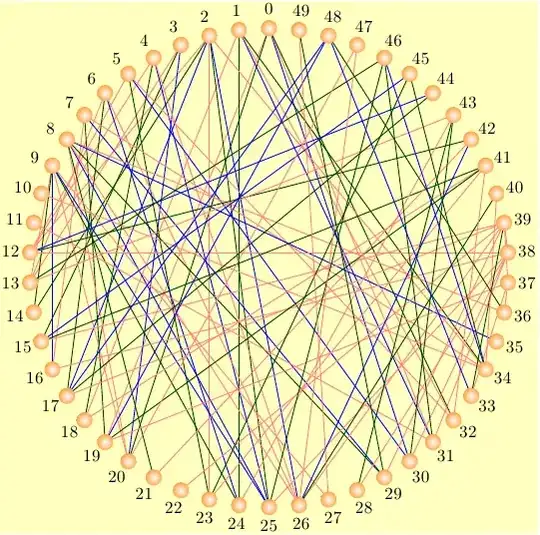
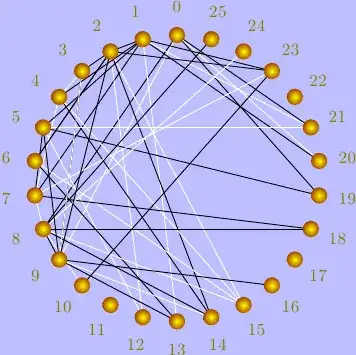
Here's (only) the beginning of how to set up something like your second example:
\documentclass{article}
\usepackage{tikz}
\usetikzlibrary{calc}
\pagestyle{empty}

\def\rowA{0}
\def\rowB{0,1,...,9}
\def\rowC{0,1,...,17}
\def\rowD{0,1,...,13}
\def\rowE{0,1,...,5}
\def\rowF{0}

\begin{document}

\begin{tikzpicture}[x=0.5cm,
                    y=1.75cm,
                    every node/.style={circle,
                                       inner sep=2pt,
                                       fill=black}
                   ]

  \foreach \x in \rowA { \node (A\x) at (\x-0.5,2)  {}; }
  \foreach \x in \rowB { \node (B\x) at (\x-5,1)    {}; }
  \foreach \x in \rowC { \node (C\x) at (\x-9,0)    {}; }
  \foreach \x in \rowD { \node (D\x) at (\x-7,-1)   {}; }
  \foreach \x in \rowE { \node (E\x) at (\x-3,-2)   {}; }
  \foreach \x in \rowF { \node (F\x) at (\x-0.5,-3) {}; }

  \foreach \x    in {4,8,9}                    { \draw (A0)  -- (B\x); }
  \foreach \x/\y in {0/2,1/7,1/8,1/17}         { \draw (B\x) -- (C\y); }

  \foreach \x/\y in {0/0,0/7,0/8,0/10,1/4,1/8} { \draw (E\x) -- (D\y); }
  \foreach \x/\y in {0/0,0/1,0/2,0/3,0/4,0/5}  { \draw (F\x) -- (E\y); }

\end{tikzpicture}

\end{document}

Be advised! Both pstricks and tikz have their own learning curves. They both have ample documentation. The documentation for pstricks is spread over multiple pdf files, which at times can lead to frustration when you don't know where to look for the documentation. tikz has an immense and very comprehensive manual (though knowing which libraries are necessary can be a bit frustrating at times).




\foreachloops andchainsand stuff. — Do you have a specific input syntax? – Qrrbrbirlbel Sep 21 '13 at 19:17