I have two sections which I'd like to separate by an empty line. Every time I press Enter, LyX removes that empty line between paragraphs. How do I prevent this?
Asked
Active
Viewed 7.7e+01k times
163


4 Answers
175
This is LyX's way of staying true to LaTeX where successive blank lines are merged - a good thing when you're talking about consistent document layout/design. If you wish to insert a forced vertical skip, insert an ERT containing either \smallskip, \medskip, \bigskip or a fixed \vspace{<len>} where you specify <len>. For a fixed/hard, single blank line, use \vspace{\baselineskip} (roughly the same as \bigskip).


The other lengths that were mentioned are "softer" and allow for some stretch/shrink.
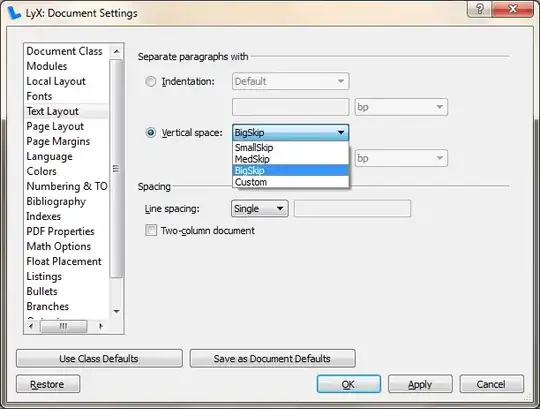
For consistency, you can also increase the skip between paragraphs (known as \parskip) under Document > Settings... > Text Layout > Separate paragraphs with > Vertical space:

41
You can use bigbreak:
alfa bravo
\bigbreak
charlie delta
Background (from @egreg answer in a more general question)
\bigbreak isn't listed in the LaTeX manual. It removes a preceding vertical space if it's less than what it would insert; it also terminates a paragraph and tells TeX that it marks a good point where a page break may happen.

-
1note
\bigbreakencourages a pagebreak. Just good to know when it's undesired.\bigskipwould be similar but without the potential pagebreak effect. – tkruse Aug 25 '20 at 13:31
21
If you want a finer control over your layout you can use \vskip.
Some text
\vskip 0.2in
Some text
You can change the value and units should you desire.
Anothing thing you can do is create a custom command:
\newcommand{\newpara}
    {
    \vskip 1cm
    }
So now you can just type \newpara in much the same way as \newline:
Some text
\newpara
Some text
Not sure how this functions in LyX but since it uses the LaTeX language it should work

Rykari
- 319
-
Welcome to TeX.SX! You can have a look at our starter guide to familiarize yourself further with our format. – Martin Schröder May 05 '16 at 10:56
-
I like this flexibility,...which made me try
\hskip 0.2inand that worked just as well, FYI. Thanks! – d84_n1nj4 Dec 18 '19 at 01:05
14
No need to use extra code other than double backslash. After ending a paragraph, give \\ and put an empty line there. Combinedly it will work for putting an extra blank line.
Like:
I am a LaTeX user.\\

I am a LaTeX user.
Check this. It will give an extra empty line between the two lines.
And if you want to use any other size of spacing, you can use \\[]. For example: \\[2in]
This will put an extra 2-inch space between the two lines.

Saiful Islam
- 321
-
15Welcome to TeX.SX! I'm afraid this isn't a good way of doing things. You should never end a paragraph with
\\, see e.g. Best choice between using \ or leaving space after each paragraph to end the paragraph and When to use \par and when \ – Torbjørn T. Jan 12 '16 at 20:52 -
1Hi, thanks for your answer
But as I faced, putting only a blank space doesn't help in putting an extra blank line between the paragraph. Even using \par does not either. So what should be used for putting a blank line between two paragraph, without front indent?
– Saiful Islam Jan 15 '16 at 23:09 -
5For LyX, see the above answer. For LaTeX, add
\usepackage{parskip}to the preamble. – Torbjørn T. Jan 15 '16 at 23:56 -
Thanks a lot. That's the thing I was wondering. After adding the package, the command is working now. – Saiful Islam Jan 16 '16 at 02:54
-
2@TorbjørnT. I am new to LaTeX but I think one of its main problem is the lack of a true command for paragraphs spacind.
\parskipdoes awfull things to section spacing, and table of contents !! – John Marjan Apr 29 '16 at 16:37 -
2@JohnMarjan Ehm, OK. I've never had that problem, as I hardly ever have the need to change the parskip. And I'm just a user, so complaining to me is sort of pointless to be honest. (Also, I didn't say anything about modifying
\parskip(with\setlength), I said add\usepackage{parskip}.That doesn't modify the ToC at least. Note that some document classes (KOMA classes andmemoirat least, I think) have their own interfaces for this sort of thing.) – Torbjørn T. Apr 29 '16 at 17:06 -
I am just a user to. I don't see the harm in raising the problem, up to you or another. I just meant that when you redefine the
parskipit changes your TOC – John Marjan Apr 30 '16 at 13:29
\bigbreakworked and then I included a\noindentto create nicely formatted paragraphs, rather than using\begin{sloppypar}and\end{sloppypar}which was pointless. – Cryptocool100 Nov 26 '21 at 22:39