Someone wrote a command called \MarginFigure for putting figures in the page margins. Unfortunately, I haven't been able to get the \includegraphics to work.
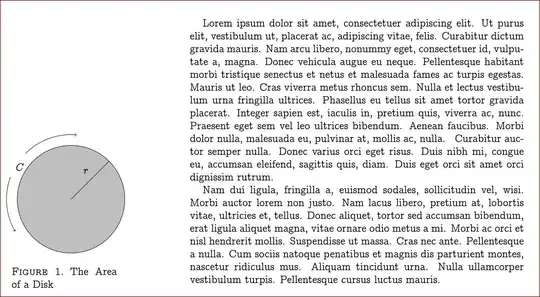
Specifically, I have figures that I've created using \newcommand and then drawing a tikzpicture. When I attempt to replace the example image with my new image, it doesn't work. Here is a minimal working example to show you what I'm talking about:
\documentclass[oneside]{amsart}
\usepackage{amsmath,amssymb}
\usepackage[T1]{fontenc}
\usepackage{concmath}
\usepackage[rmargin=3cm,textwidth=11cm,marginparwidth=6cm]{geometry}
\usepackage{graphicx}
\usepackage{marginnote}
\usepackage{caption}
\usepackage{tikz}
\usepgflibrary{shapes}
\usepackage{pgfplots}
\usepackage{lipsum}

\newcommand\MarginFigure[4][width=4cm]{
\marginnote{
\begin{minipage}{\linewidth}
    \centering
    \includegraphics[#1]{#2}
    \captionof{figure}{#3}
    \label{#4}
\end{minipage}}}
\reversemarginpar

\pgfmathsetmacro{\ex}{0}
\pgfmathsetmacro{\ey}{0}

\newcommand{\figureone}[1]{
\begin{tikzpicture}[#1]
        \draw [fill = lightgray] (0,0) circle [radius = 1.25 cm];
    \draw (0,0) -- (0.8838834765,0.8838834765);
    \node [above left] at (0.5,0.5) {$r$};
        \node [above left] at (-1.0,0.575) {$C$};
    \draw [->] (\ex,\ey) ++(135:1.5cm) arc (135:85:1.5cm);
    \draw [->] (\ex,\ey) ++(160:1.5cm) arc (160:210:1.5cm);
    \end{tikzpicture}
}

\begin{document}
\lipsum[1-2]{}
\MarginFigure{example-image-a}{The Area of a Disk}{fig:testa}
\end{document}
It works perfectly the way it is, but when I replace example-image-a with \figureone, it won't compile. I'm not sure why. Thanks for your help.


\MarginFigureis passed to\includegraphicsas the file name. – egreg Sep 26 '13 at 23:33