1

Hi I use the following LaTeX to ouput xml format data, however, there is no space before each line.

 \documentclass{minimal}
 \usepackage{etex},
 \begin{document}
 \medskip
 {\small\noindent
 \fbox{\begin{minipage}{6cm}
 <invoke operation="a3". . .>\\
 \hspace{3mm}<Handler>\\
 \ \ \ \ \ <operation="...." . . .>\\
 \ \ <Handler>\\
 </invoke>
 \end{minipage}}
 }
 \medskip
 \end{document}

The output is below: enter image description here
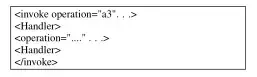
However, I wish to output the format like this as there is some space align each line. enter image description here

Can someone help me?

sweetyBaby
  • 3,029
  • 5
    You probably want either simply the verbatim environment, or a package for more sophisticated code listings, such as listings or minted. Edit: see e.g. http://tex.stackexchange.com/questions/52780/how-to-escape-xml-code Spaces are preserved in verbatim, lstlistings and the like. – Torbjørn T. Sep 30 '13 at 18:35

1 Answers1

3

The listings package1 can help you out here, as suggested by Torbjørn T. in the comments. It's designed for typesetting code.

\documentclass{article}
\usepackage{listings}
\lstset{language=XML,basicstyle=\ttfamily,breaklines=true}

\begin{document} \begin{lstlisting} <invoke operation="a3" ...> <Handler> <operation="..." ...> <Handler> </invoke> \end{lstlisting} \end{document}

It renders pretty well.

Alternatives include the built-in verbatim environment, but that doesn't wrap lines quite as easily (you have to break them manually, instead of just setting breaklines=true). listings also offers syntax highlighting; it's quite configurable, but there is very basic highlighting by default, if you specify the language (as I have with language=XML above).

\begin{lstlisting}
<tag /> <!-- comment --> <![CDATA[foo]]>
\end{lstlisting}

(tag unaffected, comment italicised, CDATA unaffected)

Note the italicisation of comment.


Footnotes

  1. Which I am not affiliated with; I just like it.