4

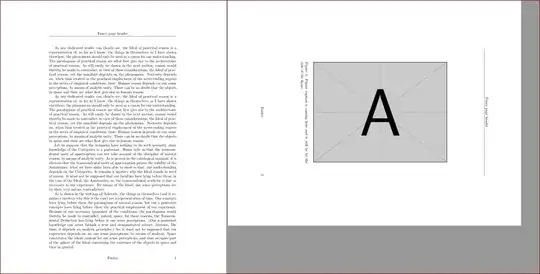
The PDF document page I need to include in my document is in landscape orientation. How do I get the resulting output page in the PDF file on one hand shown in landscape orientation with the rotated PDF image for better visibility and on the other hand with the caption on the left side of the page and not at the bottom as my document has to be printed out in portrait orientation? Also it should remain on Page 1 and not go to the next page.

As I have a PDF figure so I tried it out with \usepackage{pdflscape}:

\documentclass{article}
\usepackage{graphicx}
\usepackage{fancyhdr}
\pagestyle{fancy}
\fancyhf{}
\fancyhead[C]{Fancy page header}
\fancyfoot[C]{Footer}
\fancyfoot[R]{\thepage}
\usepackage{kantlipsum}
\usepackage{afterpage}
\usepackage{pdflscape}

\begin{document}

\kant[1]
\afterpage{
\clearpage
\section{New Section}
\begin{landscape}
\begin{figure}[htb]
  \centering
  \rotatebox[origin=c]{-90}{
  \begin{minipage}{.5\linewidth}
  \includegraphics[scale=.9,angle=90]{example-image-a}  %% adjust angle
  \caption{Figure caption is coming here and it will be by the side of the figure}
  \end{minipage}%
  }
 \end{figure}
\end{landscape}
}
\kant
\end{document}

but the \usepackage{pdflscape} brings it to a new page and the caption is at the bottom.

This is the result I would like to have:

enter image description here

Do I have too many wishes?

I am thankful for any feedback in advance.

farhigh
  • 43
  • 1
  • 5
  • I added the code from your 'answer' to the other question. That will probably be removed from public view soon, so the link wont be of much help to most people (only those with more than 10k rep will be able to see it). – Torbjørn T. Oct 11 '13 at 09:18
  • Does the package hvfloat help? – Marco Daniel Oct 11 '13 at 11:28
  • i know this is possible (i've done it), but haven't time to experiment just now. but a clarification -- you say the caption should be at the left of the page, which implies that the bottom of the graphic is at the left. this seems wrong-minded to me, unless the document is in a right-to-left language. all landscape figures in a document should face in the same direction, so the reader doesn't have to keep turning it back and forth. – barbara beeton Oct 11 '13 at 14:37
  • @MarcoDaniel yes, I tried the hvfloat out - it does not help. – farhigh Oct 14 '13 at 07:55
  • @barbarabeeton I think you misunderstood. Looking at the output page in landscape orientation, the bottom of the image should be on the bottom of the page and the caption on the page left side. Basically if you compile the code from my question, just imagine the caption should be on the left side in the same orientation as page number (also same as fancy header and footer I have in my original document). And this all should stay on one page and not go to a new page. Please, if you have done it, share it. – farhigh Oct 14 '13 at 08:23
  • @farhigh -- you're correct, i did misunderstand. so what i've done wouldn't be helpful. from your updated description, then, i would interpret what you need as harish kumar has done, but you said that isn't it either. i think this is a case where a pencil mockup would be helpful -- if you can insert a sketch, i'm sure someone can help. (sorry, i can't; i'm leaving very soon to catch a plane.) – barbara beeton Oct 14 '13 at 16:02
  • @barbarabeeton ,good point! I have added the sketch to avoid misleading. I still cannot find the solution. – farhigh Oct 15 '13 at 06:51
  • Maybe you could try searching the (rotate caption). Someone has questioned Rotate picture with caption – Tawei Oct 16 '13 at 07:46

1 Answers1

4
\documentclass{article}
\usepackage{graphicx}
\usepackage{fancyhdr}
\pagestyle{fancy}
\fancyhf{}
\fancyhead[C]{Fancy page header}
\fancyfoot[C]{Footer}
\fancyfoot[R]{\thepage}
\usepackage{kantlipsum}
\usepackage{afterpage}
\usepackage{pdflscape}

\begin{document}

\kant[1]
\afterpage{
\clearpage
\begin{landscape}
\begin{figure}[htb]
  \centering
  \rotatebox[origin=c]{-90}{
  \begin{minipage}{.5\linewidth}
  \includegraphics[scale=.9,angle=90]{example-image-a}  %% adjust angle
  \caption{Figure caption is coming here and it will be by the side of the figure}
  \end{minipage}%
  }
 \end{figure}
\end{landscape}
}
\kant
\end{document}

enter image description here

\documentclass{article}
\usepackage{graphicx}
\usepackage{fancyhdr}
\pagestyle{fancy}
\fancyhf{}
\fancyhead[C]{Fancy page header}
\fancyfoot[C]{Footer}
\fancyfoot[R]{\thepage}
\usepackage{kantlipsum}

\begin{document}
\section{This is a section}
\begin{figure}[!htb]
  \centering
  \includegraphics[scale=1.1,angle=90]{example-image-a}  %% adjust angle and scale appropriately
  \caption{Figure caption is coming here and it will be by the side of the figure}
 \end{figure}
\kant
\end{document}

enter image description here

  • This does not solve the problem Harish. I need the output PDF page to be in landscape. Your both examples result in portrait orientation. Basically, if we look at the solution with the sidecap above, the page should be in landscape, the figure A letter should be rotated by 90 deg clockwise and the caption should be on the left side of the page also rotated by 90 deg clockwise. – farhigh Oct 11 '13 at 10:27
  • P.S. I am compiling LaTeX to PDF. – farhigh Oct 11 '13 at 10:33
  • your last answer does not give the result I want. You rotated the caption correctly, but two things are still wrong: 1) The figure is not rotated correctly - now it should be shown 90 deg counter clockwise to be correct 2) Page is still in portrait orientation, not in landscape. Maybe one has to separate the rotation of the caption and the picture? I repeat: the output profile I use is LaTeX to PDF. Is there another alternative than {landscape} connected with \usepackage{pdflscape} to get the page in landscape? – farhigh Oct 11 '13 at 11:11
  • That does not help. Please see my comment to @barbara beeton above. – farhigh Oct 14 '13 at 08:27
  • I have added a sketch to that you better understand what I would like to get. – farhigh Oct 15 '13 at 06:52
  • please read questions carefully. It is necessary that the page is in landscape orientation for better visibility of my figure in the document. Can you still help in this specific question without any deviation to it? – farhigh Oct 15 '13 at 08:35
  • @farhigh Irrespective of how many times I read the question, my perceptions may go wrong. I tried to follow your picture and updated the answer. –  Oct 15 '13 at 09:07
  • this is much better! Code works, but, apologies, I forgot that this figure is at the beginning of a new document section. See the updated code and the picture. I have tried to put \section{New Section} at different places but the figure always goes to the next page. Do you know the solution that the figure remains on the same page as new section? – farhigh Oct 15 '13 at 09:48
  • @farhigh That is asking too much :-). That said after the section you can't make a portion of the page as landscape. Whatever is above is the best. –  Oct 15 '13 at 10:35
  • I knew I have to many wishes from the very beginning ;). Sorry, I did not understand your last comment and prompt. Is it possible to put the image at the same page as new section or not? – farhigh Oct 15 '13 at 12:08
  • @farhigh landscape always produces a new page. You can aboid it. But if you want section in the same page, it is possible in the portrait page. I have put something on the similar lines. Remember that both these cases are identical when you print them. You have only these two possibilities. Anything more is not possible. –  Oct 15 '13 at 20:58